
The anticipation had been building for months. Finally, the early access launch of Hytale arrived, and I was ready to jump in. But instead of crafting my first blocky masterpiece, I was met with a frustrating error message: “Patch download failed.” It turns out, I wasn’t alone in this digital wilderness.
Hytale‘s early access went live ahead of schedule, a surprise twist that quickly turned sour for many eager players. A widespread download issue surfaced, leaving countless would-be adventurers stranded before they could even begin. Here’s how to potentially get around this roadblock.
Hytale Patch Download Failed: A Collective Sigh
It’s a shared experience: the download bar inches forward, hope flickers… then freezes. After a few agonizing minutes, the dreaded “download failed” message pops up, mocking your excitement. The primary culprit appears to be overwhelming server pressure. Like trying to force Niagara Falls through a garden hose, the Hytale servers are simply struggling to keep up with the torrent of download requests. I don’t have an ETA for when Hypixel will issue an official fix, but in the meantime, these workarounds might help.
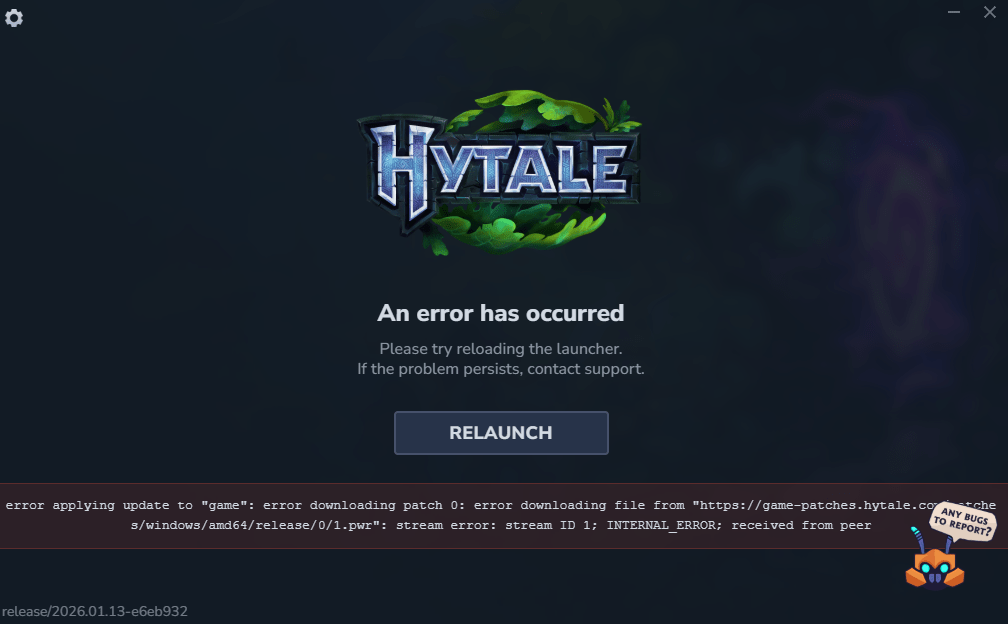
- The “Clean Slate” Approach: Delete every trace of the partially downloaded files and restart the installation from scratch. This worked for me, but be warned: it’s a gamble. You could get stuck in the same loop, with no guarantee of success.
- The “Tortoise and the Hare” Method: Close the launcher completely when the download stalls. Relaunch it, and resume the installation. The download *should* pick up where it left off. This is slower, requiring multiple restarts, but it might be a more stable path to victory.
What causes the Hytale download to fail?
The “Patch download failed” error largely stems from server overload. The initial rush of players attempting to download the game simultaneously creates a bottleneck, overwhelming the servers and causing interruptions in the download process. Think of it as everyone trying to get through a doorway at the same time.
Another option? Patience. Waiting for the initial surge of players to download and log in might ease the strain on the servers. This could allow you to complete the download without repeated interruptions.
How long should I wait before retrying the Hytale download?
There’s no magic number, but waiting an hour or two could make a difference. Monitor the Hytale community channels (Discord, Reddit, etc.) for updates on server stability. If you see reports of improved download speeds, it might be time to try again. The goal is to avoid hammering the servers during peak congestion. Consider off-peak hours in your region. For example, downloading during early morning hours when fewer players are active may prove more successful.
Ultimately, the solution rests with Hypixel. But in the meantime, these suggestions might offer a glimmer of hope. Will the launch woes of Hytale become a forgotten memory, or a cautionary tale of hype versus reality?