
The moment my avatar materialized, a wave of disappointment washed over me. The default skin was…bland. It felt like showing up to a costume party in street clothes, a glaring omission in an otherwise meticulously crafted digital persona. Thankfully, Hytale understands the assignment, offering a kaleidoscope of customization options, including the ability to fine-tune your character’s skin tone.
The game already boasts a solid selection of choices, with even more features slated for future updates. Let’s explore how you can personalize your avatar by selecting the skin color that resonates with you.
Crafting Your Digital Identity in Hytale
I remember spending hours in character creators for other games, painstakingly tweaking every slider to get the perfect result. Hytale respects your time, making the process intuitive and straightforward. Once you’ve downloaded Hytale, personalizing your avatar is a breeze.
- Select Avatar from the main menu.
- Choose the second option on the left of your screen.
- The second option includes the General set of personalizations.
- Under General, pick the second option, which is Body Characteristics.
- At the bottom (refer to the image below), you’ll find different colors to pick from.
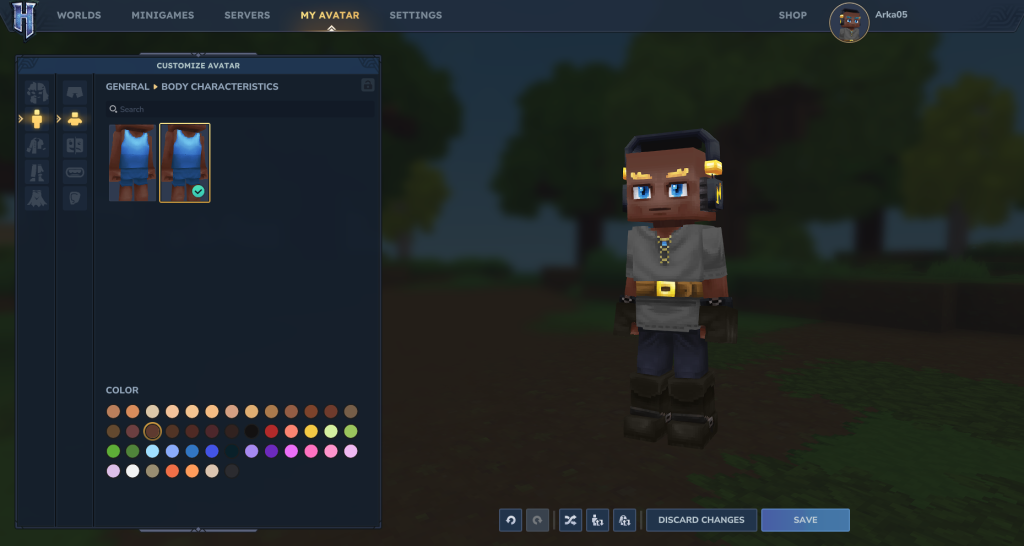
Once you’ve chosen your preferred shade, save the changes and return to the game. You can tweak your skin color as often as you like by repeating these steps. As of now, I’ve only been able to make these adjustments from the main menu.
Will Hytale let you import skin colors?
Think of Hytale‘s character creator as a painter’s palette. While the current selection offers a wide range of tones, there’s always room for more. Hytale‘s existing body color options are quite comprehensive, and cover a diverse set of human skin tones. But there are also some more unusual ones as well. I suspect modders are already hard at work expanding the possibilities, potentially introducing ways to import or create custom skin colors. As of now, the vanilla version doesn’t seem to have that functionality (although I haven’t ruled out the possibility it exists somewhere).
Pushing the Boundaries of Character Creation
The beauty of a platform like Hytale lies in its potential for expansion. The base game provides a solid foundation, but the modding community can transform it into something truly extraordinary. Mods are like a secret sauce, capable of taking a great game and turning it into something truly special.
Are there Hytale mods that add skin tones?
I’ve witnessed countless games benefit from the creativity of modders, who consistently find ways to push the boundaries of what’s possible. Hytale is no exception. The game’s openness suggests that modders could introduce visual enhancements, such as additional skin color options. So far I am pretty sure some mods have popped up already. Keep an eye on community forums and mod repositories; you might be surprised at what you find.
How much does Hytale cost (€)?
Pricing information for Hytale has yet to be released. However, other games in the genre offer some clues. For example, Minecraft costs around $30 (€27.71) for the base game. It is not confirmed that the game will follow the same model.
For now, the existing color palette offers plenty of options to create a character that feels uniquely yours. But who knows what the future holds? Will Hytale eventually allow for even deeper levels of customization, maybe even user-created skin textures?