
The Mac Mini sat humming on my desk, a silent promise of AI potential. Hours earlier, I’d stumbled on a forum buzzing about Clawdbot, this renegade AI agent people were raving about. It felt like unlocking a secret level in a game I didn’t even know I was playing. It’s popularity alone is driving the sales of the Mac Mini. If you have one already, then here’s a complete guide on how to set up Clawdbot on your Mac Mini.
What is Clawdbot? And Why All the Hype?
I remember the first time I saw Boston Dynamics’ robots; they moved with an unsettling, almost animalistic grace. Clawdbot evokes that same feeling, but instead of hardware, it’s raw, adaptable intelligence manifested as an open-source AI agent that resides right on your computer or VPS server. It connects to messaging apps like WhatsApp, Telegram, iMessage, or Slack to receive instructions, then leverages your machine’s resources to get things done.
As an AI agent, it can carry out actions for you or automate mundane tasks by connecting with your computer’s browser or terminal. And when it’s done, it will respond in the same chat. This makes it feel more alive compared to other AI assistants like ChatGPT or Gemini. Here are some key things only Clawdbot can do.
- Clawdbot has persistent memory, so no matter what you told it today or last week, it will remember it nonetheless. It does not,”reset” and adapts to your preferences and tone over time.
- Given the necessary permissions, it can carry out most digital tasks for you. Whether it is summarizing or replying to emails, working with developer tools, installing environments, or creating a morning briefing.
- Clawdbot is proactive in nature. So rather than waiting for your command, it will automatically send you briefings, alerts, or reminders that you have set up.
- It is a self-hosted service. So all your data remains inside your computer, there is no service to subscribe to, and no data collection is going on.
The combination of all these features makes Clawdbot such a compelling option over other AI chatbots from big tech companies. Some people on X are calling it the first step towards AGI (Artificial General Intelligence), while others consider it an agent to look over all your AI agents.
What makes Clawdbot different from other AI assistants?
Think of traditional AI assistants as meticulously programmed parrots; they repeat what they’ve learned. Clawdbot, in contrast, is designed to learn, adapt, and remember. That persistent memory—the ability to recall past interactions—means it evolves alongside your habits and preferences. It’s more like a digital apprentice than a mere tool.
How to Set Up Clawdbot (or MoltBot) on a Mac Mini
The other day, a friend confessed he felt like a Luddite trying to install Linux. I get it; tech can be intimidating. But believe it or not, the process to set up Clawdbot on your Mac Mini is pretty easy. Even someone like me, who doesn’t understand a line of code, was able to install Clawdbot in just a few minutes. So, simply follow these steps to get started:
- Now open a Terminal window on your Mac, copy and paste this code, and press Return.
curl -fsSL https://clawd.bot/install.sh | bashThe program will run automatically, installing all the necessary files and components on its own.
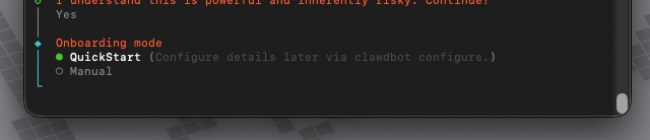
- Follow the setup wizard, and it will show this prompt. Here, select Yes and press Return.
I understand this is powerful and inherently risky. Continue?- Next, for Onboarding mode, select Quickstart.
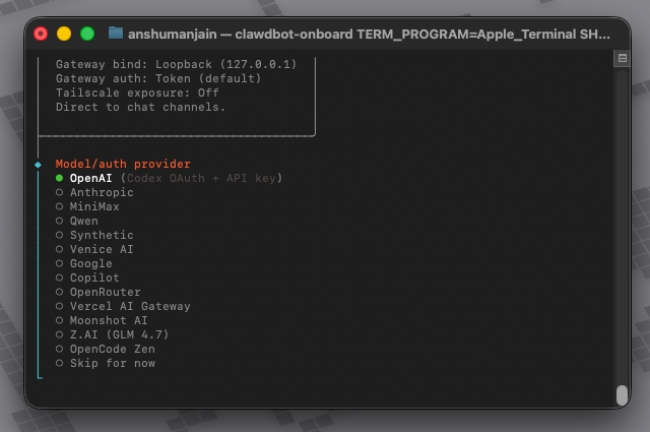
- Now, pick your model/Auth provider. I suggest you go with ChatGPT, but you can select your preferred LLM model.
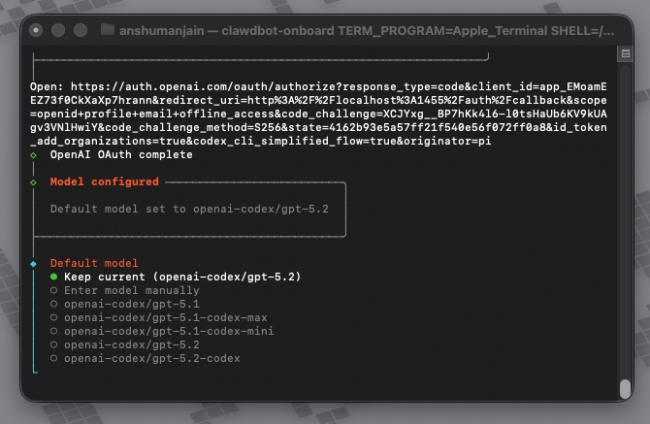
- If you selected OpenAI like me, you will be asked to pick an OpenAI Auth method. Select OpenAI API key. (Head over to platform.openai.com/api-keys to create your own API key)
- After pasting your API key, you will be asked to pick a model. Select the one you prefer. (I suggest the latest version)
- Now, you will be asked to select a channel. This is where it asks you to select your preferred messaging app to give commands to Clawdbot.
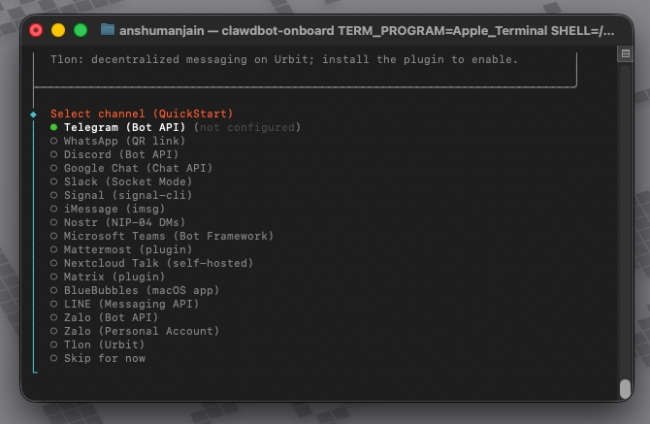
- Use arrow keys to pick an app, and press Return. Follow the wizard to set up the app.
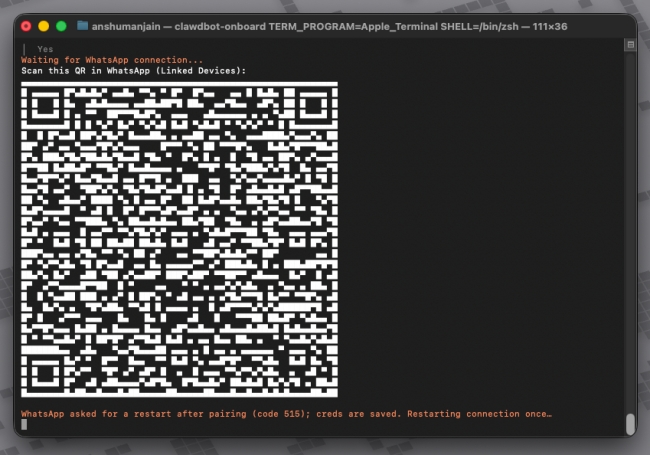
- If you choose WhatsApp, you will be shown a QR code that you need to scan using the Linked Device option in the app.
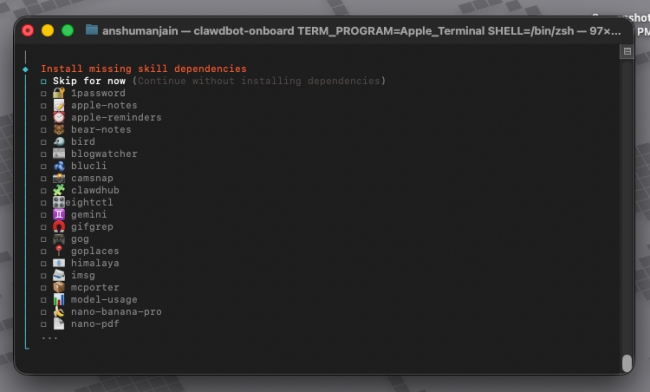
- Next, it will prompt you to Configure skills. Then, choose Yes, and select the skills you want to allow Clawdbot.
Once all is set up, you can start messaging Clawdbot to give it commands on your Mac Mini. It will then start executing them right away.
How secure is Clawdbot, really?
Clawdbot operates locally, keeping your data confined to your system, a stark contrast to cloud-based AI assistants. While this offers enhanced security, remember that Clawdbot gains access to your browser and local files. For the especially privacy-focused, this might raise some eyebrows.
How to Uninstall Clawdbot or MoltBot from Mac Mini
Let’s be frank: installing Clawdbot involves granting it access to the inner workings of your machine. If you decide it’s not for you—or if you simply want to reclaim some system resources—here’s how to remove it:
- Open Terminal app on your Mac, then copy and paste this line of command and press Return.
clawdbot uninstall- The wizard will ask which components to uninstall. Select all of them by pressing the spacebar.
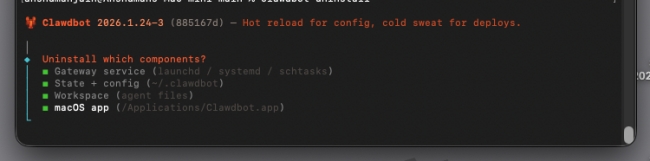
- Press Return to submit your selection.
- It will ask again, “Proceed with uninstall?” Select Yes.
Clawdbot will be successfully uninstalled from your system. If you have provided linked device access to it for WhatsApp, remove it right away.
That’s about it on how to install Clawdbot on your Mac Mini. Remember, this is a powerful AI agent that can do wonders if used correctly. So make sure you know what you are doing to make the most out of it. In case you faced any sort of error while setting up the AI agent for yourself, then do let us know in the comments section below.
Where do I download the Clawdbot software?
You can head over to the clawd.bot website and copy the terminal command line from there to install it on your Mac Mini or other Mac system.
So, is Clawdbot a glimpse into the future, or just another tech fad destined to fade away?