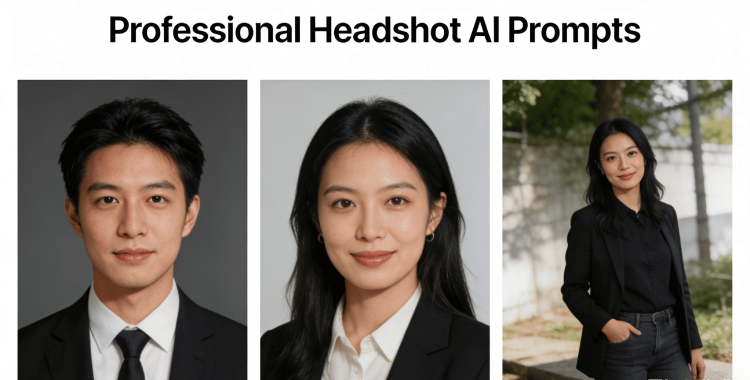
You’re scrolling through LinkedIn when a profile catches your eye—a beautifully polished headshot. Instantly, you wonder if yours could have the same impact. With the right headshot AI prompts, you can elevate your online presence, creating images that command attention without the hassle of hiring a photographer.
Whether you seek a corporate look or something more creatively modern, let’s explore how to get that perfect headshot in just minutes.
Part 1. How to Use Headshot AI Prompts
Have you ever noticed how much a headshot can influence perception? The journey to a striking AI-generated headshot starts with selecting a clear, well-lit photo—think simple selfies rather than blurry group shots. After uploading your image to a user-friendly AI headshot generator, describe the look you’re aiming for.
Focus on specifics: professional attire, uncluttered backgrounds, soft lighting, and a confident expression. Generate a variety of options, and choose one that feels natural and polished. This straightforward process can yield impressive results suitable for LinkedIn, resumes, or business profiles.
Part 2. Best 40 Headshot AI Prompts (Copy & Paste)
The secret to getting a lifelike, professional appearance from AI lies in crafting the right prompts. Below are 40 headshot suggestions ready for you to copy and paste. Each prompt is meticulously designed to specify lighting, backgrounds, attire, poses, and expressions for optimal outcomes.
1. Professional LinkedIn Headshot Prompts
1. Create a professional LinkedIn headshot with a neutral gray background, soft studio lighting, and sharp focus on the face. Subject in a dark business suit, light shirt, and minimal accessories. Natural skin tones, confident expression, and realistic corporate photography style.

2. Generate a clean LinkedIn headshot with even lighting, slight background blur, and a modern office backdrop. Professional attire, relaxed shoulders, and direct eye contact with a friendly yet confident facial expression.
3. Professional corporate headshot suitable for LinkedIn. Soft daylight lighting, plain background, formal business clothing, and a natural smile. Crisp details and balanced contrast.
4. Create a polished LinkedIn headshot with a light neutral background, blazer, well-groomed look, and calm confidence. Studio-quality lighting with crisp focus on the face.
5. LinkedIn headshot AI style: head and shoulders crop, soft shadows, modern corporate feel, natural smile, and realistic colors.

6. Generate a high-quality LinkedIn profile photo with professional lighting, clean background, business attire, and a confident posture.
7. Corporate LinkedIn headshot with subtle background blur, even skin tones, professional grooming, and soft lighting for an appealing look.
8. Create a LinkedIn headshot that appears both authentic and modern. Clean backdrop, business outfit, relaxed expression, and realistic lighting.

2. Resume & CV Headshot AI Prompts
9. Professional resume headshot with a plain white background, soft lighting, and a natural expression. Business casual attire and neat hairstyle, capturing your best self.

10. Generate a CV-ready headshot with minimal editing, neutral background, balanced lighting, and a calm demeanor.
11. Resume headshot prompt: simple background, soft shadows, professional appearance, slight smile, and realistic portrait style.

12. Create a formal resume headshot with precise focus, even lighting, and a natural, approachable demeanor.
13. AI prompt for professional headshot free: clean white backdrop, soft lighting, business casual outfit, and realistic facial features.
14. Generate a CV photo with professional authenticity. Neutral background, simple attire, and natural lighting.

15. Professional resume portrait with head-and-shoulders framing, light contrast, and a warm yet confident smile.
16. Create a headshot suitable for job applications with clear lighting, professional grooming, and a distraction-free background.
3. Business Website Headshot Prompts
17. Business website headshot featuring a modern office background, soft natural lighting, and a confident expression.

18. Generate a professional team headshot for a company site with consistent lighting and friendly expressions.
19. Corporate website headshot with balanced lighting, professional attire, and genuine smiles.
20. Create a business profile headshot with sharp details, a modern feel, and confident posture.

21. Professional headshot for company websites. Clean background, formal attire, soft shadows, and realistic skin tones.
22. Generate a polished website headshot with neutral tones and an approachable expression.
23. Corporate portrait for business pages featuring soft lighting and authentic facial details.

24. AI business headshot prompt: studio-like lighting, modern professional style, and a realistic aesthetic.
4. Creative & Personal Brand Headshot Prompts
25. Create a creative professional headshot using soft lighting to gently highlight your features. Avoid harsh shadows and opt for a lightly blurred background. Your outfit should echo a modern personal brand, and the expression should radiate relaxed confidence.

26. Generate a personal brand headshot with warm, inviting lighting and a backdrop that minimizes distraction. Aim for a genuine, confident expression with a natural skin tone.
27. Craft a modern creative headshot with lifestyle-inspired lighting, casual-professional attire, and relaxed posture.
28. Personal branding headshot featuring clean composition and professional framing. Use soft shadows to add depth while retaining sharp focus on your calm expression.

29. Creative headshot AI prompt with a subtly textured background and relaxed lighting. Strive for realistic colors and uncomplicated styling for an authentic feel.
30. Generate a personal brand portrait that feels genuine, not overly artificial. Focus on soft lighting and a friendly demeanor.
31. Professional creative headshot featuring artistic lighting and modern attire. Background should either be clean or slightly blurred.

32. Modern personal branding headshot with even lighting and realistic skin texture against a neutral backdrop.
5. Casual Social Media Headshot Prompts
33. Create a casual headshot bathed in natural daylight, emphasizing a relaxed smile and natural posture. Use a simple background to maintain authenticity.
34. Generate a friendly social media headshot using soft, even lighting and a casual outfit. Aim for approachability in your expression.

35. Casual headshot prompt with warm tones and soft natural light. The background should remain subtle to enhance simplicity.
36. Create a clean social profile headshot that feels open. Use realistic colors and minimal editing, with a casual yet neat outfit.

37. Lifestyle headshot with natural daylight emphasizing authentic expressions. The outfit should be simple yet comfortable.

38. Casual professional portrait with a clean background and balanced lighting. Your demeanor should radiate friendliness and confidence.
39. Generate a relaxed headshot suitable for social platforms with natural lighting and authentic facial expressions.

40. Casual headshot that maintains professionalism—soft lighting and natural expression without excessive editing.
Part 3. Tips to Write the Best Headshot AI Prompts
Here’s how to maximize your chances of getting that striking photo:
1. Prioritize the Light
Good lighting can transform your image. Try phrases like soft light or natural daylight to keep your face clear.
2. Keep the Background Simple
A simple background makes a headshot look polished and focused. Terms like plain background or slightly blurred work well.
3. Specify Attire
Mention specific attire such as a business suit or casual wear to align the photo with its intended use.
4. Describe the Expression
Use engaging descriptors like friendly or confident to steer clear of stiff results.
5. Ask for Natural Skin
Incorporate phrases like natural skin tones or minimal editing to enhance human authenticity.
6. Mention the Crop
Specify head and shoulders or chest-up for framing guidance.
7. Keep Prompts Clear
Avoid mixing multiple styles in one prompt to yield clearer results.
8. Experiment with Variations
Generating multiple images can help you choose the most favorable results.
9. Make Small Adjustments
If something seems off, tweak one aspect at a time—like lighting or expression—for quicker improvements.
Part 4. Change Your Headshots Background Easily with
Need a versatile backdrop for your online profiles? PixPretty makes it a cinch to create stunning visuals that stand out, whether for LinkedIn, resumes, or platforms.
How to Change Your Photo Background
Step 1: Upload
Simply drag and drop your image or select a file from your device. PixPretty is compatible with popular formats like JPG and PNG.

Step 2: Change
Automatic background removal lets you replace it with a backdrop of your choice—be it a plain color or dynamic scenery.

Step 3: Download
Instantly download your edited image, with options for free standard resolution or premium high-quality results.

Part 5. Can AI-Generated Headshots Be Trusted?
Q1. Are AI headshots legal and safe?
Yes, they are completely legal for personal profiles or resumes—just use reputable tools and avoid uploading sensitive images to unverified sites.
Q2. How can one identify if a headshot is AI-generated?
Look for tiny discrepancies such as blurred backgrounds or odd reflections. Real photographs typically come with their own imperfections.
Q3. What keeps AI headshots looking authentic?
Realism lies in detailed prompts. Ask for natural lighting, simple backgrounds, and realistic skin textures to highlight your best self.