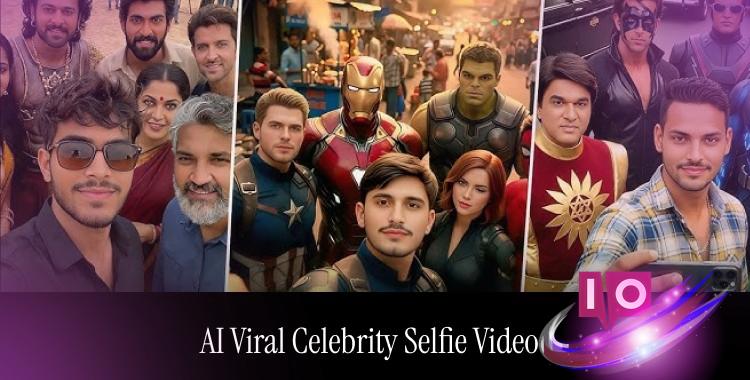
Scroll through social media, and you can’t help but notice them—the vibrant, lively clips where fans and celebrities seem to pose together, sharing a perfect moment. They capture not just attention but the essence of a dream come true. Thanks to AI, these viral celebrity selfie videos are accessible to everyone. You can create them with just a few clicks, no camera crew required.
This guide is your ticket to mastering AI-generated celebrity selfie videos that pop on Instagram and TikTok.
Part 1. The Buzz Around AI Celebrity Selfie Videos

Platforms like Instagram Reels and TikTok are buzzing with a trend that feels magnetic. Users are sharing quick, engaging clips that make it seem like they’re in the presence of their favorite stars. Whether it’s a fan edit or an AI-produced selfie, these videos are designed for rapid sharing and a mass audience.
Part 2. Crafting Your Viral Celebrity Selfie Video
Let’s break down the steps to creating your own stunning videos using AI tools such as Gemini 3 Nano Banana Pro and Kling 2.5 Turbo.
Step 1: Curate Your Celebrity Line-up
Begin with a straightforward list of the celebrities you’d like in your video. Something like this:
Keep it relevant to your audience; familiar faces draw in more viewers.
Step 2: Generate Celebrity Selfie Images
Utilize Gemini 3 Nano Banana Pro for high-quality images of your chosen stars.
Basic Image Prompt Template: Create a realistic, high-fidelity (4K) image. The person from the attached photo is taking a selfie with [Celebrity Name] at [location]. Keep aspects like skin tone, expression, and pose natural.
Tip: Source clear, well-lit selfies and name celebrities clearly for optimal results.
Step 3: Generate Images for All Celebrities
Create images for your celebrity choices and store them systematically for seamless video integration.

Step 4: Animate with Kling 2.5 Turbo
Transform your static images into an engaging short video using Kling 2.5 Turbo.

Example Video Prompt: In the first frame, the person takes a selfie with Celebrity A, then shifts locations for a selfie with Celebrity B. A handheld camera effect carries the viewer along.
Step 5: Edit and Export
Ready your clips for final editing and export.
Step 6: Advanced Image Prompts
For more cinematic images, elaborate prompts can help dig deeper.
Advanced Prompt Example: Create a cinematic 4K selfie of the person with Tom Cruise on a Top Gun set. Ensure all facial details match with realistic lighting and texture.
Part 3. AI Prompts to Fuel Your Viral Celebrity Selfie Video
Here are detailed AI prompts that you can utilize directly.
1. Image Creation Prompts
These prompts are formulated for AI tools like Gemini or Nano Banana Pro, focusing on realism and detail.
Prompt 1: Create a realistic 4K selfie. The person in the uploaded photo is next to [Celebrity Name], both smiling naturally in soft daylight.
Prompt 2: Ultra-realistic selfie at a coffee shop with [Celebrity Name], both focused on the camera, in warm indoor lighting.

Prompt 3: High-quality selfie of [Celebrity Name] on a bustling street, handheld phone angle, with natural shadows.
Prompt 4: Close-up selfie with [Celebrity Name] at a red carpet event, capturing bright flash lighting and sharp facial focus.
Prompt 5: Outdoor selfie of the uploaded person and [Celebrity Name] at sunset, basked in soft golden light.

Prompt 6: Selfie inside a car with [Celebrity Name] using natural window light. Exude effortless charm.
Prompt 7: Indoor selfie with [Celebrity Name], showcasing balanced exposure and natural expressions.
2. Video Creation Prompts
These prompts are made for AI image-to-video converters like Kling 2.5 Turbo, focusing on dynamic flow and realism.
Prompt 8: Generate a 10-second vertical selfie video where both the person and [Celebrity Name] move slightly and smile, mimicking handheld phone motion.
Prompt 9: Create a self-video where the camera gradually moves closer, revealing laughter between the two in natural light.

Prompt 10: Short vertical selfie, where the person takes a step forward with [Celebrity Name] waving.
Prompt 11: Record a 12-second selfie video featuring casual movement and background flow.
Prompt 12: Create a selfie video with subtle camera panning, where both sides share smiles and nods.
Prompt 13: Surprise reaction selfie as the person starts recording with [Celebrity Name] in the frame.

Prompt 14: Film a public place selfie with [Celebrity Name] in the background, creating a natural, immersive vibe.
Prompt 15: Generate a cinematic selfie video with gentle camera movement and soft lighting, focusing on eye contact.
Prompt 16: Create a 9-second transition video featuring a gradual zoom-in effect.
Part 4. Best Practices for Keeping Videos Viral-Ready
Simplify your process with straightforward rules to make your videos shareable and platform-friendly. Not adhering to them could result in a lackluster impact.
Part 5. Answering Your Curiosities
Q1: Can I legally create these AI celebrity selfie videos?
The question of legality is common. While many AI tools permit the creation of these videos, it’s crucial to respect copyright and the rules of the platforms. Avoid creating misleading content that could lead to content flags.
Q2: How realistic can these AI celebrity videos appear?
AI has advanced to a point where these videos can look exceptionally realistic, mimicking the natural lighting and casual expressions we associate with genuine interactions.
Q3: Which tools are favored for creating these AI videos?
Content creators often resort to online AI tools that generate engaging celebrity scenes, perfect for social media consumption.
Q4: Will my AI celebrity videos face removal on TikTok or Instagram?
Typically, these videos remain online, though platforms may limit visibility if they find the content misleading.
Q5: What makes some AI celebrity videos go viral while others languish?
Insights gathered from creators suggest storytelling, emotional engagement, and image quality are key elements. Videos that resonate emotionally tend to spread more.
Wrapping It Up
With AI technology, the era of viral celebrity selfie videos has arrived. Craft your strategy with the right prompts, tools, and a thorough understanding of your audience. How far could such videos elevate your social media presence?