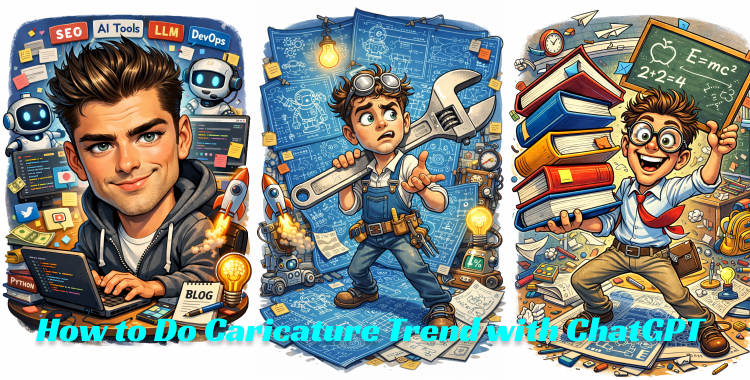
Suddenly, your mundane selfie transforms into a vibrant cartoon character, capturing your essence with hilarity. In early 2026, a wave of caricature creativity swept through social media, inviting everyone to turn their everyday vibes into exaggerated artwork. Whether you’re a chef balancing oversized utensils or a software developer buried in lines of code, this guide offers 30 prompts to help you generate viral caricatures that are totally shareable—no artistic talent required.
How You Can Generate Viral Caricature Images on ChatGPT
Step 1: Upload Your Photo in ChatGPT
Open ChatGPT and upload a clear photo of yourself. Opt for a front-facing image bathed in good lighting, where your facial features stand out. This ensures the AI captures your likeness accurately.
Step 2: Enter a Caricature Image Prompt
Once your photo is uploaded, use prompts like, “Create a caricature of me based on what you know about my job.” You’ll find the prompts listed in the next section; just remember to emphasize exaggerated features and vibrant cartoon styles.

Step 3: Refine the Prompt and Regenerate
Feel free to switch prompts or tweak specific details. Adjust elements like the exaggeration level, color palette, or background style until you achieve the look you desire. Sometimes it takes a few tries, but that’s part of the fun!
Step 4: Save the Final Image
When you’re happy with your caricature, save it in high resolution. Crisp images garner more attention—and you want all those likes, right?
Step 5: Turn the Image into a Viral Video (Optional)
Want even more impact? Upload your caricature to Grok to create an animated video version. These lively presentations often attract more buzz on platforms like TikTok and Instagram Reels, keeping your caricature alive.

Best 30 Caricature ChatGPT Prompts (Copy & Paste)
1. Caricature Portrait Prompts

- Create a high-quality caricature portrait of a young man, featuring an oversized head, exaggerated facial proportions, large expressive eyes, and a playful smile.
- Turn this person into a caricature illustration highlighting an enlarged forehead and sharp jawline, emphasizing personality through facial expression.
- Generate a detailed caricature portrait of a woman with exaggerated cheekbones and big sparkling eyes, creating a polished digital art style.
- Create a professional caricature headshot with a large head-to-body ratio and stylized facial exaggeration.
- Design a caricature portrait with realistic features but with playful exaggeration that pops.
- Illustrate a caricature-style portrait with an oversized head and bright lighting, capturing strong personality traits.
2. Job-Focused Prompts

- Exaggerate an engineer surrounded by massive blueprints and quirky inventions, holding a giant wrench with a comedic expression.
- Draw a caricature of a teacher juggling enormous books, enthusiastic and ready to inspire.
- Generate a caricature of a nurse with a gigantic stethoscope, making medical care look fun.
- Caricature a developer typing on a colossal keyboard amid raining code—pure tech chaos!
- Exaggerate an artist passionately painting with splatters everywhere, capturing creativity in a single frame.
- Create a caricature of a chef with comically oversized kitchen tools, complete with a cheerful grin.
3. Celebrity & Public Figure Caricature Prompts

- Create a caricature inspired by a famous movie star, focusing on their signature features with a humorous twist.
- Design a caricature portrait inspired by a well-known singer, highlighting their facial traits in an exaggerated style.
- Generate a caricature of a prominent public figure, making unique features pop with vibrant colors.
- Create a stylized caricature inspired by a famous actor, emphasizing bold lines and dynamic expressions.
- Illustrate a caricature inspired by an internet personality, capturing their essence in a playful style.
- Design a caricature portrait inspired by a celebrity’s signature features with artistic exaggeration.
4. Couple, Family & Group Caricature Prompts
- Create a caricature of a couple with oversized heads and warm smiles in a vibrant setting.
- Generate a family caricature with exaggerated features and joyful expressions, capturing their essence.
- Design a caricature of two people standing together, emphasizing playful poses and bright colors.
- Create a group caricature with consistent style and a lively palette, depicting their unique attributes.
- Illustrate a family caricature with simplified bodies and oversized expressions—fun for all!
- Generate a cute couple caricature with a romantic style, showcasing their love with charm.
5. Pet & Animal Caricature Prompts
- Create a caricature of a dog with an oversized head and playful demeanor, exuding joy.
- Generate a cat caricature featuring exaggerated facial features, ensuring maximum cuteness.
- Design a pet caricature with large proportions and vivid colors, perfect for animal lovers.
- Create a funny animal caricature showcasing exaggerated features and a cheerful pose.
- Illustrate a pet caricature with oversized expressions, bringing humor to your furry friends.
- Generate a premium-quality animal caricature with playful character traits and vivid colors.
Tips to Create The Best Caricature Image
To land stunning caricatures, pay attention to your photo setup and prompt adjustments. Simple tweaks can lead to effective results eyeing the feeds of your social media!
Why This Caricature Trend Went Viral
The caricature boom kicked off in early 2026 by transforming ordinary jobs into memes almost effortlessly, feeding into the addictive nature of social media.
ChatGPT’s ability to tap into your chat history adds a layer of personal flair, turning every image into a delightful reflection of your digital footprint.
Free access and the lack of required skills made it easy for anyone to jump on board, spawning an avalanche of posts across platforms from coast to coast.
The constant loop of tweaking and regenerating keeps users engaged, creating charming cartoon versions of themselves in mere moments.