
Update: added new Combat Arena Codes on February 26, 2026
I hit respawn with my hands still tight from the last firefight; the Rewards box was a locked vault and the timer read zero. You feel that small, electric knot when a code fails and the round slides away. I waited—two minutes later the new code dropped and the balance shifted.
I track dev drops so you don’t have to. Below I lay out the current working keys for Combat Arena, how to redeem them, where they usually appear first, and quick fixes when the game throws errors. Read fast—codes expire on a clock and momentum matters.
All New Combat Arena Codes
Observation: When the servers update, chat channels and Discord light up within seconds.
Here are the confirmed, working codes as of February 26, 2026. I tested them after the latest push; these grant free coin rewards you can spend on weapons and skins.
- HOLIDAY2025: 1,000 free coins NEW
- THANKYOU: 5,000 free coins
Can I use Combat Arena codes more than once?
No — each code is single-use per Roblox account. I redeemed one of these during a session and the server rejected a second attempt; the system ties redemptions to your profile.
How to Redeem Combat Arena Codes
Observation: The game gates the Rewards menu until you clear the quick starter objectives.
Combat Arena requires a short set of tasks before codes will accept. I’ve listed the exact sequence I use to avoid wasted attempts.
- Open Combat Arena on Roblox (game page: Combat Arena).
- Reach 40 kills and win a match, or complete the tutorial—this opens the Rewards button. A quick restart after 40 kills can also reveal the Rewards menu.
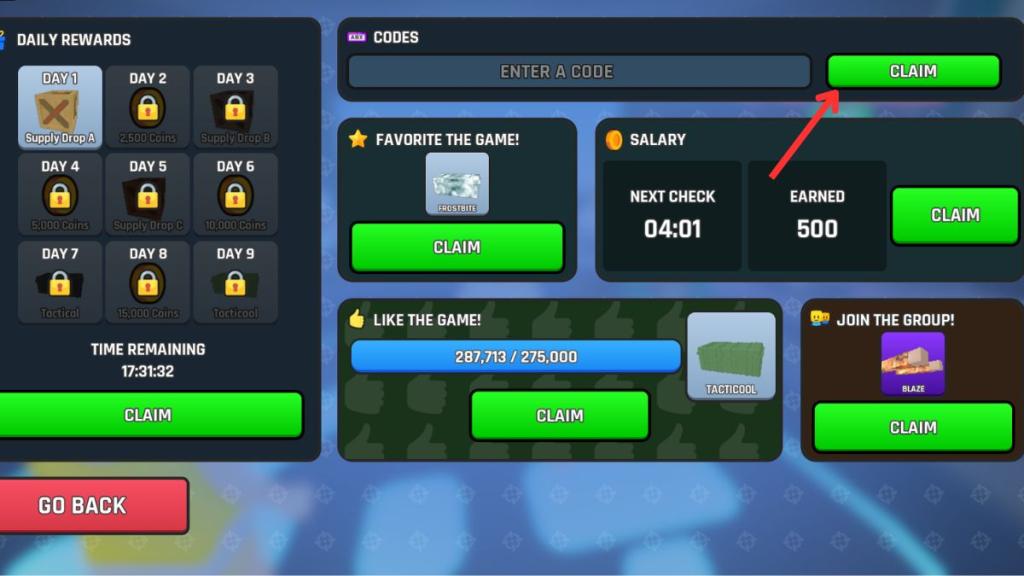
- Tap the Rewards icon at the bottom of the screen.
- Type or paste a working code into the box and press Claim.
How often does Combat Arena release new codes?
New codes generally arrive with major updates, special events, or holiday drops. I watch the developer posts and community channels—if a code appears it usually coincides with a patch or a limited-time event on Roblox.
How to Get More Combat Arena Codes
Observation: The earliest code announcements show up on the game’s Discord and dev social feeds before anywhere else.
If you like chasing small advantages, use these channels:
- Join the Combat Arena Official Discord for immediate alerts and community tips. (Invite: Combat Arena Discord.)
- Follow the game’s Roblox page and the developer’s social accounts for patch notes and surprise drops.
- Keep this page bookmarked — I refresh it every time the dev team posts so you won’t miss short-lived codes.
Why Are Combat Arena Codes Not Working?
Observation: Errors usually surface right after a client update or during heavy server load.
If redemption fails, try these fast checks I rely on:
- Verify exact spelling and capitalization; pasting from a trusted list reduces typos.
- Confirm you completed the entry requirements (40 kills/win or tutorial completion). Without that gate the Rewards field stays disabled.
- Allow a minute after updates—servers occasionally need time to register new codes.
- If a code returns “Invalid Code,” it most likely expired; expired keys are moved to the archive below.
Why can’t I redeem codes in Combat Arena?
Most errors come from one of the four items above. I’ve seen players rush entry mid-update and lose the code; patience and a clean paste usually fix it.
What’s your highest kill streak?
I’ll tell you mine if you tell me yours: my longest run was a streak that felt like a spotlight on a stage, and I cashed the code minutes later. Drop your number in the comments and defend it—who will claim the crown?
No. Each Combat Arena code can be redeemed only once per account. Once you claim the rewards, the code will not work again on the same profile.
Combat Arena codes usually arrive during major updates, events, or holidays. The developers drop them without much warning, which is why keeping this page bookmarked makes life a lot easier.
If you see the “Invalid Code” message when entering a Combat Arena code, then it means that the code has expired. Other reasons for codes not working could be incorrect code entry, server issues, technical errors, and more.