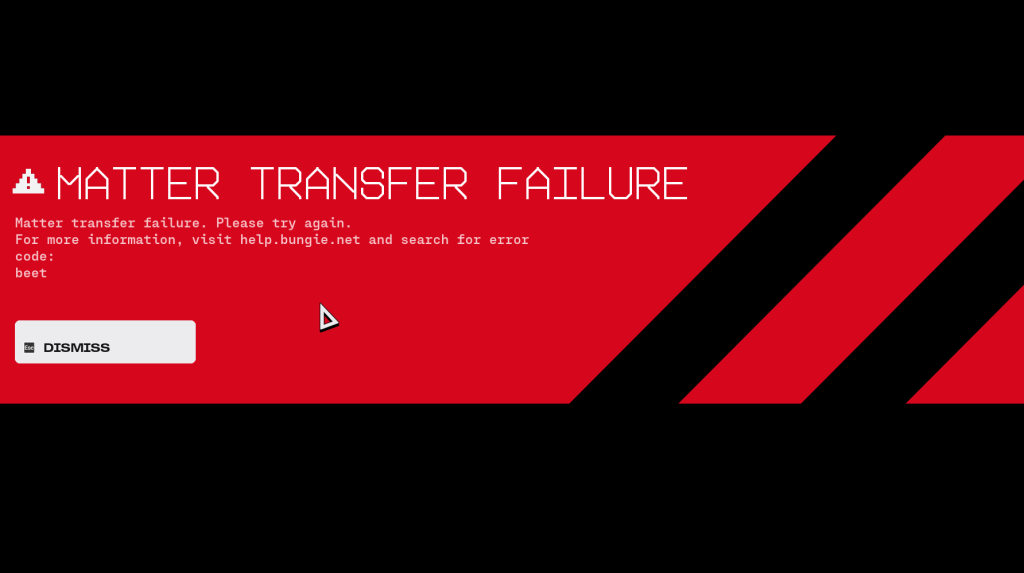
The loading bar hit 100 percent, the map faded in, and a red bridge warning crashed the screen. Matter Transfer Failure blinked at me with the code “beet”. My squad’s round vanished before it began.
I’ve spent hours testing Server Slam and trading screenshots with friends so you don’t have to guess. You and I will run through why this shows up, what you can try right now, and what to expect from Bungie.
Marathon Matter Transfer Failure Error fix
In dozens of launches I saw the error almost always the instant a match finished loading.
The short story: the game fails to complete the handoff between matchmaking and session servers. Sometimes it’s your PC, sometimes it’s the flood of players. Below are the fastest, most reliable moves I test first when I see “beet”.
- Wait 60–120 seconds and try again. If hundreds of players are joining, the system can clear itself like a highway pileup; many errors vanish on the second attempt.
- Lower graphics and relaunch the match. Go into Video settings and step down to Medium or Low, then restart the round. If your GPU is taxed—NVIDIA or AMD drivers included—reducing load prevents local failures.
- Close background apps. Open Task Manager (Windows) or Activity Monitor (macOS) and shut nonessential programs: Discord streams, browser tabs, overlays. Think of background processes as a clogged artery—free the flow and the game can finish its handshake.
- Use the official client you launched from. If you launched through Steam, keep Steam open. If you’re on Bungie.net or a console, avoid switching clients mid-launch.
- Check server status. Scan Bungie Help on Twitter, Bungie.net’s server page, or the Destiny 2 Support account on X for live updates before brute-forcing retries.
Why the beet error keeps popping up
On Server Slam launch day I watched dozens of players try to join at once and the error clustered around the first wave of logins.
Bungie’s systems are handling an enormous surge during special events. When matchmaking finishes but the transfer to the play session chokes, the client throws Matter Transfer Failure — beet. That can be caused by:
- Excessive incoming traffic on Bungie’s matchmaking or session hosts.
- Local hardware or driver problems—outdated GPU drivers, insufficient RAM, or aggressive overlays.
- Client mismatches: launching from the wrong platform or having conflicting background services.
What does error code “beet” mean?
It’s a client-side message that indicates the handoff between matchmaking and the game session failed. Sometimes it’s an overloaded server, sometimes your rig can’t complete the transfer. Check Bungie’s support channels first; their posts often confirm whether the issue is widespread.
How do I fix Matter Transfer Failure error in Marathon?
Follow the quick checklist above: try a short retry wait, lower graphics, close extras, and confirm you launched with the correct client. If the error persists after a few retries and you meet recommended specs, collect logs and open a ticket with Bungie Support or post a Timestamped clip to Discord and Reddit so others can correlate timing.
Is the “beet” error caused by servers?
Sometimes. If social channels and Bungie’s status page show mass reports, it’s server-side and waiting is your only truly reliable fix. If reports are isolated, the problem is more likely on your end.
Quick technical tips and tools I use
When I hunt down errors I run a short diagnostics routine every time the screen goes red.
- Task Manager / Activity Monitor: Free memory and kill overlays.
- Driver tools: Use GeForce Experience (NVIDIA) or Radeon Software (AMD) to verify drivers are current.
- Network tools: Ping the Destiny servers, check latency in Command Prompt, or use a simple traceroute to spot obvious routing issues.
- Community tools: Bungie’s Help pages, the official Destiny Discord, and subreddit threads often surface pattern reports faster than official posts.
If you try every local fix and errors still cluster during peak time, the smartest move is patience and documentation: capture the time, the lobby ID, and a screenshot. Share it on Bungie’s support channels so engineers can match your trace to their logs.
Are Bungie’s servers going to smooth out under heavy load, or will every Server Slam become a live stress test for players and support teams?