
I dropped into a sudden 2v2 match and watched my Gojo clone crumple under a surprising new move. For a second I thought the code I redeemed yesterday had lied to me. I learned then that a single working code can flip a whole round.
I follow AniPixels codes closely, and I’ll tell you what matters right now: which codes are active, how to claim them fast, and where to ping when something breaks. I write from the trenches so you don’t waste time chasing expired drops — and you’ll see exactly what to copy and where to paste.
All New AniPixels Codes
The server shows a spike every time the devs drop a new code—people swarm the shop immediately.
Here are the fresh codes added on March 1, 2026. Redeem them fast; some are time-limited and can swing a match like a jackpot slot.
- Doppio: Doppio NEW
- Gojo (Legs): Gojo (Legs)
- CandyVegito: Candy Vegito
When were the latest AniPixels codes released?
The newest AniPixels codes were added on March 1, 2026. I recommend redeeming active codes immediately because timed rewards can disappear without notice.
Expired AniPixels Codes
I scanned the active code list and the game logs for expired tags.
Right now there are no expired codes on the public list—everything above is working. That can change, so copy and claim before a timed code rotates out.
Where can I find new AniPixels codes quickly?
Bookmark this page for quick updates, and join the AniPixels Discord Server for instant alerts.
Official sources I monitor: the AniPixels Discord (check the active-codes channel), the Roblox game page, and developer posts on Twitter/X. If you want push-notifications, enable Discord pings for code updates.
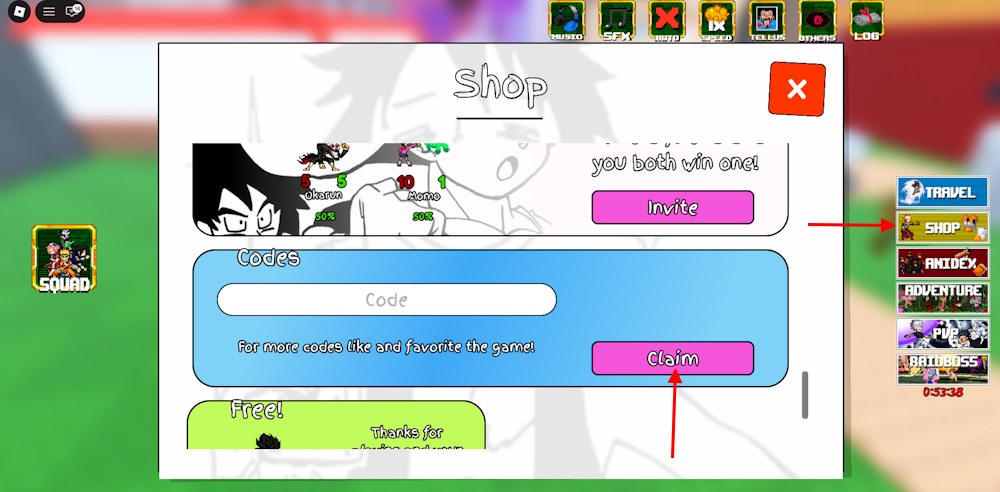
How to Redeem AniPixels Codes
You’ve copied a code and the cursor is blinking in the shop box.
Follow these steps to claim rewards quickly:
- Open AniPixels on the Roblox app or web page: https://www.roblox.com/games/102438325176100/AniPixels.
- Click the Shop button on the right menu.
- Paste the code into the code field—copy-paste to avoid typos.
- Press Claim and watch the parts or boosts drop into your account.
Why are my AniPixels codes not working?
Several simple things usually cause failures: server resets after a live update, small typing errors, or timed codes that expired while you were copying them.
If a code returns an error, try these quick fixes: wait a minute for servers to stabilize after a new drop, paste instead of typing, restart the Roblox client, and check the AniPixels Discord active-codes channel to confirm status.
How to Get More AniPixels Codes
I watch dev posts and Discord threads during weekend updates—code drops often follow short streams or patch notes.
Make these channels your routine: follow the AniPixels developers on Twitter/X, keep the Roblox game page bookmarked, and join the Discord for instant drops. Think of the Discord as a Swiss Army knife for code hunting: channels, pins, and instant chatter that point you to fresh rewards.
If you prefer a single reference, keep this page open and refresh when you hear a new drop mentioned on social.
If you want to compare unit strength, tools like Roblox stat trackers and community spreadsheets on Google Sheets can help you evaluate which parts are worth chasing.
What anime unit are you betting will dominate the next season’s meta?