
I remember staring at the Hernand map while a Greymane jawed about camp upgrades and I had no idea how to make him useful. You will hit the same blank wall the first time you see the Missions tab. That empty minute is where most players lose hours they could have spent getting gear or cash.
At my desk my coffee went cold — How to start missions in Crimson Desert
I’ll walk you through it like a shopkeeper showing the register. You get a camp in Hernand, and that opens the whole side of the game that feels MMO-born: managing comrades, sending them out, and converting idle time into goods and coin.
Quick starter checklist:
- Open the map.
- Switch to the Factions tab.
- Find a location. Little icons at the top-right of each name tell you the mission type—wheat for farming, a shield for bodyguard, etc.
- Double-click the location to pull it up on screen.
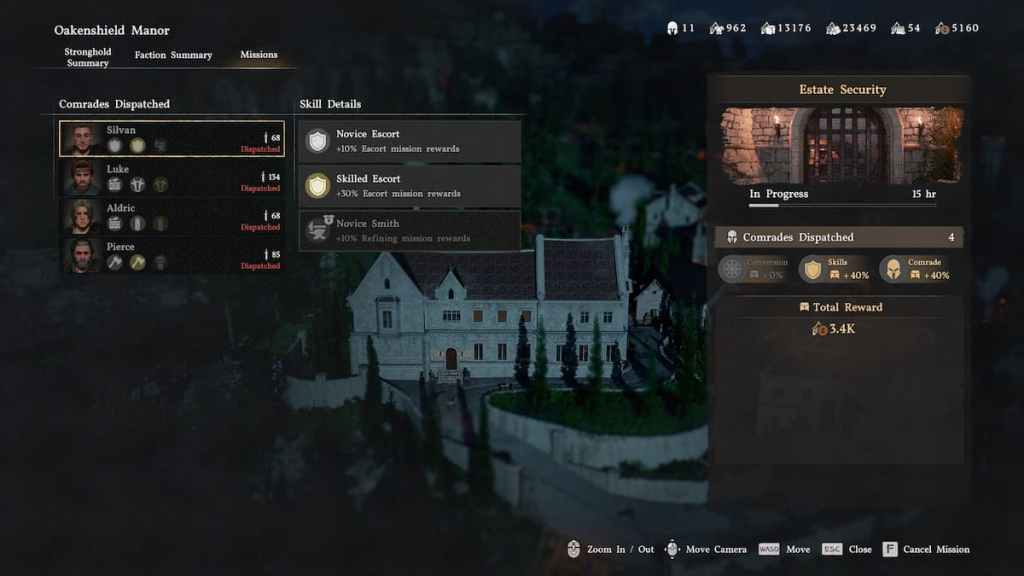
- Go to the Missions tab.
- Pick a mission and assign comrades—match skills to task for better yields.
- Hit Dispatch on your platform (PC/Steam, PlayStation, Xbox).
Think of your Greymanes like a small logistics team: assign the right specialist and watch returns compound. The Dispatch Coordinator at your camp later lets you manage everything from one screen, no map hopping required.
How do I start Greymane missions?
Start at the Hernand camp. Open the map, choose Factions, double-click the target region, then the Missions tab—assign people and press Dispatch. If you don’t see missions, advance the Greymanes’ faction quests to recruit more comrades and open more mission slots.
What rewards do Greymane missions give?
Early missions return camp-focused benefits: wheat, camp funds, basic materials. As you progress and unlock farther locations you’ll get player-useful items and resources that feed your character’s crafting and upgrades.
How long do missions take?
Mission timers run on in-game time. An eight-hour mission finishes if you sleep or wait on a campfire for eight hours. They repeat automatically unless you cancel them—so find a reliable node and farm it like a persistent rental income stream.
On my first week I watched a Greymane bring back only wheat — What rewards mean for you
Early returns feel small, but they scale. Send specialists from the Greymane roster to jobs that match their skill icons and you’ll improve yields. Later, those same missions become meaningful: useful crafting materials, cash, and consumables for your character.
Pearl Abyss designed this with MMO habits in mind—if you follow guidance from Discord threads and subreddit strategy posts, you’ll learn which nodes repeat valuable drops and which give only camp perks.
At a keyboard in a late-night Discord chat — Tips to manage your Greymane crew
I’ll give you the pragmatic moves I use when I don’t want to babysit the camp every session. You want routines that scale.
- Match skills to task: offense-focused comrades on bodyguard runs, harvesters on farming.
- Rotate missions that auto-repeat to passively farm resources while you quest elsewhere.
- Use the Dispatch Coordinator at Greymane camp once it’s available—it centralizes assignments like a conductor organizing an orchestra.
- Keep an eye on timers and rest at campfires if you need fast turnarounds; mission clocks are patient like a slow oven, so plan your play sessions around them.
- Check community tools: Steam guides, Reddit threads, and Discord servers often list which locations yield tradeable items versus camp-only goods.
If you want to spend less time guessing and more time testing, start small: assign one mission type, track returns, then expand your rotation—what’s the one mission you’ll try first?