
I watched a lobby tilt the moment someone hammered six digits into the keypad. You could feel the leaderboard tighten as numbers jumped. Ten seconds later a player darted to the Upgrade Shop with a secret item and the match changed forever.
Update: Added new Fortnite Go Up for Brainrot codes on March 30, 2026
At the keypad, whispers turn into shouts — All New Fortnite Go Up for Brainrots Codes
- 476767: Add Secret Brainrot into the machine NEW
- 823423: Skip Brainrot Machine cooldown NEW
- 481148: Max level secret brainrot into the Inventory NEW
If you want more chaos, the Steal the Brainrot map uses similar codes and mechanics. If you prefer to avoid brainrot mayhem before your next Royale drop, check recent Fortnite map changes from Epic Games and UEFN creator notes.
Behind the creator’s feed, old codes vanish overnight — Are There Any Expired Fortnite Go Up for Brainrots Codes?
As of April 2026 these three codes are active. Ferins and other creators rotate codes around events or after UEFN updates, and each code is limited to one claim per account. If a code disappears from your keypad, it was probably retired or already redeemed.
I keep this list updated when creators post on the Fortnite Discover page, X/Twitter, Discord, or the map description — that’s where the first notices come from.
When you land on the map the keypad is the obvious target — How to Redeem Fortnite Go Up for Brainrots Codes
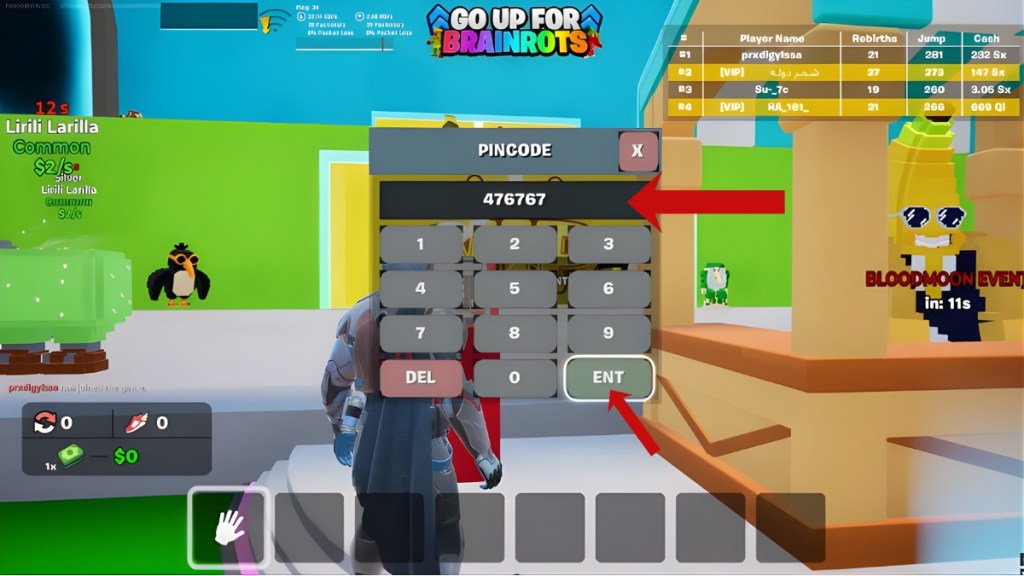
Use these steps when you land on the Go Up for Brainrots map (Map Code: 7875-7934-3852):
- Load the map in Fortnite (UEFN mode).
- Walk to the Keypad Device beside the Upgrade Shop.
- Hold the Interact button (Square/X on controller, E on PC) to bring up the keypad.
- Type your code exactly and press the ENT key to claim the reward.
What are Fortnite Go Up for Brainrots codes?
They are six-digit entries the map creator programs into the keypad to deliver rewards: secret brainrots, cooldown skips, or inventory items. Creators like Ferins publish these codes in Discover posts, on Discord, and on X/Twitter.
How do I redeem Go Up for Brainrots codes?
You redeem them directly on the map’s Keypad Device. If the map rejects your entry, double-check for typos and that you haven’t already claimed the code with the same account.
On Discord and Twitter a single post can light up servers — How to Get More Go Up for Brainrots Codes in Fortnite
If you want fresh codes follow the creator (Ferins) on the Fortnite Discover tab and on social channels: X/Twitter, Discord, and Reddit are fastest. Epic Games forums and UEFN community pages also surface admin drops.
I monitor those channels and update this guide as new keys appear, so treat this page like a live feed for active codes.
When the keypad refuses your digits, the problem is usually obvious — Why Are My Fortnite Go Up for Brainrots Codes Not Working?
Here are the usual suspects:
- Code expired or was deactivated after an update from Epic Games.
- You already redeemed that code on your account—each code is single-use per account.
- Typo or extra digits; the keypad input is sensitive and quick to reject errors.
- Server-side issues: check Fortnite server status if nothing else explains the error.
Sometimes the keypad becomes a vault after a map patch, refusing entries until the creator reactivates codes. And when a player hits a max-level brainrot, the leaderboard is a pressure cooker — one claim can blow the ranking wide open.
Want me to keep hunting new drops from Ferins, Epic, and the UEFN community — or will you trade the grind for a fast ascent?