You’re two minutes from checkout when you pause. Reviews praise the story, but performance notes haunt the comments. I’ve felt that same tug—and I want you to stop guessing.
On any store page you’ve hesitated before buying — New FPS Estimate Feature Will Allow Steam to Predict a Game’s Performance on PC
I tracked the leak and the clues so you don’t have to guess what Valve is building. Hidden in Steam’s latest client code, a line discovered by ResetEra member Dex3108 reads: “Select an App and a PC config to get a chart of estimated frame rates, based on the frame rates of other users.”
That sentence is small, but it changes the buying loop. Instead of theoretical minimums and optimistic marketing, Steam could offer charts built from real-world runs sent by real machines. For you that means a quick, visual answer to the urgent question: will this run well on my PC?
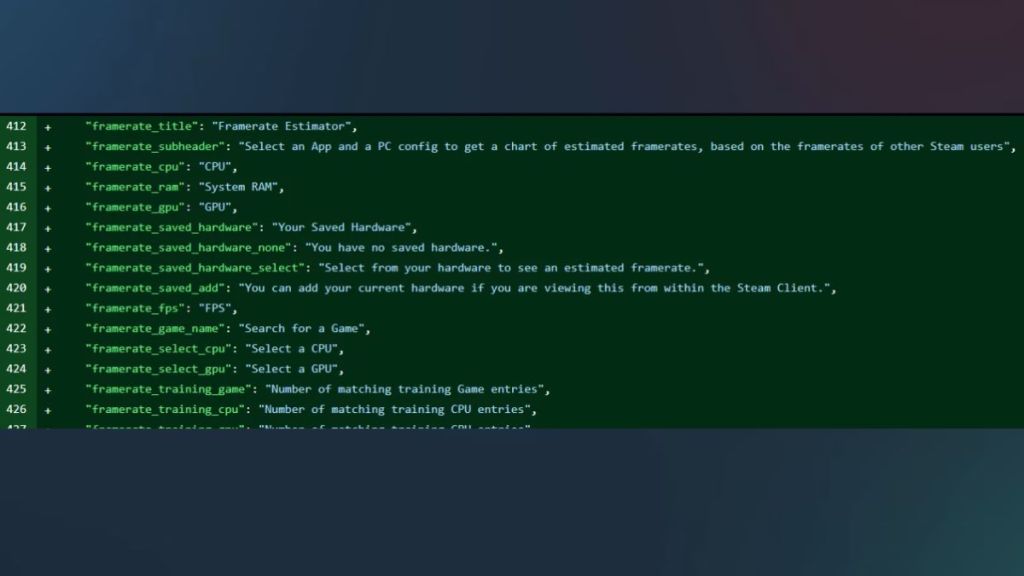
The code notes a simple user flow — How the feature would work, in practical terms
You’d pick a title, enter or select your PC specs, and get a chart. The data points won’t be synthetic benchmarks; Valve’s SteamOS beta already collects frame-rate telemetry and hardware fingerprints from consenting systems. That means the graph will be stitched together from other players’ real sessions.
I’ve seen prediction tools before, but this would act like a traffic report for your GPU: you know where congestion happens and how fast you’ll likely move under similar conditions. For purchasers that’s a release from fear-of-loss: no more buying blind and discovering the game stutters on day one.
How will Steam estimate FPS on my PC?
By matching your configuration to a pool of anonymized runs. Valve can compare CPU, GPU, RAM, OS, and settings to similar setups and display a range—30–60 FPS, 60+, or unstable drops—backed by user-submitted runs. Think of it as a crowd-sourced performance map layered on the store.
A real-world hesitation every Steam Deck owner has felt — What this means for handhelds and low-power PCs
When a new AAA patch drops, Deck owners wait for official verification. If Steam shows expected frame rates up front, you’ll know whether a title is Deck-friendly before you install. For Valve, that cuts friction; for developers, it becomes public pressure to optimize across architectures—Intel, AMD, NVIDIA, and handheld silicon alike.
This could also reduce reliance on third-party tools like Can You Run It. Those services compare specs to published requirements; Valve’s approach would replace guesswork with community-sourced evidence, and might force studios—CD Projekt, for example with The Witcher 4—to stop treating mid-range GPUs as an afterthought.
Will Steam’s FPS estimates be accurate?
Accuracy will be uneven at first. It depends on sample size, driver differences, and how Valve filters out outliers. But with millions of clients and telemetry from SteamOS betas, the margin for error should shrink quickly. I’d expect conservative ranges at launch rather than exact numbers.
One obvious consequence spotted in forums — Why developers should care
Players already post clips and benchmarks to Reddit and ResetEra; a visible Steam chart amplifies that feedback. Public performance charts are pressure—good pressure—to optimize. Developers who ignore wide hardware parity risk public, quantifiable complaints rather than scattered forum posts.
For studios that invest in scalable settings, the payoff is clearer sales. For those that don’t, the feature will feel like a scoreboard no one asked for but everyone watches.
Will this replace tools like Can You Run It?
Short answer: probably. Steam’s integration, access to live telemetry, and a store-centric presentation give it an advantage over standalone comparison sites. Third-party tools may survive as diagnostics, but Steam’s feature could become the first stop before purchase.
I’ll be watching the rollout: Valve’s client code hints at a modest UI—a selector, a chart, maybe quick presets for “Low,” “Medium,” and “High.” If implemented well, this becomes practical and quiet; if mishandled, it turns into noise. I want you to have evidence before you spend.
Are you ready to let a single chart change how you decide which games make it into your library?