
I remember staring at a blank Recruit screen after an evening raid, knowing several boxed Pokémon were stranded in another app. My thumbs froze — the wrong Nintendo account, a missed step. That quick mistake almost cost me a favorite catch.
I’ll walk you through the exact steps I use to ferry Pokémon from Pokémon HOME into Pokémon Champions, remove the guesswork, and explain what actually carries over once they arrive.
I once missed a transfer because my accounts didn’t match. How to transfer your Pokémon from HOME
First, get the mechanics right: install the Pokémon HOME mobile app and sign in with the same Nintendo Account you use for Champions. If those accounts don’t match, the transfer won’t land — and that rare you saved will stay stuck.
Open HOME, tap into the main screen, then open Options. There’s a menu item that lets you send a Pokémon to visit Champions. Pick the Pokémon, confirm the send, and the app will dispatch it. Your HOME box acts like a ferry carrying creatures across apps; you only need to steer it.
Can I transfer Pokémon from HOME to Champions?
Yes. As long as both apps use the same Nintendo Account and you use the send-to-Champions option in HOME, the Pokémon will appear as a pending transfer inside Champions.
You’ll often spot pending recruits waiting the moment you open the app. How to use your Pokémon in Champions
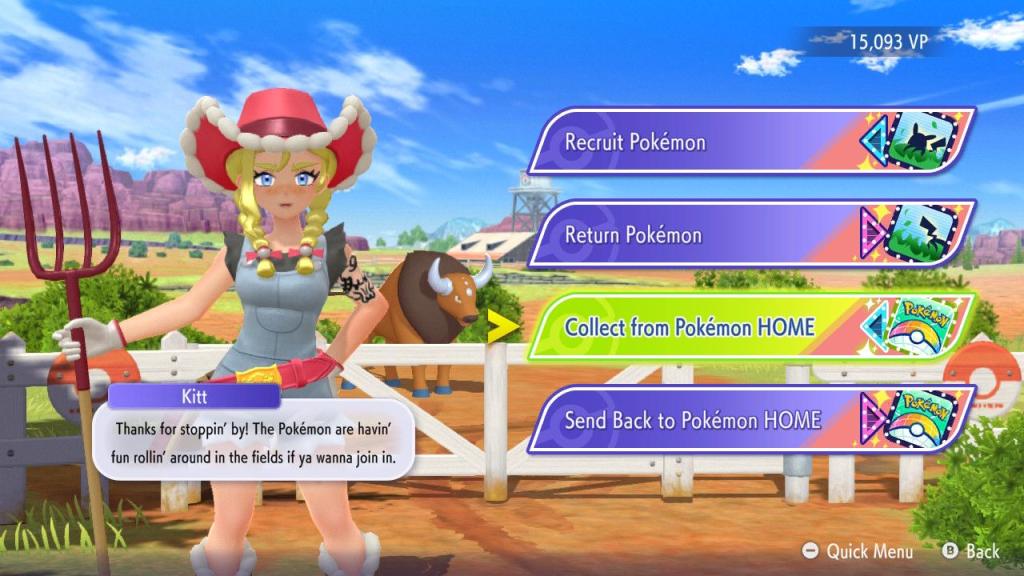
Open Champions and head to the Recruit section. There’s a specific accept option for transferred Pokémon — tap Accept and they’ll drop into your boxes. From there you can add them to teams, inspect moves, or keep them stashed.
Not every move survives the trip. If a transferred Pokémon knows attacks banned by Champions, it won’t be battle-legal until you change its moves. Some training stats such as EVs do carry over, but you’ll often need to retrain aspects of the Pokémon inside Champions to make them competitive. If you send a Pokémon back to HOME, its training won’t work in other games or HOME, although if you return it to Champions the training will remain.
Will moves, EVs and training carry over?
Moves that are banned by Champions will be unusable in combat until replaced. EVs generally carry across, but you should plan on re-training in Champions for peak performance. Think of the Recruit screen as a customs desk that inspects what can fight and what must be changed.
Do I need the same Nintendo account on both apps?
Yes — the Nintendo Account is the bridge between HOME and Champions. If you use different accounts, transfers won’t appear. Keep your account details consistent on your phone and console to avoid losing time or a rare catch.
I’ve used this routine with both the mobile HOME app and the Champions client, and it’s saved me from costly recruitment mistakes and duplicate training sessions. You can rely on the official apps and your Nintendo Account to move Pokémon safely — but always double-check account names before you hit send. Ready to move your best team over and test them in Champions?