I wandered onto a Cloud Island and felt a small panic—an event timer flashing in the corner, items I didn’t own, and a Pikachu sofa I might miss forever. You can feel the timer over these events like a heartbeat. I had to map every date so I wouldn’t be that player who arrives too late.
I wrote this to cut through the noise: every limited-time event in Pokopia, the exact dates, what each one offered, and how to catch them on your Nintendo Switch 2 without guessing. Read the table, then use the quick notes below to plan which islands you’ll visit and when.
| Event | Dates available | Description |
|---|---|---|
| More Spores for Hoppip | March 10 to 25, 2026 | Players could collect Cotton Spores on Dream Islands and exchange them for new furniture items from Hoppip in the Pokémon Center. Hoppip, Skiploom, and Jumpluff could all be befriended and added to the Pokédex. |
| April Fools’ Day | Annually on April 1 | Complete a special PC challenge to earn an Inflatable Sudowoodo decoration. |
| Pokopia x IKEA | April 1 to May 10, 2026 | Players can visit a new Cloud Island featuring IKEA-designed homes. Special furniture sets and food items inspired by Pokémon sold in IKEA stores. |
| Bulbasaur’s Jump Rope Contest | April 19 to April 27, 2026 | Players can compete in Bulbasaur’s Jump Rope game to win prizes. |
| Sableye event | April 30 to May 10, 2026 | Like the Hoppip event, Sableye will sell items in the Pokémon Center in exchange for a new currency called Red Crystal Fragments that can be found on Dream Islands. You can also befriend Sableye and add them to your Pokédex. |
I noticed Hoppip popping up across Dream Islands on March 10 — the kind of small discovery that makes you check your calendar.
Here’s every limited-time event in Pokopia, already released or confirmed, with the dates and what each one offered. Study the table above, then skim these snapshots to decide which runs you need to make.
How do Pokopia events work?
Events drop temporary islands, special NPCs, or new currencies that you collect while roaming Dream Islands. Some NPCs sell exclusive furniture at the Pokémon Center; others add Pokémon you can befriend and record in your Pokédex. The game’s mechanics are simple: visit the island, complete the activity, trade the event currency, and collect rewards.
This morning I logged into a Cloud Island that had two houses with IKEA tags nailed to the doors.
The Pokopia x IKEA collaboration is live now. Use code 0SJ8 5TRX to visit the IKEA Cloud Island. Inside you’ll find one Pikachu-themed home and one Snorlax-themed home where you can hang out, photograph items, and preview furniture before buying at the Pokémon Center.
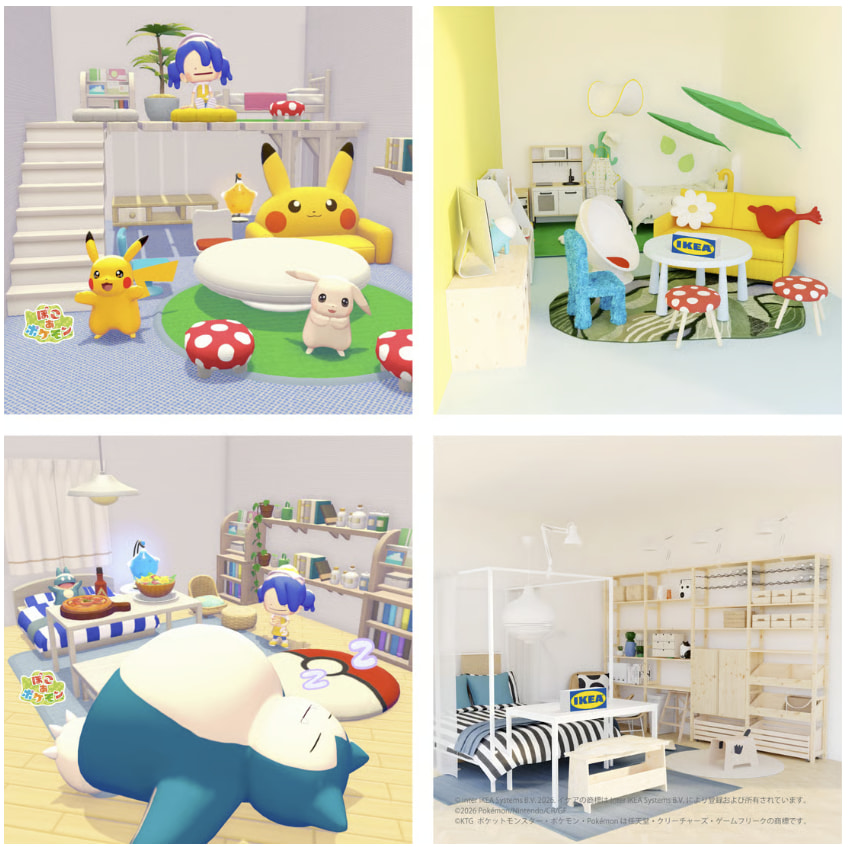
The IKEA run ends May 10, 2026, so you have a fixed window to visit both themed houses and buy special sets if you want them in your catalog. The IKEA collaboration also ties into real-life furniture sales and in-store promotions, making this one of the bigger crossovers between gaming and retail in recent months.
Can you still get past events in Pokopia?
Technically, yes. Players can adjust the Nintendo Switch 2 system clock to access past events, but if you prefer the intended rhythm of the game, use this guide to plan ahead and catch the islands live. I recommend tracking the dates and syncing with friends so you don’t miss time-limited rewards.
Yesterday I noticed a tiny countdown badge on Bulbasaur’s icon — it read April 19.
The next event is Bulbasaur’s Jump Rope Contest, running April 19 to April 27, 2026. You can host guests on your Cloud Island or visit friends’ islands to participate. The challenge is pure timing and rhythm: keep Bulbasaur jumping consecutively without tripping the rope to win prizes.
How long do Pokopia events last?
Events vary. Some are single-day captures like April Fools’ Day (April 1 annually). Others run multiple days to weeks—Hoppip ran from March 10–25; IKEA runs April 1–May 10; Sableye is April 30–May 10. Plan your calendar: missing a multi-week event is one thing, missing a one-week contest is another.
Quick prep tips from someone who tracks release windows: mark the start and end on your calendar, invite a friend to mirror your runs, and use the Pokémon Center when event-specific currency appears. Treat the IKEA houses like a catalog preview—those setups are easy to scan and decide which pieces you want to buy later.
The IKEA homes felt like a secret drawer full of catalog items you didn’t know you needed.
If you want more frequent reminders, set a Switch alarm or follow the official Pokopia channels and IKEA’s social posts—both will flag event drops and sometimes offer surprise bonuses tied to retail promos. Which of these limited-time moments will you chase first?