
Update: added new Launch Your Rocket codes on April 28, 2026
I froze while the wheel spun and my in-game rocket barely moved — five minutes of planning gone in a single bad click. You can feel the clock press against your shoulder; my spin timer felt like a ticking bomb. I wrote these notes after chasing every active code so you don’t waste that same breath.
I play, I test, and I sort the working codes from the noise so you can get straight to upgrades. Read fast, redeem faster, and use the rewards where they actually move your rocket.
All New Launch Your Rocket Codes
On update day the game’s chat and Discord fill up with players shouting for free spins and boosts.
- NewUpdateArrived: 5 Spins NEW
- HereWeGo: 3 Spins NEW
- MoonUpgrades!: x2 Money for 15 minutes NEW
- SorryForShutdown: 5 Wheel Spins
- EasterIsHere!: 15m x2 Chocolate
- SorryForDelays: Exclusive Tower x4 Money
- MoreBoosts!: 15m x2 Money and 15m Lucky Crates
All codes above were active at publication. I test them live on the Roblox client; claim them quickly because the developer retires codes without notice.
How do I redeem codes in Launch Your Rocket?
I keep the redemption steps short because you want results, not a lecture. Open the Launch Your Rocket game in Roblox (mobile or PC works). Walk to the central hub, enter the Codes area, paste a working code, and tap Redeem. If nothing happens, close Roblox and try again in a private/new server.
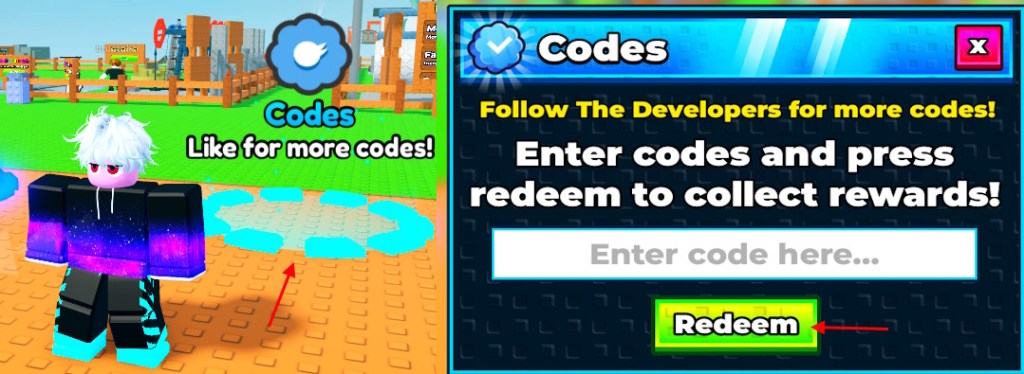
How to Redeem Launch Your Rocket Codes
On many servers the codes panel is easy to miss because players rush straight to the launchpad.
You enter Codes at the hub, paste a code, and hit Redeem. If the code fails, check for typos and case sensitivity — codes are exact. Restart Roblox or join a fresh private server; most players find expired or region-limited behavior resolves that way. I also watch the developer’s Discord and the game’s Roblox page for manual drops.
How to Get More Launch Your Rocket Codes
On social channels, new codes appear in bursts around updates and downtime notices.
You should scan three places first: the game’s official Discord codes channel, the Roblox game page (developer posts), and the developer’s X/Twitter if they use it. I keep an eye on community hubs like the Launch Your Rocket Discord invite and aggregator sites that collect drops. If you prefer passive tracking, bookmark this page or follow a trusted curator on X; that saves you frantic searching when a short-lived code appears.
Where are new Launch Your Rocket codes posted?
Developers post most codes on Discord and Roblox, and shorter-lifetime promos sometimes arrive via X. I watch those channels hourly around updates to catch time-limited freebies.
Why Are My Launch Your Rocket Codes Not Working?
On busy release days, dozens of players report failures that turn out to be simple problems.
First, check spelling and caps — mistyped codes fail instantly. Second, many codes are single-use or expire; if you see “invalid” it may already be spent. Third, server state matters: try a private/new server or restart your Roblox client. I also recommend checking whether the reward is time-limited (for example, a 15-minute x2 money buff) so you don’t blame the code for a short window.
Why do some codes say expired?
Codes expire when the developer removes them or a promo window closes. They also vanish if the code was region-locked or tied to an event. Codes can feel like footprints in sand at high tide — there one moment, gone the next — so redeem fast when you see one labeled NEW.
If you used one of these codes, where did it move your rocket — a few extra meters or straight to orbit?