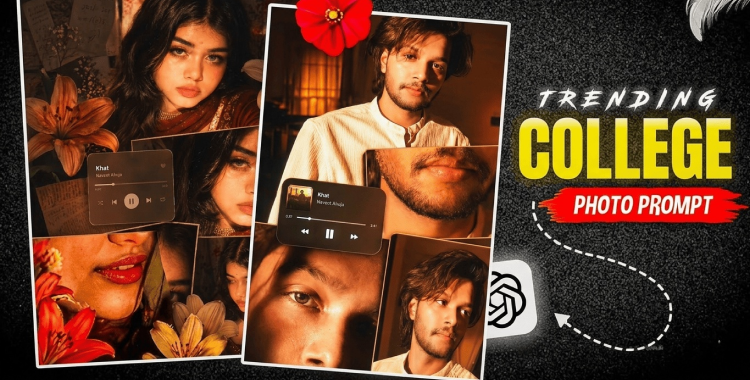
I scrolled through my feed and felt a small panic—thirty collage posts competed for attention in under five minutes. My feed looked like a thrift-store magazine stitched to a neon billboard. You want a collage that stops the scroll and starts a conversation.
by Emma Collins 2026-04-29 15:25:19
Part 1. How to Create a Trending Collage AI Photo
Tonight my Explore page was full of layered edits from creators I follow.
I’ll walk you through a tight, repeatable process I use when I make a collage for Instagram, TikTok, or YouTube thumbnails. You don’t need fancy gear—just a clear idea, the right prompt, and a little editing polish.
-
Decide the story: single subject, travel diary, or fashion spread. A clear narrative makes a multi-panel image readable on mobile.
-
Copy and paste one of the prompts below into your AI tool (Midjourney, DALL·E, Stable Diffusion, or ). If the result feels off, tweak lighting, frame style, or textures until the voice matches your feed.
| Theme | Prompts | Copy Now |
| Prompts |
rich amber, burnt orange, and
golden tones with high saturation glowing highlights and slightly crushed blacks Styling messy tied back hair, loose strands, glossy lips, subtle eyeliner dewy skin delicate necklace, white top Panels Top -serious direct gaze Middle: lips + necklace close-up Bottom left: eye closeup with shadow split Bottom riaht: analed soft gaze Add lily stickers orange, cream, red around the collage. Include a rounded music player Ul centerleft Khat – Navzot Ahuja Finish with glow/bloom highlights, subtle vignette, and flash night |
COPY
|
-
Save the export at a high resolution, then bring it into Lightroom, Photoshop, or Canva for finishing: color grading, grain, and stickers or text. Export optimized for the platform—square for Instagram, vertical for Reels and TikTok.

How do I make an AI collage photo?
Start with a clear subject and a layout plan. Tell the model your frame types (polaroids, torn paper, magazine strips), color palette, and one stylistic detail—grain, glow, or tape—and iterate until you have panels that read individually and as a set.
Which apps work best for collage edits?
Use for prompt-first generation, Midjourney or DALL·E for creative variations, then finish in Adobe Photoshop, Lightroom, or Canva for stickers, typography, and export presets.
Part 2. Best 20+ Trending Collage AI Photo Editing Prompts
My saved prompts folder gets updated every week as trends shift.
Below are ready-made prompts you can paste into any image generator. Each one targets a clear aesthetic so the AI produces cohesive panels you can stitch together without fighting the composition.

- Create a trendy aesthetic collage photo of a stylish young woman, with layered polaroid frames, torn paper textures, handwritten notes, soft beige tones, warm lighting, subtle film grain, and a dreamy Pinterest-style composition.
- Generate a viral Instagram collage edit of a couple, featuring overlapping photo strips, scrapbook stickers, vintage stamps, soft pastel colors, romantic shadows, and a clean editorial layout.
- Design a travel collage photo with multiple snapshots, map cutouts, passport stamps, torn paper edges, ocean-blue accents, glossy magazine styling, and a story-driven vacation mood.
- Create a retro film-inspired collage portrait with flash photography, grainy texture, faded colors, contact-sheet panels, paper tape, and a nostalgic 2000s social vibe.
- Generate a luxurious magazine-style collage featuring a fashionable girl, bold typography, black and gold accents, layered image blocks, clean white space, and a high-end editorial look.
- Make a dreamy romantic collage photo with soft pink tones, flowers, lace textures, handwritten captions, overlapping portraits, and a delicate scrapbook aesthetic.
- Create a cool street-style collage of a boy, with urban textures, ripped paper layers, polaroid frames, monochrome tones, graffiti elements, and a confident social-media trend look.
- Generate a birthday celebration collage with balloons, confetti, party stickers, layered snapshots, glitter details, bright colors, and a fun Instagram-ready composition.
- Design a best-friend collage edit with candid photos, playful sticker elements, handwritten phrases, film frames, soft pastel lighting, and a warm memory-board style.
- Create a cinematic collage portrait with moody lighting, deep shadows, muted tones, layered scenes, film borders, and a dramatic storytelling atmosphere.
- Generate a summer beach collage with sandy textures, ocean blues, shell details, polaroid photos, torn paper edges, and a fresh vacation scrapbook feel.
- Make a floral aesthetic collage with pink and white flowers, soft glow lighting, layered frames, delicate paper textures, and a feminine dreamy moodboard look.
- Create a Korean-style aesthetic collage photo with clean composition, soft skin tones, minimal stickers, subtle grain, pastel palette, and a gentle social-media vibe.
- Generate a night neon collage with city lights, glowing reflections, dark blue tones, flash photos, glossy typography, and a modern energetic street aesthetic.
- Design a minimal luxury collage with neutral colors, elegant spacing, simple frames, soft shadows, clean typography, and a polished premium lifestyle feel.
- Create a youth school-life collage with notebook paper textures, doodles, class snapshots, polaroid frames, pastel highlights, and a nostalgic mood.
- Generate a lifestyle collage with coffee, books, fashion details, daily snapshots, muted warm tones, paper cutouts, and a casual but stylish social layout.
- Make a scrapbook-style collage with tape strips, paper textures, stickers, memo notes, overlapping photos, and a cozy handmade memory aesthetic.
- Create a fashion editorial collage with bold poses, sharp composition, monochrome accents, layered panels, magazine text, and a high-impact trend look.
- Generate a soft glow portrait collage with golden-hour lighting, creamy tones, delicate paper layers, subtle grain, and a romantic Pinterest-inspired atmosphere.
- Design a storytelling memory collage with multiple candid shots, date labels, Polaroid borders, torn paper, warm tones, and a heartfelt visual diary style.

Part 3. Create Trending Collage AI Photos with
Several creators I follow use a single tool for generation, then another for finishing.
If you want speed with control, is worth a test: prompt-first generation designed for social formats, plus presets that match Instagram aspect ratios. Pair it with Lightroom or Photoshop for highlight and vignette control, or Canva for sticker placement and type treatments.

What prompts create viral collage images?
Viral prompts are specific: give the AI the frame types, color palette, camera vibe (flash, film, softbox), and one sticker or text callout. That focused constraint reduces randomness and produces panels that feel intentional.
Part 4. Tips to Get Better Collage AI Photo Results
My test exports show one thing clearly—simple stacks win on mobile.
Be specific about subject, layout, lighting, and palette. Mention frame style (polaroid, torn edge), paper textures, shadow direction, and mood words like “dreamy” or “editorial.” Keep each panel readable at a glance.
When you edit, here are practical moves I use:
- Limit the palette to 2–4 dominant tones so panels read as one piece.
- Use subtle grain and a small vignette to tie panels together.
- Add one recurring element—sticker, color swatch, or a tiny logo—to create continuity.
- Check thumbnails: if the collage is cluttered at 200px wide, simplify.
Think of the collage as a kaleidoscope; misaligned colors or competing focal points break the spell.
Conclusion
Small choices—frame types, a single sticker, the right prompt—change whether a collage scrolls past or sparks saves and shares. You can prototype five variations in an hour and refine what works with real engagement signals on Instagram, TikTok, or YouTube.
Will your next collage stop the scroll and start a conversation?