You refresh the Discord announcements and a code blinks across your screen. Your thumb hovers over Redeem — and for a second the whole hunt feels possible. I remember stomaching hours of rerolls before a single Miracle Birth Fruit turned a weak line-up into a contender.
Update: added new Blox Monsters codes on June 15, 2026
I write about these drops because I want you to stop wasting rerolls. Read fast, copy the codes, and you’ll be rerouting luck into predictability.
All New Blox Monsters Codes
On my desk a sticky note reads “codes = saved time.” Below are the working codes dropped by the devs and community channels — redeem them for fruits, rerolls, and crystals that tilt capture outcomes in your favor.
- 10000CCU: 1 Miracle Birth Fruit NEW
- NewTrait: 1 Miracle Birth Fruit NEW
- NewMutation: 1 Gorgeous Fruit NEW
- BonVoyage: 1 Bloodline Reroll NEW
- Mega: 1 Solitude Crystal NEW
How do I redeem Blox Monsters codes?
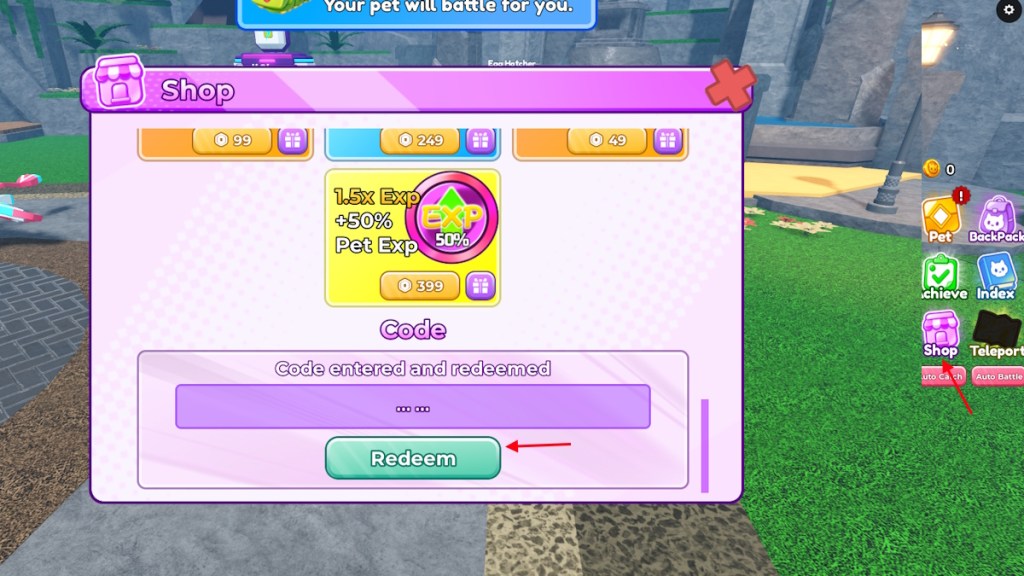
Launch the game on Roblox, open the Shop on the right, find the Codes box, paste the code and tap Redeem. First-time redeemers will be prompted to enable notifications inside the game — that’s required before codes will accept.
Expired Blox Monsters Codes
My clipboard keeps a running log of codes that died mid-week. Right now, none of the entries above have expired — when they do, I’ll mark them here so you don’t waste a paste.
How to Redeem Blox Monsters Codes
At my PC I keep two tabs open: Roblox and the game’s Discord announcements. That setup is deliberate — it speeds up claiming time. Follow these steps and you’ll stop losing codes to a slow load.
- Open Blox Monsters on Roblox.
- Tap the Shop icon on the right side of the screen.
- Scroll to the Codes section and paste a working code.
- Press Redeem and collect your reward.
Why are my Blox Monsters codes not working?
If Redeem refuses a code, first confirm you turned on in-game notifications — that gate closes access until enabled. Then copy the code exactly; casing and spacing matter. If the code still fails, it has likely expired or already been redeemed on your account.
How to Get More Blox Monsters Codes
In Discord I watch a pinned list and a handful of streamer channels. That’s where most drops appear first.
Codes pop up across several channels: the official Blox Monsters Discord, the developers’ Twitter/X posts, short TikTok clips, and YouTube livestreams where devs hand out limited-use drops. I follow dev handles and community creators for the fastest alerts — your notifications can be the difference between a free Miracle Birth Fruit and a missed opportunity.
If you want a steady feed, pin the official Discord and follow the game’s Twitter/X; combine that with a YouTube sub to the most active creators. That creates a three-point net that catches most codes.
Why Are My Blox Monsters Codes Not Working?
On my phone a red error message once swallowed a code because I had already redeemed it on another account. That’s a common misstep.
Here are quick checks before you panic: notifications enabled? Correct code entry? Not already claimed on this account? If all pass and the code still fails, it’s expired — the devs rotate drops fast, and community giveaways often carry single-use limits.
Where do new Blox Monsters codes appear?
They come from official dev posts, community events, collaborations with streamers, and milestone celebrations (followers, concurrent players, or special updates). Watch Discord announcements, follow the dev team on Twitter/X, and keep an eye on trending creators on TikTok and YouTube for exclusive drops.
Codes are a weathered map to buried loot. Each code is a loaded die that can swing a fight in your favor.
If you enjoy similar games, try Catch a Monster, OMG Pet, or Collect All Pets — each has its own codes and communities that mirror the same hunt on Roblox. Want me to track expired drops or add a price estimate for items like Miracle Birth Fruit (~$1.00 (€0.91)) next update?