
I sprinted through a thinning of trees as the sky sank to black. My flashlight stuttered, and I realized I’d left a stack of bandages back at the crashed car. I froze, because surviving one more night suddenly felt like a bet I couldn’t afford to lose.
I play Nightfall enough to know when a small advantage becomes survival. I’ll tell you what I use, where I grab fresh codes, and how to redeem them fast so you don’t lose a run to a typo or a late patch. You won’t get spoilers—just the fast, practical rewards that keep your runs alive.
All New Nightfall Codes
Players swarm to new drops the moment devs post a line in Discord.
These codes are working as of July 24, 2026. Enter them exactly as written—Roblox codes are case-sensitive.
- 2KMembers: 10 Cash NEW
- 200k: 10 Cash NEW
- Sorry: 1 Free Revive NEW
Expired Nightfall Codes
Developers remove old codes faster than players can test every theory in chat.
Right now there are no expired codes to list, which is good—redeem the active ones before the next update. I’ve seen devs retire rewards without warning after milestone drops, so I treat each announcement like a small deadline.
How do I redeem Nightfall codes?
Open Nightfall on Roblox, and I’ll walk you through the clicks that matter.
- Launch Nightfall on Roblox.
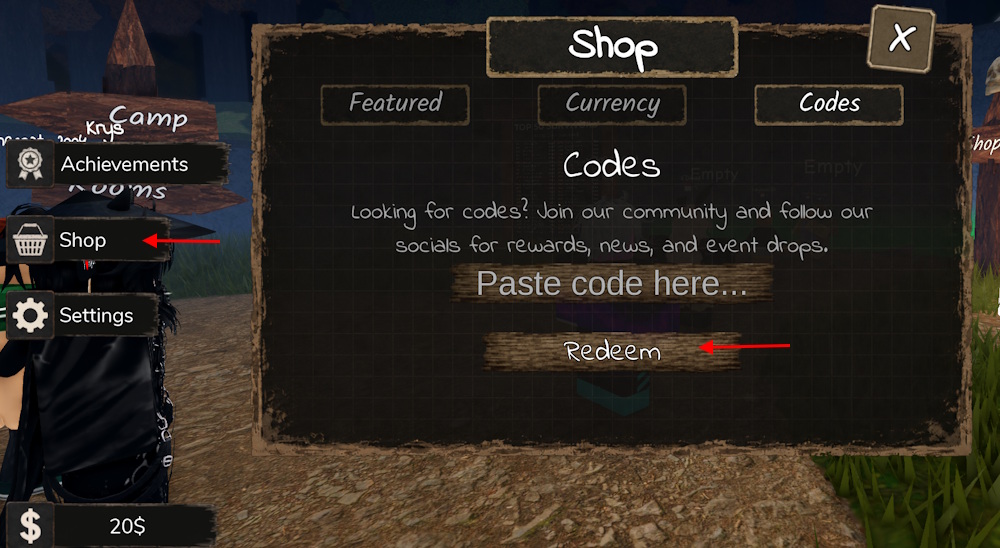
- Click the Shop button on the left side of the screen.
- Open the Codes tab.
- Paste a working code into the text box and press Redeem.
How to Get More Nightfall Codes
Dev posts and milestone tweets are where new codes appear first—in plain view.
If you want fresh codes fast, watch the official Nightfall Discord server and the Roblox game page. The dev team posts announcements there after hitting player milestones, releasing updates, or running events. I also check the game’s Roblox group and the occasional X (Twitter) thread where players clip new codes immediately after release.
Tip: pin the Nightfall Discord and enable notifications for announcement channels so you get codes the second they drop.
Where can I find Nightfall’s official announcements?
Official posts are on the Nightfall Discord, the Roblox game page, and sometimes the devs’ X account—these are the dependable sources I follow.
Why Are My Nightfall Codes Not Working?
Every successful run shows you how small mistakes compound into big problems.
Start with the basics: Roblox codes are case-sensitive and space-sensitive. If a code fails, double-check for extra spaces, letter case, or that you didn’t already redeem it. Codes can also expire or take a few minutes to propagate across servers after a developer posts them. If you still hit a wall, rejoin the game and try again. Copy-pasting directly from a trusted list—like the game’s Discord announcement—cuts down on errors.
One more thing: while you’re juggling supplies and timing, remember that the night is a closing curtain and your inventory is a small fortress—treat every resource as precious and stack them where they matter.
Why isn’t my code redeeming in Nightfall?
It’s usually a typo, an expired key, or a delayed server update—rejoin, paste carefully, and check the announcement time stamp.
If you want me to monitor the channels and refresh this list when new codes drop, tell me which platform you prefer—Discord or X—and I’ll follow the devs for you. Ready to risk one more night for a shot at the rarest loot?