
I remembered the first time I typed a wrong command and watched my squad vanish from the training lobby. My heart raced — not because I lost progress, but because a single line of text had that much power. You feel that same tiny electric panic the moment a command window blinks at you.
I write and play; I’ve spent hundreds of hours on Roblox’s Shindo Life and helped players on Discord and YouTube troubleshoot the trickier commands. You don’t need every command memorized, but you should know which ones move the match, change your Tailed Spirit, or cost real-world value. Treat this as a practical field guide — concise, usable, and written the way I’d explain it to a teammate mid-game.
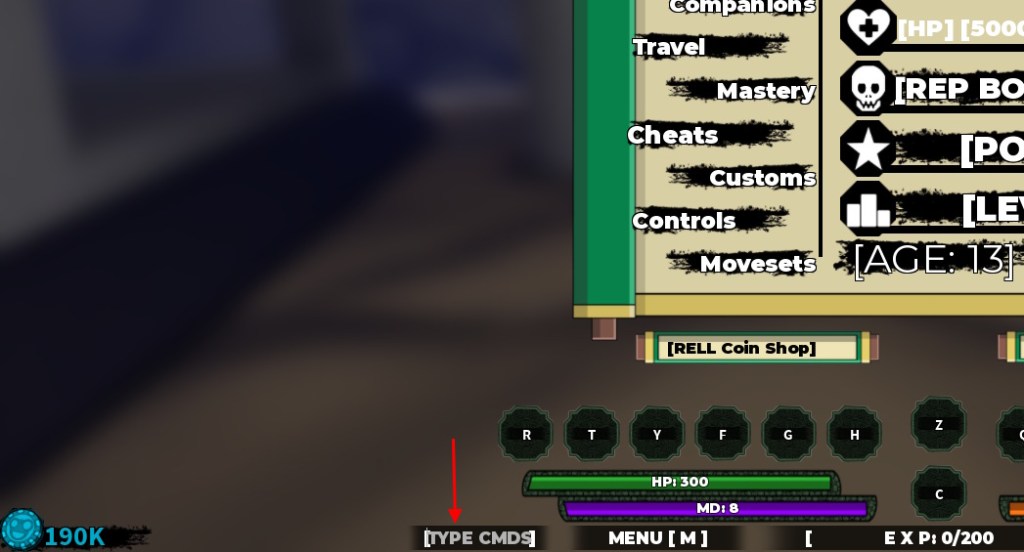
Servers will often cluster around the Type CMDS box. Full List of Shindo Life Console Commands
Below is the canonical table of commands you can type into the command box. Most commands begin with an exclamation mark (!) and must be typed exactly. Some work anywhere; others only run inside War Servers, while a few need Kage-level permission or an active Tailed Spirit.
| Command | Use | Example |
|---|---|---|
| !1v1 [player1] [player2] | Starts a private 1v1 match between two players. | !1v1 Naruto Sasuke |
| !acc [player] | Accepts a squad invitation. | !acc Naruto |
| !accd [player] | Accepts a duel invitation. | !accd Sasuke |
| !autoclick on/off | Enables or disables auto clicking. | !autoclick on |
| !begin | Starts the selected training session. | !begin |
| !bell | Starts Bell Training. | !bell |
| !beserk | Automatically attacks nearby enemies while training with a Tailed Spirit. | !beserk |
| !cancel | Cancels the active mission. | !cancel |
| !ccmds | Closes the command list. | !ccmds |
| !cdog | Changes Okami’s dog color for 25 Robux (~€0.30). | !cdog |
| !cmds | Displays all available commands. | !cmds |
| !cpads | Starts a CPAD training session. | !cpads |
| !cross on/off | Toggles the rogue mark on your headband. | !cross on |
| !despawn | Removes the spawned War Server map. | !despawn |
| !domain [player] | Pulls a player into the Forged Rengoku dimension. | !domain Naruto |
| !duel [player] | Sends a duel request. | !duel Sasuke |
| !end | Ends the current training session. | !end |
| !endgame | Ends the current War Server game. | !endgame |
| !ffoff | Disables Friendly Fire. | !ffoff |
| !ffon | Enables Friendly Fire. | !ffon |
| !game elim | Starts an Elimination match. | !game elim |
| !game tdm | Starts a Team Deathmatch match. | !game tdm |
| !inf | Shows information about the current training. | !inf |
| !inv [player] | Invites a player to your squad. | !inv Naruto |
| !join [player] | Joins another player’s training lobby. | !join Naruto |
| !kick [player] | Removes a player from your squad. | !kick Naruto |
| !ktrain [player] | Starts Kunai Training with another player. | !ktrain Sasuke |
| !leave | Leaves your squad or disbands it if you’re the leader. | !leave |
| !lobby | Returns you to the training lobby. | !lobby |
| !name | Changes your in game name. | !name Hokage |
| !puppet | Opens the Puppet Art customization menu. | !puppet |
| !pushup | Starts Push Up Training. | !pushup |
| !renaxe green/gold/ruby/random | Changes the Renshiki Axe color. | !renaxe ruby |
| !revertface | Removes your custom face ID. | !revertface |
| !reward | Claims rewards after completing training. | !reward |
| !rogue | Marks your character as a rogue. | !rogue |
| !skip | Skips to the final section of an event cutscene. | !skip |
| !spawn [map] | Spawns the chosen War Server map. | !spawn Ember |
| !spawn team | Spawns the selected team. | !spawn team |
| !spirit | Opens the Tailed Spirit customization menu. | !spirit |
| !spirit off | Closes the Tailed Spirit customization menu. | !spirit off |
| !squad | Creates a new squad. | !squad |
| !start | Starts the selected activity or match. | !start |
| !team1 | Assigns players to Team 1. | !team1 |
| !team2 | Assigns players to Team 2. | !team2 |
| !tentacion | Activates Tentacion Mode or opens the Tentacion Boss Arena for eligible Tailed Spirits. | !tentacion |
| !tm | Starts Team Deathmatch training. | !tm |
| !topad | Teleports you to the training pad. | !topad |
| !treejump | Starts Tree Jump Training. | !treejump |
| !unrogue | Restores your village affiliation. | !unrogue |
| !village [village] | Changes your headband village symbol. | !village Ember |
What is the Shindo Life berserk command?
!beserk is the one you use when training with a Tailed Spirit and you want the character to auto-attack nearby targets using melee and abilities tied to Z and Q. I’ve seen newer players toggle it and then forget to respond to spirit prompts — it helps farming but can cost interaction if you leave it unchecked.
What is the Shindo Life Tailed Beast command?
The main Tailed Spirit command is !spirit. It opens the Tailed Spirit customization menu where you can reroll colors or change skins using Spins. !tentacion is related — it opens Tentacion Mode for eligible Generation 3 Tailed Spirits at Level 2000.
Is there a Shindo Life auto clicker command?
Yes. Use !autoclick on to start auto clicking and !autoclick off to stop it. Treat auto-click as a convenience for repetitive training, not a replacement for learning timing and combos.
You’ll notice players call them “secret” because the UI doesn’t list them all. What Are the Shindo Life Secret Console Commands?
They’re simply text commands you type instead of selecting from menus. That manual entry feels secret because it looks like a developer console — and it behaves like one. Think of them as a small toolkit for power users, like a pocket Swiss Army knife.
- Every command begins with an exclamation mark (!) and must match spelling and capitalization exactly.
- Most commands go into the Type Command box in the bottom-left. If that box is missing, the in-game chat will usually accept the same inputs.
- Some commands require context: War Server-only commands include !spawn, !game tdm, !team1, and !endgame. Kage-exclusive commands like !rogue need permission.
- Player- and map-targeted commands need exact names to work.
- Cosmetic commands can cost Robux or Spins. For example, !cdog costs 25 Robux (~€0.30); Tailed Spirit rerolls use Spins or in-game currency.
- Some older admin or developer-only commands found online are no longer accessible to regular players and will return no result.
Most players learn the command box by trial and error in private servers. How to Use Console Commands in Shindo Life
Commands execute in seconds if you know the box. I’ll walk you through the simplest, most reliable method so you don’t waste Spins or disrupt a War Server match.
- Press M to expose the cursor, then click the Type CMDS text box in the bottom-left.
- Type the command exactly, including the leading exclamation mark (!).
- Add a username, village, or map name if the command needs one — names must match exactly.
- Hit Enter to run the command.
- If nothing happens, check whether you’re in the right server type or have the required Tailed Spirit/Kage permissions.
- When in doubt, try the same command in a private server or ask in a community Discord; creators and mods on YouTube and Twitch often demonstrate live.
I recommend testing high-impact commands in private servers (Roblox private servers) before you run them in a crowded War Server. If you share clips on YouTube or clips on Twitch, permission errors and botched spawns make for bad content fast.
If you want a tidy cheat sheet for your squad, copy the key commands into a Discord channel or a Notion page and pin it. The table above is the most complete, play-tested list I’ve used — Moyens I/O and community wikis helped cross-check edge cases.
Commands are tools, and tools are neutral — they change the game only when you decide how to use them. Do you use them to grind faster, troll the lobby, or run perfectly timed War Server plays?