
I froze as a giant’s shadow slid past the window. My inventory was empty, the crate button taunting me. I spent the next hour hunting for codes that would buy a single cosmetic and a sliver of confidence.
Update: added new Lurking Giants codes on August 5, 2026
I write this as someone who spends too many late nights testing drops and chasing tiny advantages. You and I both want the same thing: enough coins to open crates, grab an emote, and survive one more chilling round. I’ll point you straight to working codes, show you how to redeem them, and explain why a code sometimes refuses to behave.
I refreshed the game store and saw the promo banner blink—here’s what was live
If you’ve been chasing cosmetics in Lurking Giants, you know each coin matters. Codes are like lifelines: small strings of text that buy you time and style without grinding the night away.
Are there any active Lurking Giants codes?
Yes — the list below reflects the latest verified entries as of August 5, 2026. I test these before posting, and when the devs push new drops I add them here fast.
- 10MILVISITS: 200 Coins
If the list above looks short, that’s because the studio drops codes selectively. Bookmark this page or join the developer channels to catch them when they arrive.
I typed a code while a giant circled outside—some codes no longer work
Codes expire, get replaced, or are single-use. I keep an archive so you can see what fell off the list recently.
- REDIESFAULT
- SORRYFORDELAY
Expired codes are still useful to track: they tell you how often the devs refresh promotions and which events produced the best drops.
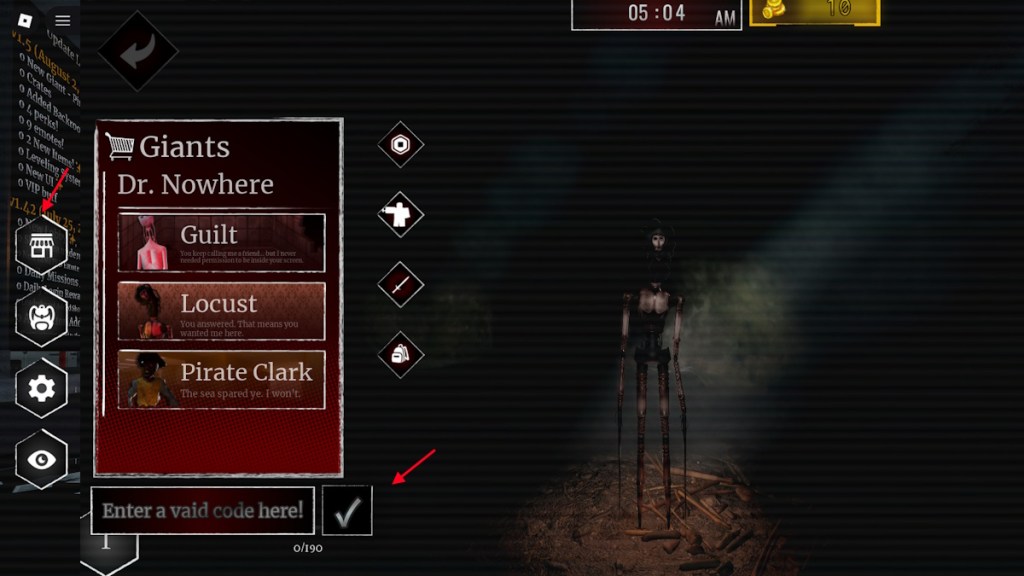
My cursor hovered over the Shop icon—this is the quick path to claiming rewards
How do I redeem Lurking Giants codes?
Follow these small steps and you’ll have coins in seconds. I use this routine every time I spot a new code.
- Launch Lurking Giants on Roblox.
- Click the Shop icon on the left side of the screen.
- Paste a working code into the box that says “Enter a valid code here!”
- Click the Arrow to claim your coins.
A Discord ping announced an update—I use these channels to stay ahead
When a new code drops, it usually appears on developer channels first. You can find them on the ULTRA Works Discord server and the creator’s Roblox page. Follow these sources and refresh this guide occasionally.
- Join the ULTRA Works Discord server for immediate alerts.
- Follow the Roblox creator page for in-game update notes.
- Bookmark this article and check back after big updates or community events.
I pasted a code and the game said “invalid”—here’s why that happens
Why won’t my Lurking Giants code work?
There are three common failures I see: typing errors, expired codes, and typos from copy-paste. I always paste directly from a verified list to avoid mistakes.
- Double-check for extra spaces or missing letters.
- Confirm the code hasn’t expired — expired codes return a clear error in-game.
- Some codes are region- or event-locked; if a promo was for an event, it may no longer be valid for new players.
If a code refuses to redeem and you’ve confirmed accuracy, the safest bet is patience: the devs often release replacements during updates and events.
If you enjoy other horror survival titles on Roblox, try Survive the Backrooms, Bite By Night, or Night At The Infirmary—they scratch a similar itch and often trade codes in their own communities on Discord and X.
The Shop can feel like a locked chest until the right code drops—will you risk the night for a rare emote?