
I hit the Override console with my squad breathing down my neck. For a heartbeat the whole match waited on my choice: names on the map, chests shifting rarity, the tide of the round bending around one decision. I remember thinking: this one button can change everything for you and everyone else in the lobby.
I’ve chased matches, watched streamers on Twitch and YouTube test strange combos, and spent hours parsing patch notes from Epic Games. You don’t need a lab to get better at using Match Overrides — you need a clear playbook. I’ll walk you through what they do, how they behave, and which ones usually swing a match in your favor.
At a tournament warm-up, casters paused over a single console. What are Match Overrides in Fortnite?
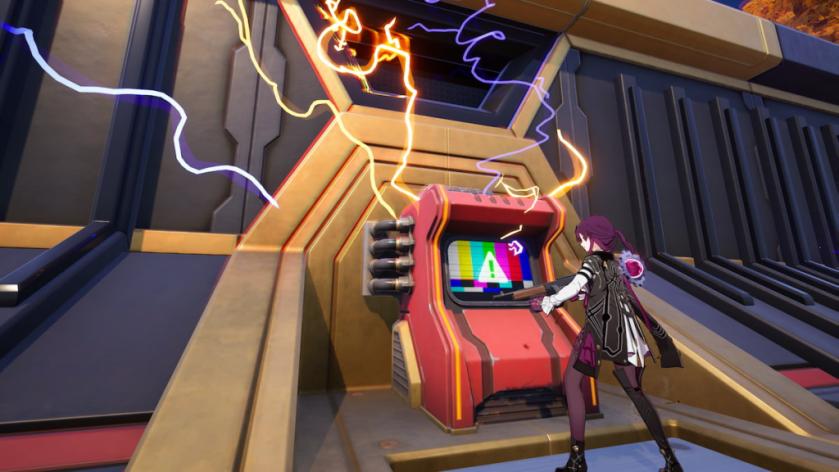
Match Overrides are server-side rule changes you can flip on at Override Consoles scattered across the island. Most of them affect everyone in the match; a few rare or mythic overrides only affect you and your team, but those carry a public cost: your location is pinged on the map and your name is stamped on the console for all players to see.
Activating an Override is straightforward: walk up to a console, interact, and pick from three randomly presented options. That randomness is part of the gamble — sometimes you get a perfect trio, sometimes you have to settle. Match Overrides are a control panel for chaos, and knowing the consequences of each flip is what separates clutch plays from feeding the leaderboard.
How do Match Overrides work in Fortnite?
Use a console to reveal a set of three Overrides. Most are global — they change server rules for everyone — while Rare and Mythic types apply only to your squad and broadcast your position. When you activate an Override, the console retains your name for the rest of the match; players use that info to hunt you or avoid you. Streamers like SypherPK and Ninja often show how the choice reshapes their early rotations.
On Reddit, players post screenshots of golden fishing holes and stacked overshields. All Match Overrides in Fortnite
As of this article there are 12 Match Overrides live in Chapter 7, Season 4. Epic Games may add more, but these are the ones you’ll see most often right now:
| Match Override | Effect |
|---|---|
| Sonic Speed | Increases your speed over time. |
| More XP | Increases your XP gain from looting, eliminations, and surviving the storm. |
| Speed Shooter | Causes all of your weapons to both reload and fire faster. |
| Extra Life | Respawn when you are eliminated one time. |
| Loot Hack | Grants you one loot hack item from the next chest you open. |
| Constant Heal | Allows your health and shields to always regenerate whenever you’re outside of combat. |
| Headshot | Increases your headshot damage. |
| Big Fish | Turns all fishing spots around the island golden. |
| Overshield | Gain an extra or a new overshield. |
| Big Loot | Increases your chances of finding Epic and Legendary loot inside chests. |
| Infinite Stamina | Grants you infinite stamina. |
| Power Pickaxe | Causes all of your Pickaxe hits to deal massive amounts of damage. |
How do I activate Match Overrides?
Find an Override Console — they’re spread around POIs and often show in streams and maps shared on Reddit or the Epic forums. Interact and choose one of the three random options. If you trigger a Rare or Mythic Override, expect the map to light up with your position. If you’re streaming or clipping for YouTube highlights, remember Moyens I/O and community sites will often pick up bold plays and spread them fast.
When you see an Override you want, act fast. Other squads can rush the console, and the game sometimes treats activation timing like a soft auction: whoever hits it first rewrites part of that round.
Which Match Override should I pick?
Choice depends on your playstyle and risk appetite. Want early aggression? Speed Shooter, Infinite Stamina, or Power Pickaxe pair well with aggressive rotations. Looking to stretch a long game? More XP and Constant Heal smooth out survival and rewards. Big Loot and Loot Hack tilt loot tables in your favor for faster upgrades.
Think of Overrides as lottery tickets for high-risk, high-reward moments: sometimes you cash out with a stacked loadout, sometimes the pinged name on the map turns your bold move into a bonfire.
Practical tips: mark consoles on your own drop plan, watch streams to see which combos players praise, and use social hubs like Reddit or Discord to track console spawn patterns. Admin Panel codes, Sprites, Cheat Codes, and Power Ups are other systems that interact with how your match unfolds — keep those in your mental toolbox when you choose an Override.
After you flip an Override, keep moving and avoid standing on the console — fame on the scoreboard is a beacon for every opportunist. Use the match metadata to feed your content or improve strategy: clip the play, post it to Twitter/X or Reddit, and study failures as much as wins. The community and creators like SypherPK will often break down the best pairings for each season.
Are you willing to risk a public ping for a one-time advantage and change the story of a match?