
I almost missed it the first time — a Star Path duty staring at me like a forgotten to-do list. I pressed the Events tab and felt that small jolt of confusion: where do you vote? You’re two clicks from finishing the task and earning rewards, and I’ll walk you through the exact clicks that matter.
I play across Switch and PC, and I follow patches from Gameloft on Twitter and threads on Reddit and the Discord. Treat this as the cheat sheet I wish I’d had when I first saw the Pop City Star Path duty asking for votes.
Someone at the photo kiosk points at the screen — What is a dreamy contest in the valleyverse in Disney Dreamlight Valley?
DreamSnaps is the in-game weekly photo contest. Every Wednesday a theme drops with rules; players create a shot, submit it, and judge each other’s entries. You can enter, but for the Star Path duty you only need to vote — which means you’re still shaping the community gallery without composing a single frame.
How do I vote in DreamSnaps?
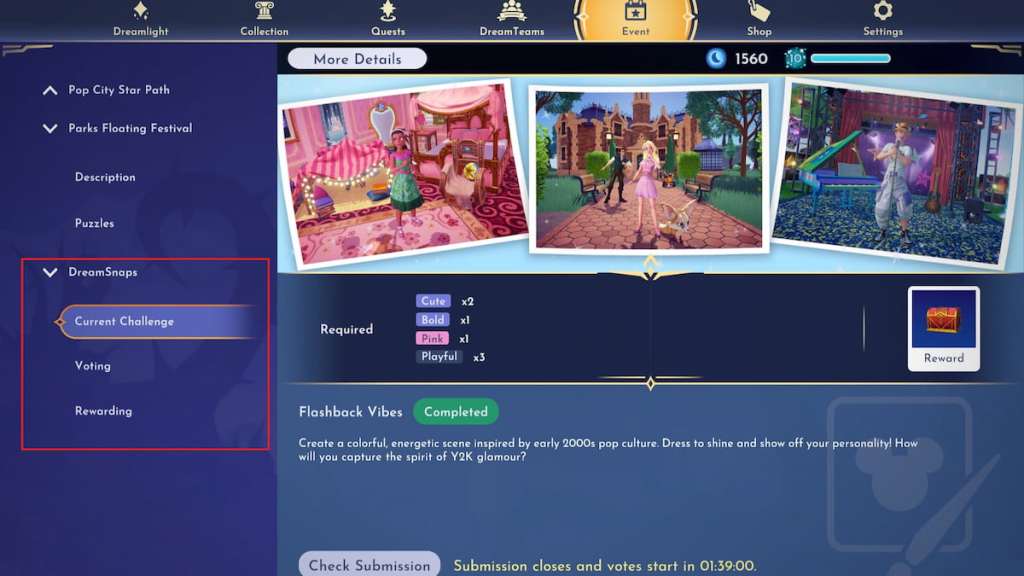
Open the Events page from the main menu — it sits between DreamTeams and Shop. On consoles and Steam the layout is the same; Gameloft keeps it consistent across platforms.
- Find DreamSnaps. Events stack on the left; scroll until you see the DreamSnaps tab. It’s not a temporary event, so it’s usually near the bottom of the list.
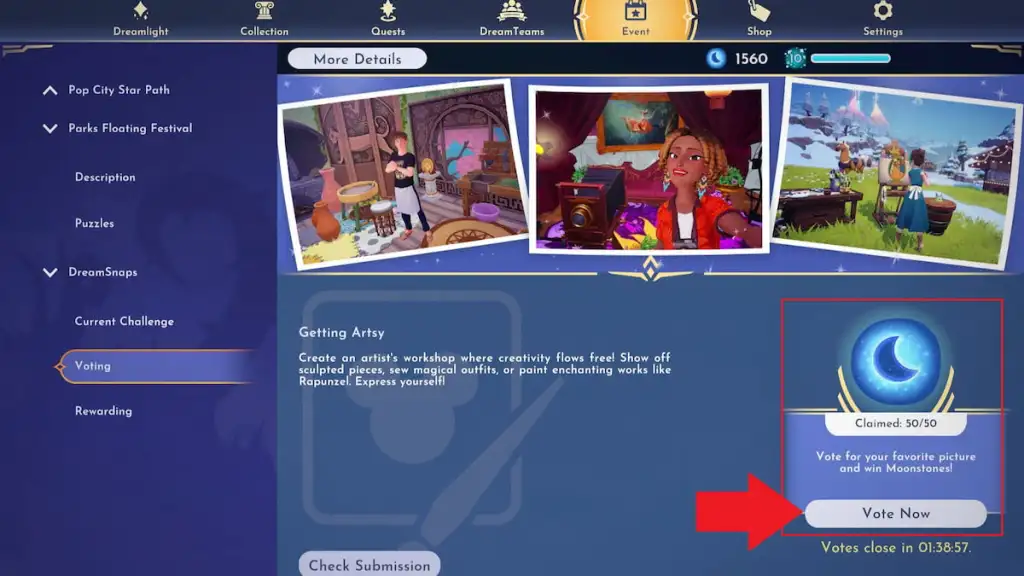
- Switch to Voting. Under DreamSnaps, choose the Voting tab to reach the current gallery of entries.
- Hit Vote now. The button is in the bottom-right. Click it and you’ll be shown two submissions — pick the one that best fits the week’s theme.
A friend taps their watch and shrugs — Vote on a dreamy contest in the valleyverse in Disney Dreamlight Valley
The Star Path Pop City duty asks you to submit 20 DreamSnaps votes. That’s the full requirement, and it’s simple: each voting round counts as one vote. You can complete all 20 in a single sitting or spread them across multiple weeks, whichever fits your play schedule.
Tip: you earn Moonstones for voting — 10 Moonstones per round, up to 50 Moonstones per week. Treat those Moonstones like small currency bonuses that add up; they feel like finding coins behind an arcade machine.
How many votes count toward Star Path?
The duty records 20 total votes. Finishing it pays 25 Tokens toward the Pop City event and advances your Star Path progress toward vault rewards. Those Tokens are what you spend in the event shop to claim skins and items.
If you’re pacing yourself, do at least 10 votes a week to collect the 50 free Moonstones cap. If you want to influence the community aesthetic, vote thoughtfully — the voting pool shows real player work from across PC, Switch, PlayStation, and Xbox.
If you want to stretch Token earnings, pair voting sessions with short chores: craft a DJ Booth Rig, shoot a themed photo for DreamSnaps, or finish small quests like Take Photo: Neon Koi Lantern. Share finds on Reddit, X, or the official Discord to see how others approach themes and to spot fresh ideas.
I’ll leave you with one thing: will you vote quickly to finish the Star Path, or curate every selection to shape the valleyverse aesthetic?