
I watched the Item Shop flip to the new set and felt my pulse hitch — Spyro shimmered into the grid like a green traffic light. You know that split second when a crossover you want appears and the clock suddenly matters. If you want to grab the purple dragon without wasting V-Bucks, I’ll walk you through the clean route.
I’ve bought skins, tracked drops, and timed resets; you get the advantage when you know the exact steps and what to consider before you spend. Read this straight through and you’ll leave with a plan, not a guess.
The Item Shop reset hit at 8 PM ET — here’s how to buy Spyro and what it costs
Observation: The shop refreshed on August 28, 2026, with the seasonal Override arrivals visible the moment servers flipped. Spyro the Dragon arrived as part of the Gaming Legends theme, bundled alongside Crash Bandicoot in a package that pairs nostalgia with practical savings.
Here’s the step-by-step you should follow the minute the Item Shop shows the bundle:
- Open Fortnite (Epic Games) and go straight to the Item Shop during a non-peak moment if you can — you’ll avoid hiccups during purchase.
- At the top of the Item Shop, find the Crash Bandicoot and Spyro bundle section.
- Choose between the full Crash Bandicoot + Spyro bundle (3,000 V-Bucks — about $23.99 (€24)) or the Spyro the Dragon Sidekick alone (1,500 V-Bucks — about $11.99 (€12)).
- Click the Purchase button and hold until the confirmation circle completes.
- Fortnite will add Spyro to your locker and confirm the acquisition in-game.
- Open your locker, select Spyro the Dragon, and tweak any available styles or Sidekick Points rewards before you jump into a match.
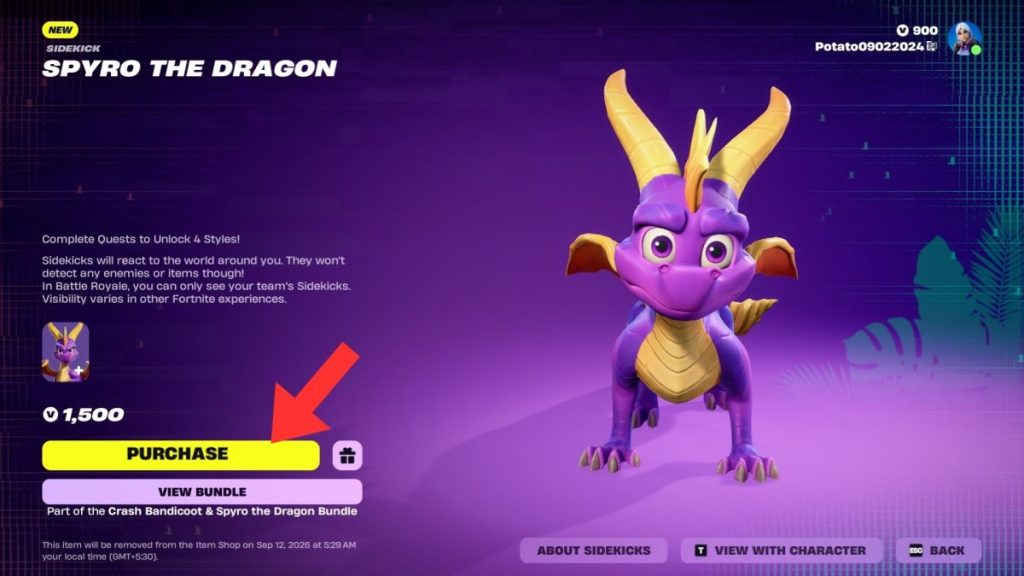
The bundle saves you V-Bucks if you wanted both characters, but if your V-Bucks are limited, buy the Sidekick alone and spend the rest on the Chapter 7 Season 4 Battle Pass or cosmetics you actually use. Think of Spyro not just as flair but as a small bonus engine: you can earn Sidekick Points to reach extra styles and a handful of reactions and emotes.
| Cosmetic Name | Cosmetic Type |
|---|---|
| Banner Icon | Banner Icon |
| Spyro’s Heart | Reaction |
| Scales (Green) | Style |
| Spyro’s Fiery Flourish | Emote |
When was the Spyro the Dragon Sidekick released in Fortnite?
Spyro dropped into Fortnite on August 28, 2026, at 8 PM ET, coinciding with the Override season Item Shop reset. Epic Games timed the release to pair with the Gaming Legends theme, which also features Crash Bandicoot.
How much does Spyro the Dragon Sidekick cost in Fortnite?
The Sidekick price is 1,500 V-Bucks (about $11.99 (€12) if you bought equivalent V-Bucks), while the Crash + Spyro bundle is 3,000 V-Bucks (about $23.99 (€24)). If you need V-Bucks, check your platform store (PC, PlayStation, Xbox, Nintendo Switch) for current packs and occasional bonus bundles from Epic.
When will Spyro the Dragon Sidekick leave the Fortnite Item Shop?
Spyro is scheduled to leave the Item Shop on September 11, 2026, at 8 PM ET — so the clock is real. If you want the dragon, weigh your priorities: Battle Pass progression or a permanent cosmetic in your locker. Buy now, or risk missing a return that may not match this price or bundle.
I’ll add one practical tip from my experience: if you want Sprites and small match advantages, check Fortnite Lobby codes and official Epic channels for legitimate giveaways and events — don’t fall for sketchy third-party promises. Treat purchases like trades: what does this piece add to your playstyle or collection?
Spyro is a fierce, loyal little sidekick — a spark of nostalgia and personality in your matches, like a lucky coin you slide into your pocket before a tense game — so will you pick him up now or wait to see if Epic brings him back later?