
I load the game and the main menu blinks a message I almost miss. My pulse ticks faster because this hat is free for a limited time. You can grab it before the window closes — and I’ll walk you through it step by step.
Store shelves fill with promos every September — How to get Hogwarts Legacy free DLC
I’ve chased seasonal freebies across the PlayStation Store, Xbox Store, Steam and the Nintendo eShop. You don’t need witchcraft to claim the Astronomer’s Hat; you need to be at the right place at the right time and follow a couple of quick taps.
- Open your platform store page for Hogwarts Legacy. Use the PlayStation Store, Microsoft Store on Xbox, Steam, Epic Games Store, or Nintendo eShop depending on your platform.
- Find the DLC or add-ons section. Scroll the game page until you see add-ons — the Astronomer’s Hat sits among seasonal extras.
- Download the free Astronomer’s Hat add-on. It’s free during the promo window; accept and add it to your account or library.
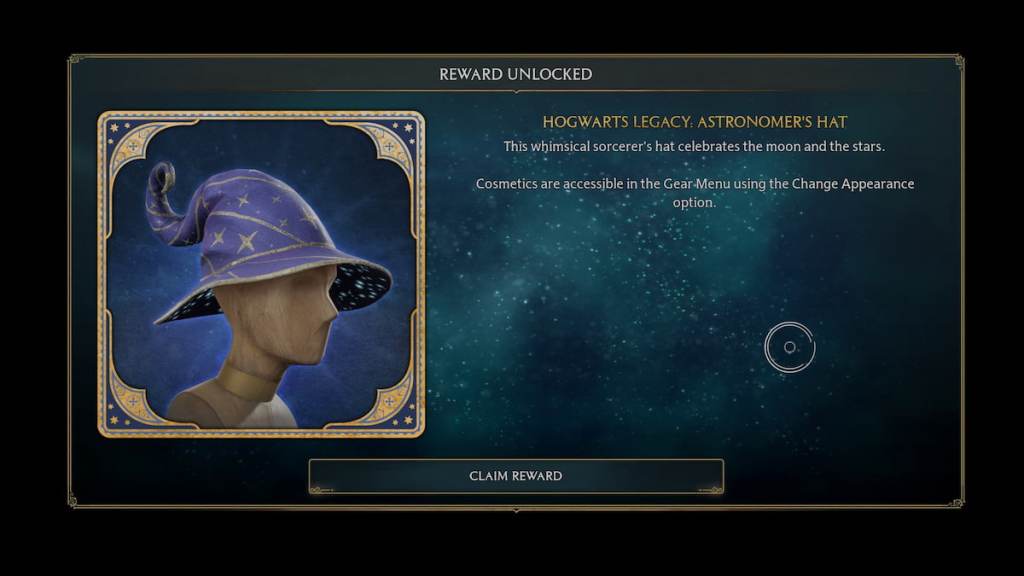
- Launch Hogwarts Legacy. When the main menu loads, a pop-up will confirm the DLC. The menu pop-up is a lighthouse in a fog — follow its prompt and select the claim or reward option.
Players notice the small pop-up first — How to get Astronomer’s Hat in Hogwarts Legacy
You’ll see the DLC appear in your account immediately after the download completes. I recommend opening the game right away so the main menu registers the new content and shows that confirmation pop-up.
How do I claim the Astronomer’s Hat DLC?
Claiming is a two-step routine: grab the add-on from your platform’s store, then load the game. When the pop-up appears on the main menu, choose the claim reward option and the hat is added to your inventory.
Every wardrobe menu feels like a catalogue — How to equip Astronomer’s Hat in Hogwarts Legacy
I teach players to move fast in menus because cosmetic slots fill up and it’s easy to miss the new item. You don’t need a special vendor or potion — the hat sits in your Collections.
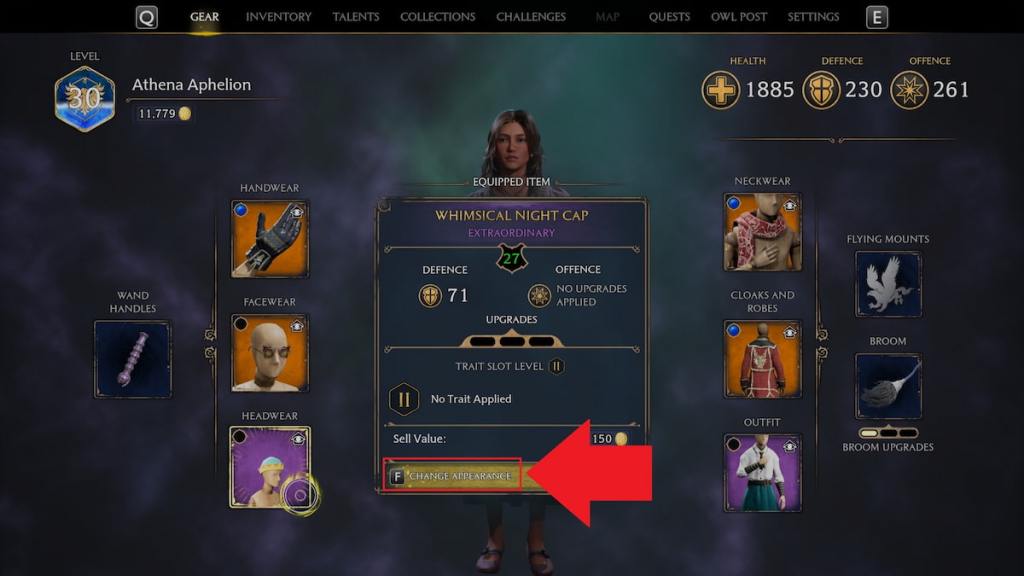
- Open the in-game Gear page.
- Hover over your current headwear and select the Change Appearance option.
- Scroll to the Collections section to find the Astronomer’s Hat and equip it to your character.
How do I equip the Astronomer’s Hat?
Use Gear → Change Appearance → Collections. If you don’t see the hat, quit and relaunch the game so the DLC registers with your save file.
Gamers track limited windows closely — How long is the Hogwarts Legacy Astronomer’s Hat available for?
Promo items have a shelf life. The Astronomer’s Hat is available to claim from Aug. 31 to Sept. 30, 2026. After that date, Warner Bros. Games or Avalanche Software may remove it or change its status.
Is the Astronomer’s Hat permanent?
If you claim the free DLC during the promotion, the item is added to your account and you keep it permanently. If you miss the window, the hat may disappear from the store or return as paid content later.
Claiming the hat becomes catching a comet — quick, bright, and worth the effort. If you’ve got PlayStation Plus, Xbox Live, or a Steam account ready, the few clicks take under a minute.
Now that the hat’s on your head, there are fun small goals to poke at: visit the Undercroft, find the Dungeon of Doom, solve the courtyard bridge fire puzzle, or try flipping a Troll’s club — which one will you tackle first?