
I was halfway through trimming a stubborn branch when my phone flashed: a new Grow a Bonsai code dropped. You feel the nudge—one short string, a tiny promise of Gems and mixes, and suddenly your slow afternoon spins into quick clicks. I’ll show you how to grab those freebies fast, and why some codes evaporate before you can blink.
I’ve chased Roblox codes for years; I use Discord, the Roblox group pages, and browser tools to stay ahead. You’ll get the full active list, step-by-step redemption, and where the team posts the next wave of drops. Read fast: codes expire without warning.
All Grow a Bonsai Codes list
I noticed a queue of players crowding the in-game rewards kiosk after one update—and they were all trying codes at once.
Below are the current freebies and the ones that recently expired. The active codes give Gems, Coins, and Dragon Stone Mixes that speed up your garden progress. Remember: the codes are seeds you plant in a spreadsheet of luck, so paste and redeem quickly.
Which codes are currently active?
- 1000MEMBERS — Redeem for 1,000 Gems, 10,000 Coins, and 2 Dragon Stone Mixes (New)
- GROWBIGTREES — Redeem for 2 Dragon Stone Mixes
- ILOVEWISTERIA — Redeem for 500 Gems and 1 Dragon Stone Mix
- 15KVISITS — Redeem for 1 Dragon Stone Mix
- JOINTHEDISCORD — Redeem for 500 Gems
- 50KVISITS — Redeem for 250 Gems and 1 Dragon Stone Mix
- LAUNCH — Redeem for 5,000 Coins and 100 Gems
Are there any expired codes I should know about?
- 5000VISITS
- BONSAI
- GEMS100
How to redeem codes in Grow a Bonsai
At a friend’s PC I watched them redeem three codes in under 20 seconds and then go straight to the central area for crates.
Follow these exact taps and you won’t waste a single drop of time:
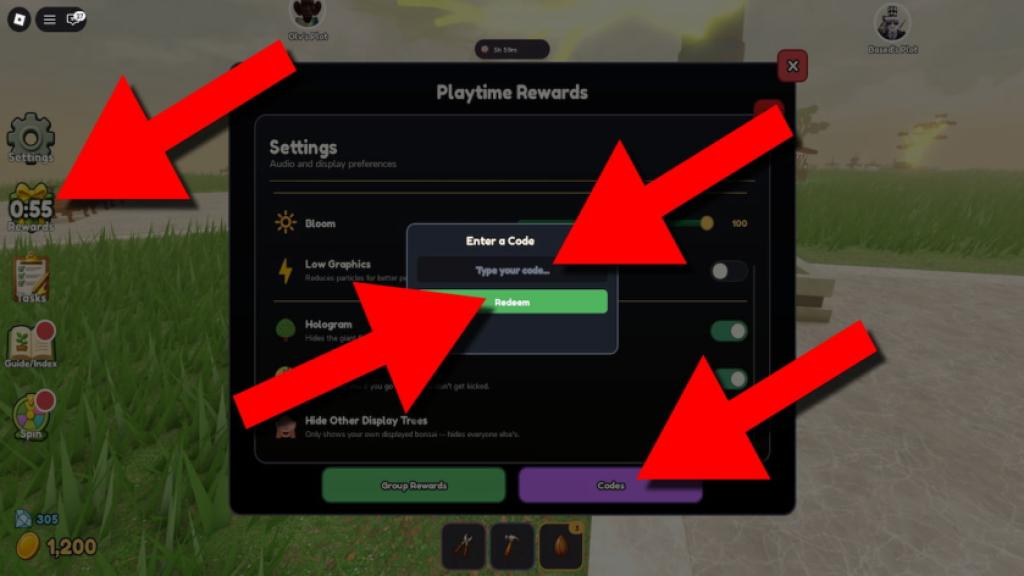
- Run Grow a Bonsai on Roblox.
- Press the Rewards button on the left side of your screen.
- Click the Codes button in the bottom-right of the rewards panel.
- Type the code into the Type your code… field.
- Hit Redeem and watch your Gems, Coins, and Mixes appear.
Official Wiki, Trello board, and Discord server information for Grow a Bonsai
I joined the Discord and watched devs pin a giveaway, then posted a screenshot in the Shizen Group—players spotted a typo and earned a free mix.
There isn’t a public Wiki or Trello for this game, but the developer-run Discord and the Shizen Group on Roblox are where the team announces codes, events, and giveaways first. If you want the earliest tips, those two are the hubs.
Where do devs post new codes and updates?
Check the Grow a Bonsai Discord server and the Shizen Group on Roblox. Devs often drop codes during events and patch notes there.
Tools and channels that make code hunting faster
I keep a small toolkit open: Discord, Roblox group pages, and a lightweight browser extension that notifies me of fresh codes.
Use these to gain an edge: Roblox (for the game), Discord (for dev posts), Codes Hunter on the Chrome Web Store (if you want extension alerts), Problox newsletter (for weekly roundups), and Moyens I/O’s codes coverage for curated lists. Each reward is a raindrop shaping a miniature mountain—stack them and your bonsai garden starts to feel intentional.
If you want the fastest wins, copy codes the instant they drop and redeem them in-game; they’re gone before notice most of the time. Ready to sprint to the rewards kiosk next time a code alerts you?