
I remember opening a Newzoo chart and feeling a small jolt: Roblox is a living city now, humming with people and commerce. You’ve probably watched an afternoon evaporate inside one of its games and wondered what that adds up to. I’ll walk you through the H1 2026 numbers and show how to check your own hours.
Roblox Playtime Hours in H1 2026
At my coffee break I noticed a headline: Roblox logged 4.05 billion play hours across PC and console in the first half of 2026.
That figure comes from a Newzoo report that reads less like a press release and more like a cultural weather map. Roblox is pulling older players into its ecosystem while remaining fiercely popular with its existing base. Arcade, co-op, and survival horror experiences keep players engaged, and anime and animation fandoms are swelling inside the platform’s user-created universe.
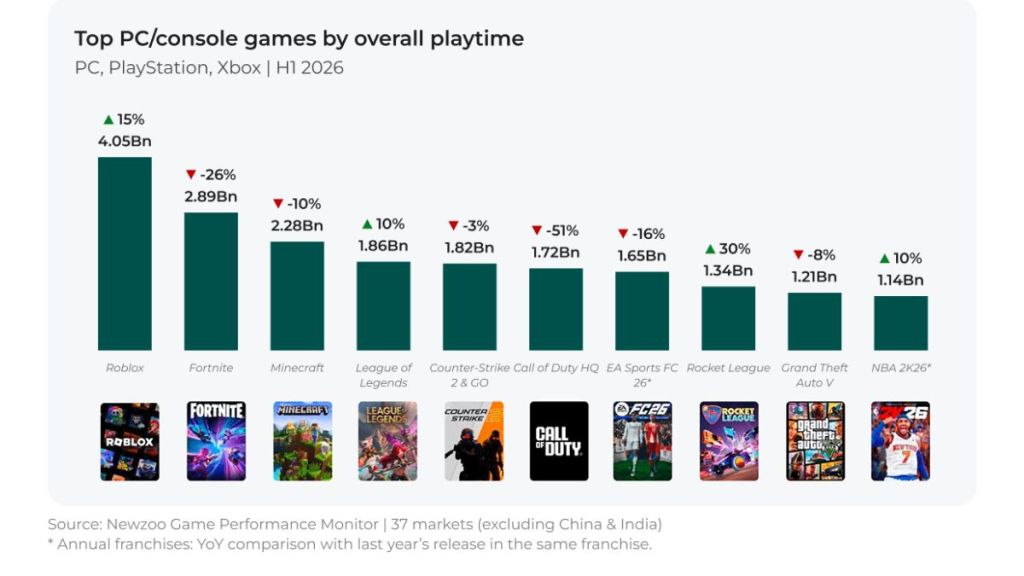
Two figures from the report are clearest: the raw play hours and a behavioural split. About 80% of Roblox players over 16 have spent money on games in the past six months, compared with 59% of non-Roblox PC/console players. That gap is meaningful to creators, publishers and platforms such as Roblox Corporation and third-party developers who sell passes, skins, or game-specific items.
If you’re tracking industry signals, remember Newzoo, Roblox, and the developer economy around Roblox when forecasting user engagement. The platform’s design encourages repeat sessions and microtransactions, which is likely why revenue-related participation outpaces other platforms.
Can you check your total lifetime playtime on Roblox?
No—Roblox does not offer a lifetime playtime counter. The platform provides recent activity through the Screen Time feature, which gives week-based insights rather than a single lifetime tally.
How to Check Your Roblox Playtime Hours
At my desk I opened the Roblox app to test the settings myself and saw how the data is framed: recent and ranked, not all-time.
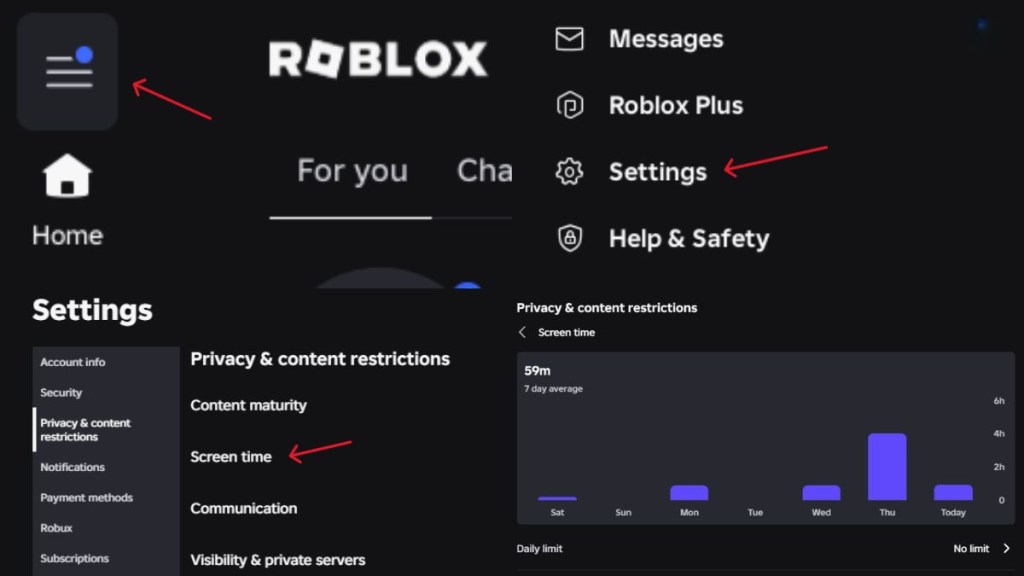
Roblox doesn’t keep a visible lifetime odometer, but Screen Time works as a digital odometer for recent behaviour and favorite experiences. Use it to see which titles are eating your time and to surface the top 20 experiences you’ve played in the past seven days.
Follow these steps on PC or mobile to view your playtime insights:
- Open Roblox in the desktop client, browser, or mobile app and sign in.
- Tap the three-line menu in the top-left corner.
- Select Settings.
- Open Privacy & content restrictions.
- Choose Screen Time and wait for the data to load.
- Pick Top Games to view your recent playtime for up to 20 experiences.
If you care about parental oversight, the Parental Controls panel surfaces screen time, friends, and spending data for child accounts. Developers and parents often use tools like Roblox’s developer console, Google Analytics, or third-party dashboards to triangulate engagement over longer windows.
Does Roblox Screen Time show every game you’ve played?
Not every single title. Screen Time lists your top 20 experiences from the last seven days, so short sessions or obscure games may not appear.
Can you check your Roblox playtime on mobile?
Yes—the same Screen Time feature is available in the Roblox mobile app. The steps mirror the desktop flow through Settings > Privacy & content restrictions > Screen Time.
Numbers like 4.05 billion hours change how publishers, creators and advertisers plan; they also change how you should think about your own time inside Roblox. So tell me: how many hours will you admit to next?