
My coffee went cold while the patch finished installing. The Sims 4 October 2026 update patch notes – New items, food overhaul, body toggles, and more
I watched the loading bar stall and then roll forward, and by the time the game landed I realized this was not a tiny maintenance tick — it was a package with surprises. I’ll walk you through what matters, what’s hidden, and what changes how you play, with the kind of blunt clarity I use when I test mods with Sims 4 Studio and MC Command Center.
On the desktop my mods were still loading. What’s new in this patch and why you should care
You’re getting free base-game content from EA and Maxis — that matters because anything that lands in the base game instantly affects every save on Steam and the EA App. This October update mixes fresh CAS and build items targeted at elder Sims, a rework of how food behaves, new body toggles, and a host of quality-of-life fixes and bug resolutions that make everyday play feel less fiddly.
What did the October 2026 Sims 4 update add?
Short answer: elder-focused clothing and furnishings, muscle and weight toggles, a food system overhaul, and a bunch of UX and bug fixes. Below I break the pieces down so you can try them quickly in your own households.
I saw a grey-haired Sim knitting in Sunset Valley. New elder content and where to find it
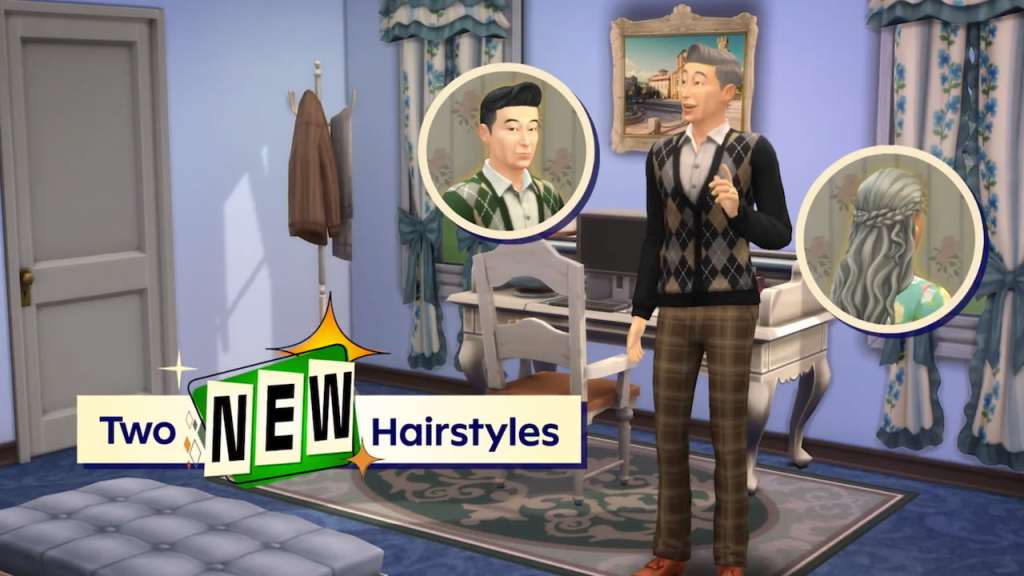
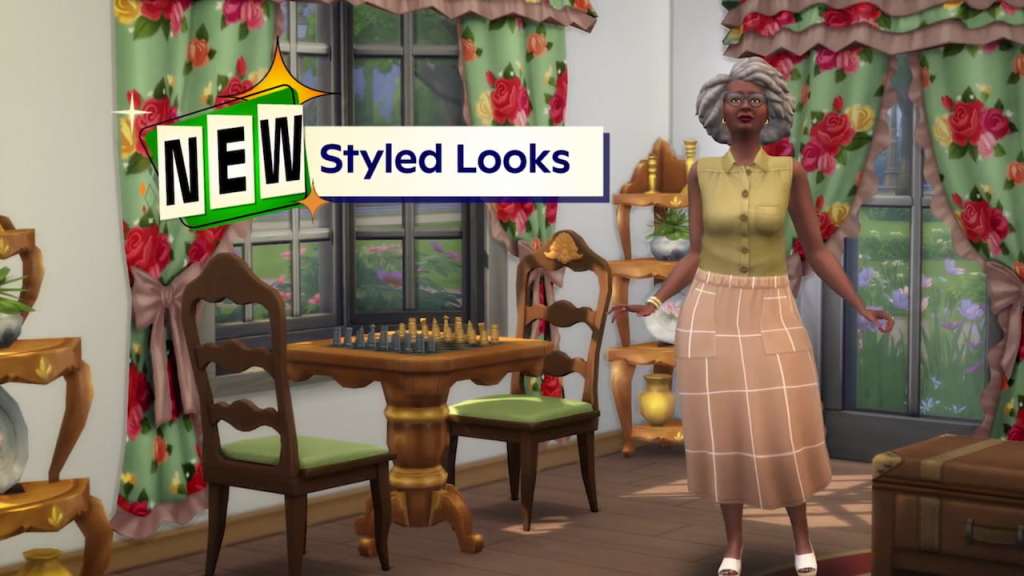
The update ships a tidy bundle of CAS and build items targeted at elders, and Maxis bundled a Styled Room plus preset Styled Looks so you don’t have to hunt through swatches. The new items read like a nostalgia set for quieter households: two new hairs (Quiff Side Part, Half-Down Waves), several clothing pieces and recolors, and a handful of cozy home objects.
- CAS additions: Quiff Side Part; Half-Down Waves; Polo Shirt with Cardigan; Long Dress with Lace and Buttons; Sleeveless Blouse; Long Skirt with Pockets; plus five recolors (High-Waisted Jacket, Long Blazer, Granny Dress, Open Cardigan, Loose Pants with Crease).
- Build Mode: Light of Yesteryear sconce; Needlepoint Nook Chair; Glowlden Goose table light; Heritage Home Drapery (three widths); Petals & Proverbs Plaque; Granny’s Roost Rug; Floral Fossil sofa; Early Bird double bed; Bloom & Gingham Delight wallpaper.
- New Styled Room and Styled Looks make these assets fast to preview and drop into families.
The scale on the slider finally felt different. Muscle and weight toggles explained
How do muscle and weight toggles work in The Sims 4?
You can flip global switches for muscle and weight under Gameplay settings, or control them per-Sim through the Sim Physique controls. That means you can stop life-stage or activity-based changes from pushing a particular Sim’s body around if you want them to stay consistent. If you’re running mods, test these toggles with Sims 4 Studio and MC Command Center to confirm compatibility—some older mods change physique behavior.
The kitchen was messy, but the food drawer was neat. Food overhaul: what changed and why it matters
What changed in the food system?
Maxis rebalanced pricing and calories across base and pack content so meals feel sensible again, and they expanded the Family Recipes feature from the Businesses & Hobbies expansion to include over 375 existing dishes from the base game and other packs. Leftovers now get priority when Sims are hungry and leftovers exist in a fridge or on counters, the fridge’s “Open” option is easier to find, and Sims can “Quickly Decorate” baked goods placed in awkward spots.
The new food system is a finely tuned diner: more polite, less chaotic, and smarter about where food lives and who eats it.
- Standardized food pricing and calories across packs
- Sims autonomously prefer leftovers when available
- Family Recipes expanded to include hundreds of dishes
- Fridge interactions reordered so “Open” is front and center
- Quickly Decorate available for hard-to-reach baked goods
The TV remote slipped under the couch. Quality-of-life fixes that actually save time
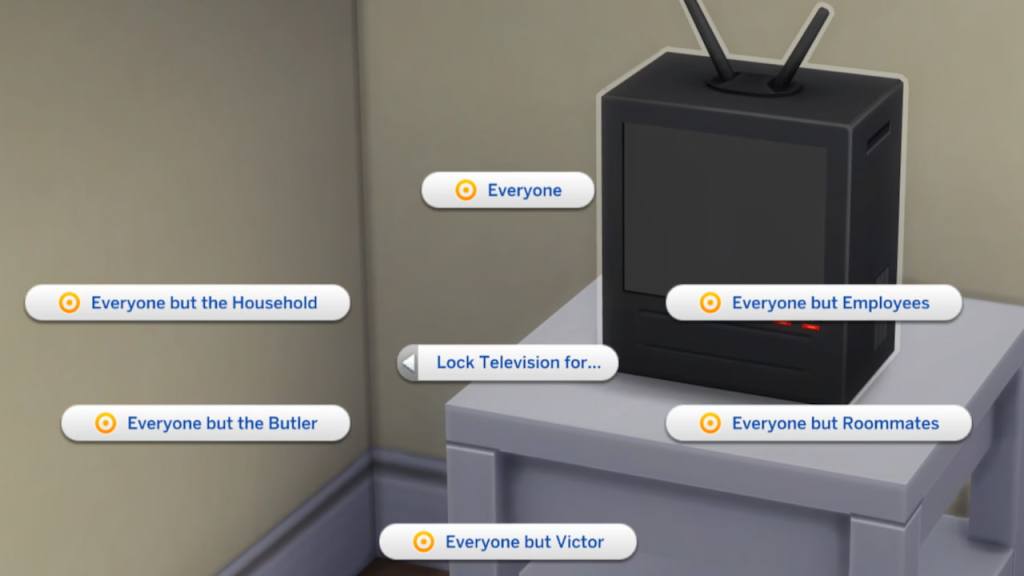
Small UX changes add up: televisions can now be locked like computers, a new “Sim Options…” category houses self-interactions to reduce menu clutter, and Save Backup better tracks elapsed time when you return after long breaks. These are the kinds of fixes that matter when you run multiple households and hundreds of mods or packs.
The save file hiccup felt familiar. Major bug fixes worth testing
This patch answers several persistent annoyances: Sims now stay seated while eating more reliably, an infinite loading loop tied to the Move Objects cheat was addressed, bartenders can take orders while socializing, infants fall asleep properly regardless of odd energy values, and an infinite white screen for some saves has been fixed. Dine Out received multiple dining-specific fixes, and general odd food placement issues were corrected.
- Sims more likely to remain seated while eating
- Fixed infinite loading from Move Objects cheat
- Bartenders accept orders even when busy
- Infants can fall asleep correctly
- Infinite white screen issue resolved for some saves
- Various Dine Out dining fixes
For the exhaustive list, read the official patch notes at EA’s site and pay attention to compatibility notes if you use community tools like Sims 4 Studio, MC Command Center, or custom content.
If you want tasks to try immediately: hunt Power Shifts, complete the Feeding Frenzy quest, collect Gibbi Point Butterflies and Moths, or pull the sword from the stone to see how the rebalanced food and social systems react mid-quest.
I’ve tested the toggles and poked around the new recipes; now it’s your turn — will elders finally take over the culinary scene or will players mod their own alternatives?