
The first tree fell and my heart jumped—three quick taps, then nothing. You realize the Shop button is a small door to advantage, and someone else already walked through it. I dug for codes while the server timer blinked red.
I’m the person who reads developer posts, sifts Discord threads, and tests codes so you don’t waste time. Read fast: these codes speed your progress, save you spins, and can be the difference between punching wood and swinging an axe. Below I list what works now, how to claim rewards, where I watch for drops, and the tiny mistakes that turn a valid code into an error message.
All New Chop A Forest Codes
Observation: I checked the in-game Shop at peak hours and noticed developers drop codes around events.
If you want instant momentum, redeem these active codes before they expire. Codes are tiny keys to hidden chests.
- HALLOWEEN: 3 Hellrider Spins and 250 Candy Corn NEW
- SORRYCANDY: 300 Candy Corn NEW
How do I redeem Chop A Forest codes?
Open Chop A Forest on Roblox, tap the Shop icon at the right, paste the code into the box, and hit Claim. If it takes, your reward appears immediately; if not, try a quick server change.
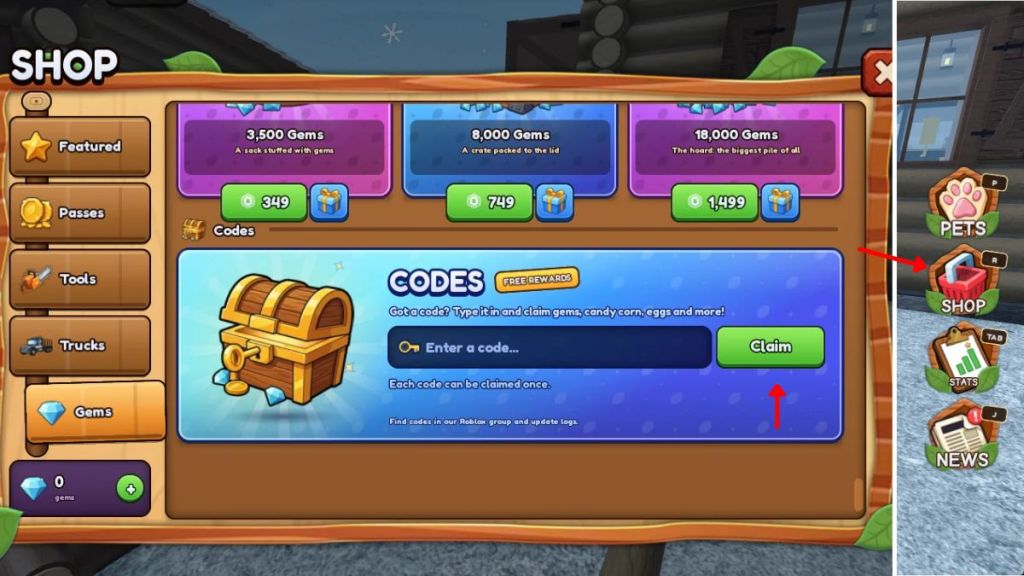
How to Redeem Chop A Forest Codes
Observation: I noticed players missing rewards because they typed codes on mobile screens while moving.
Follow these exact steps and skip the fiddling:
- Launch Chop A Forest on the Roblox app (mobile or PC).
- Tap the Shop icon on the right side of the screen.
- Enter a working code in the text box — copy/paste to avoid typos.
- Press Claim and watch Candy Corn and Spins land in your inventory.
Where can I find new Chop A Forest codes?
Watch the developer’s Discord and the game’s Roblox group for the fastest drops. I monitor the Chop A Forest Discord, the WCT Capital community on Roblox, and feeds on Twitter and Roblox DevForum threads for announcements.
How to Get More Chop A Forest Codes
Observation: The best codes come after community events and server milestones.
If you want a steady flow of freebies, follow the right channels and stay active. The Shop is a compass pointing to rewards.
- Join the official Discord for rapid updates and occasional exclusive drops.
- Join the in-game Roblox group (WCT Capital) for group-only bonuses.
- Follow developers on social platforms and check developer posts on Roblox and DevForum.
- Bookmark this page or your chosen code tracker and refresh after events.
Expired Chop A Forest Codes
Observation: I keep a short log of expired codes so you don’t waste attempts.
- SORRYDELAY
Why Are My Chop A Forest Codes Not Working?
Observation: I hear the same errors in chat — typos and old servers are to blame.
Common failure modes and fixes:
- Typos: Codes are case-sensitive. Copy/paste to be safe.
- Expired codes: Developers retire codes after events; try another one.
- Server age: New codes sometimes only work on fresh servers — join a new server and try again.
- Timing: Some codes activate a short while after announcement; wait a minute and retry.
Why won’t my Chop A Forest code work?
Double-check spelling, change servers, and verify the code wasn’t listed as expired here. If the problem persists, post the code in the game Discord and a moderator or community member will usually confirm status quickly.
If you’ve tried everything and still get an error, what did you try first — copy/paste or typing by hand?