
I opened X for a minute and saw a five-second clip that gave away the ending. My stomach folded and I closed the app before my thumbs could scroll further. You can feel the dread already—so let me show you a clean way out.
I’ve been keeping my feed tidy through several big launches; you can copy what worked. You and I both want to play GTA 6 without someone else narrating the plot for us.
Quick note: mentions of tools and platforms below include real brand names like X (Twitter), YouTube, Instagram, TikTok, Reddit, Discord, BlockTube and Unhook so you can act fast.
I learned the hard way that a single unchecked word can blow a whole narrative. Now here’s a practical list you can paste into every mute box.
Best Keywords to Mute to Avoid GTA 6 Spoilers
Observation: I once had a full story spoiled because a friend used a single word in a meme thread.
Mute exact titles and lots of variations. Trolls omit the obvious, so you must block character names, endings language, and leak phrases. Add singular and plural forms; add versions with and without numbers or Roman numerals.
- Grand Theft Auto 6 / Grand Theft Auto VI
- GTA 6 / GTA VI / GTAVI / GTA6
- Grand / Theft / Auto / Six
- Leonida / Vice City
- GTA 6 Leak / GTA VI Leak / GTA 6 Leaks / GTA VI Leaks
- GTA 6 Story / GTA VI Story / GTA 6 Plot / GTA VI Plot
- GTA 6 Story Leak / GTA VI Story Leak / GTA 6 Story Leaks / GTA VI Story Leaks
- GTA 6 Story Spoilers / GTA VI Story Spoilers / GTA 6 Spoilers / GTA VI Spoilers
What words should I mute to avoid GTA 6 story spoilers?
At minimum add: GTA 6, GTA VI, Grand Theft Auto 6, Leonida, Vice City, Jason, Lucia, GTA 6 Ending, GTA 6 Leaks, GTA 6 Story Spoilers. Then layer in phrases about deaths, finales, missions, and plot twists so you catch disguised posts.
A little maintenance here feels like putting a filter on a coffee maker: the bad stuff never reaches your cup.
Next, protect each app individually—rules are the same, but the controls differ.
I tapped a notification once and watched a thumbnail spoil an entire act. These platform steps stop that.
How to Mute GTA 6 Spoiler Words on X (Twitter)
Observation: an “X-verified” account dropped a clip in Notifications and the damage spread through replies.
On X you can mute entire phrases from your timeline and notifications. Add every variation and pick a long mute duration. Steps:
- Open X on desktop or mobile and sign in.
- Go to Notifications (desktop) or tap your profile icon (mobile) and open Settings and privacy.
- Choose Privacy and safety, then Mute and block, then Muted words.
- Tap the plus icon and enter words or phrases from the list above. Set the duration to the longest option you’re comfortable with and save.
- Repeat until every variation is covered—this is tedious, but it works.
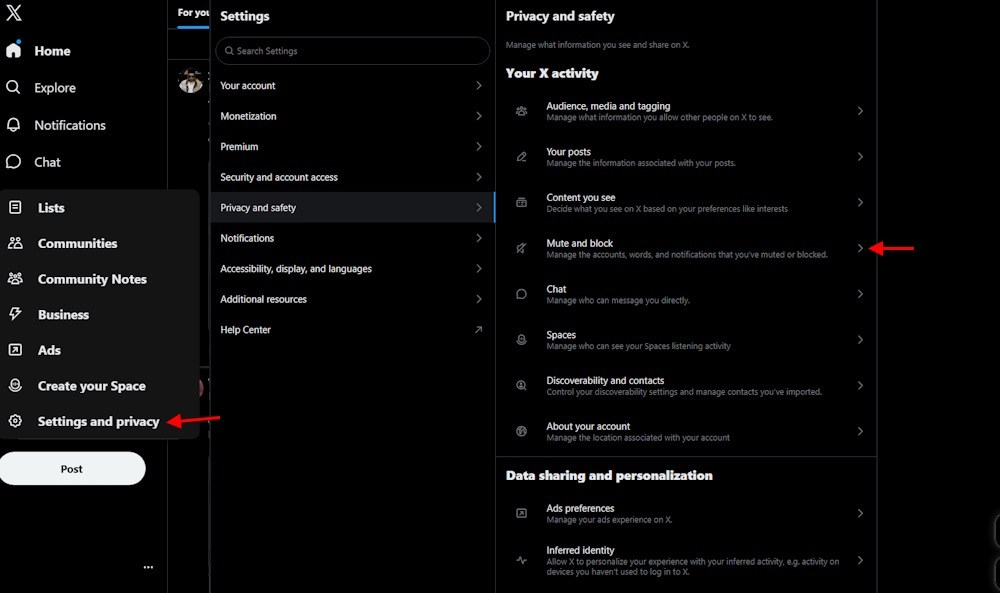
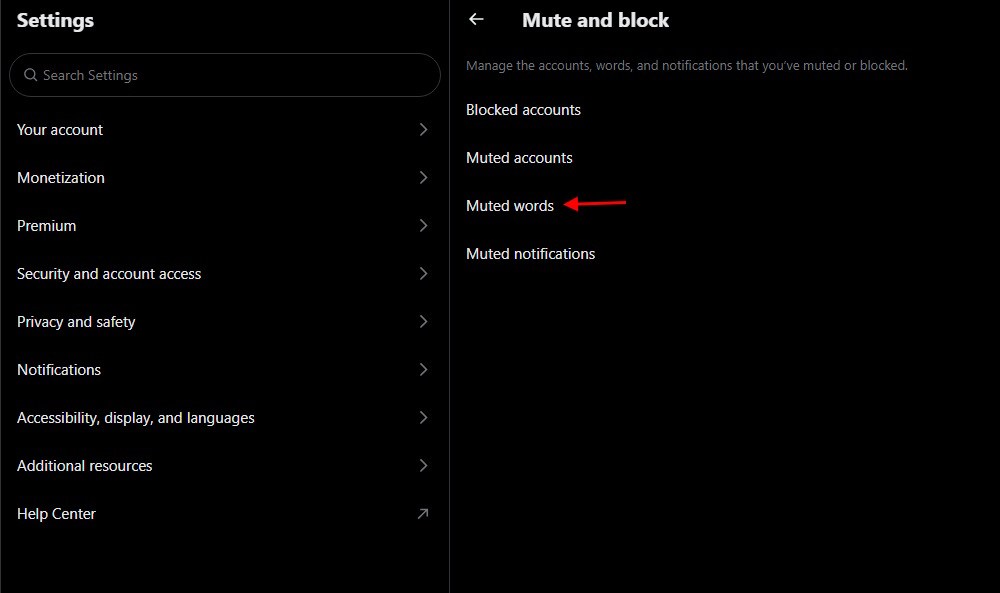
Pro tip: mute new accounts and hashtags fast. If you want extra control on desktop, try BlockSite-style extensions, but start with X’s built-in list.
I clicked a YouTube thumbnail and lost three missions’ worth of surprises. Video platforms leak by design.
How to Block GTA 6 Spoilers on YouTube
Observation: many creators bury spoilers in thumbnails or the first 10 seconds of a clip.
Desktop: install BlockTube and Unhook to hide recommendations and block channels. Both are free in basic form; some pro features cost around $5 USD (€5) but the free layer is usually enough.
- Install BlockTube and Unhook in Chrome or Firefox.
- Use them to hide recommended videos, remove trending rows, and block specific channels or keywords.
- On mobile or TV, clear and pause watch history. This turns off recommendation signals and makes your home feed blank.
- If a suggested video appears, click the three dots and choose Not interested or Don’t recommend channel.
- Move the app to a hidden folder if you’re prone to opening it by habit.
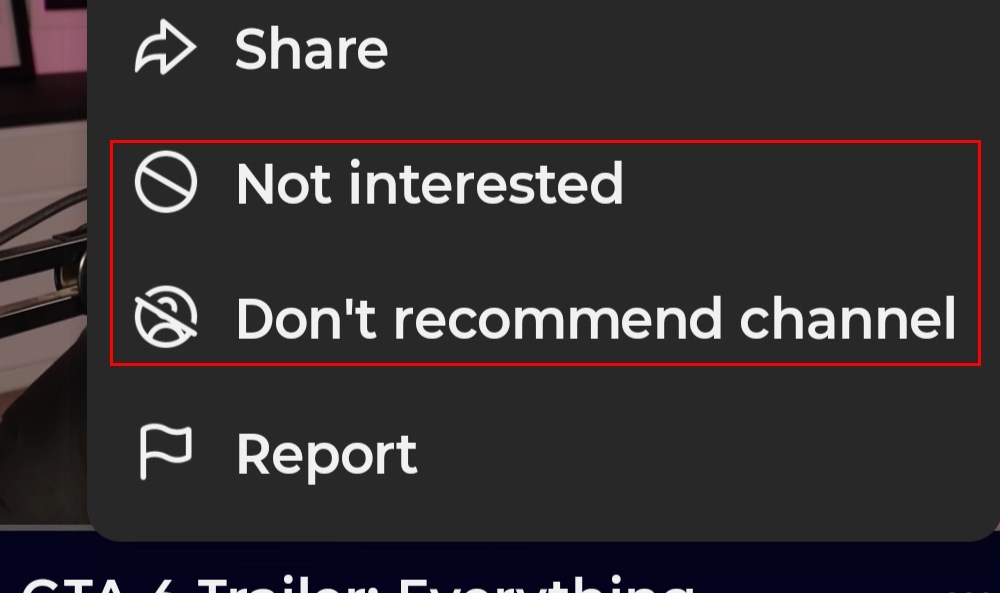
Short, sharp action here saves hours of regret later.
A friend’s Reels blew a subplot in two taps; Instagram learns fast from every click.
How to Avoid GTA 6 Spoilers on Instagram Reels and Feed
Observation: Instagram’s For You-style feed will push what you interact with most—so don’t interact with GTA 6 content at all.
Tell Instagram to forget. Use Not Interested on any spoiler posts, mute repeat offenders, and stop opening comments under suspect clips.
- Tap the three dots on a post or Reel and select Not interested to see less similar content.
- Mute or block accounts that share leaks or story clips.
- Use Instagram’s Hidden Words to filter comments and story replies for phrases such as GTA 6, Lucia, Jason, and GTA VI.
- To add hidden words: go to your profile → hamburger menu → Hidden Words → type a word → Add.
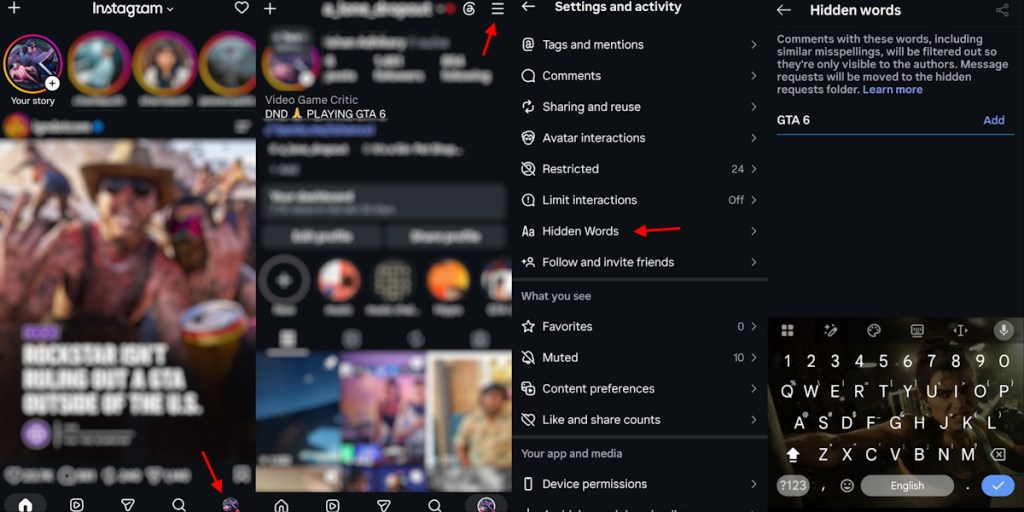
Treat your interactions like breadcrumbs—you don’t want to lead the algorithm back to spoiler territory.
Two nights of doomscrolling taught me that TikTok trains itself on the quiet choices you make.
How to Avoid GTA 6 Spoilers on TikTok
Observation: one long-press and a Not interested click can change your For You feed dramatically.
Use TikTok’s keyword filtering and the Not Interested option to nudge the algorithm away from spoilers.
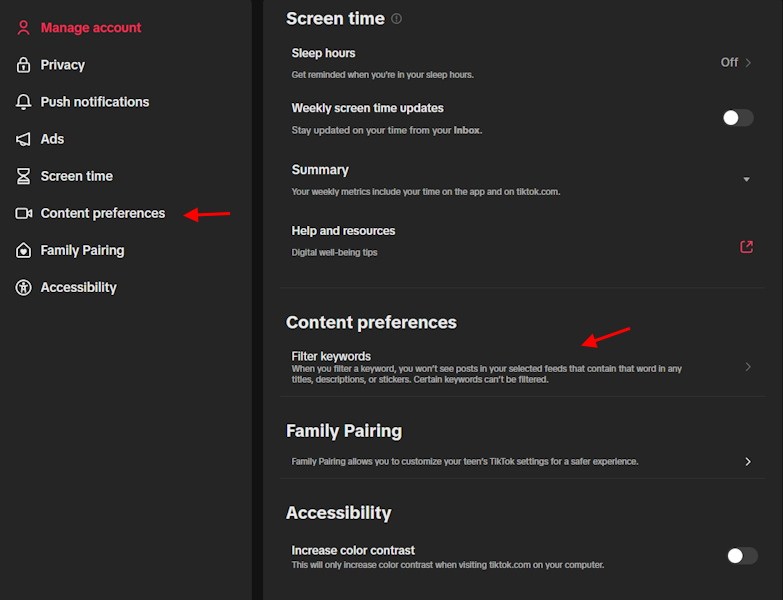
- Open TikTok → Profile → Settings → Content preferences.
- Choose Filter video keywords → Add keywords.
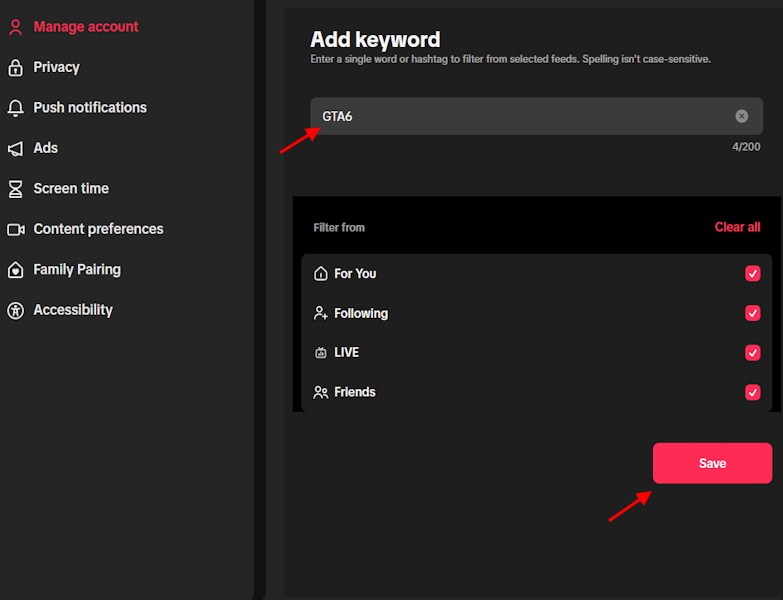
- Enter terms: GTA 6, GTA VI, Lucia, Jason, leaks, spoilers.
- Select which feeds to filter (For You / Following) and tap Save.
- Long-press any offending video and select Not interested to train your feed.
Don’t teach TikTok to recommend GTA 6 clips—ignore, filter, and move on.
I’ve seen entire spoiler runs live in Discord and Reddit before a game even ships.
Avoiding GTA 6 Leaks on Reddit, Discord, and Google
Observation: threads and chat servers become echo chambers—one leak, many reposts.
Take these practical steps to reduce accidental exposure:
- Reddit: temporarily unsubscribe from r/GTAVI and similar gaming subreddits. Hide or mute tags and avoid the front page for a week or two.
- Discord: mute public servers and specific channels. Turn off push notifications for Discord on your phone.
- Google: don’t search for the game until you’re ready. Autocomplete and featured snippets can surface spoilers before you know it.
- Avoid early reviews and discussion threads from outlets that may spoil story beats in headlines or metadata.
Is muting keywords enough to avoid all GTA 6 spoilers?
No—keyword filters miss images, uncaptioned clips, and clever phrasing. The most reliable method is a short, deliberate social media break during launch week or strict muting plus selective app use.
Think of your mute list as a perimeter fence and your behavior as the guard dog that decides whether a gate stays open or closed.
If you want a final checklist: mute the keywords, install control extensions on desktop, pause watch history on YouTube mobile, add hidden words on Instagram, filter TikTok keywords, mute Reddit/Discord, and avoid Google searches about the plot.
Rockstar built this story for players who want to discover it themselves—are you going to guard your copy or risk a single scroll for a laugh?