
I dropped onto the island with the match timer bleeding seconds and a stranger’s beat thumping in my headphones. My hands fumbled through menus while a chest blinked across a rooftop. By the time I figured out the music was mine to control, I’d already lost a shot at a rare drop—and learned the secret.
I’ve chased quests and tuned menus in more Fortnite rounds than I’ll admit. You want the Jam Track Player running so every container you open counts toward the Treasure Hunters mission; I’ll walk you through the exact clicks and habits that make that happen without wasting a match.
During warm-up I noticed the Jam Track tab hiding behind the emote menu — How to use Jam Track Player in Fortnite
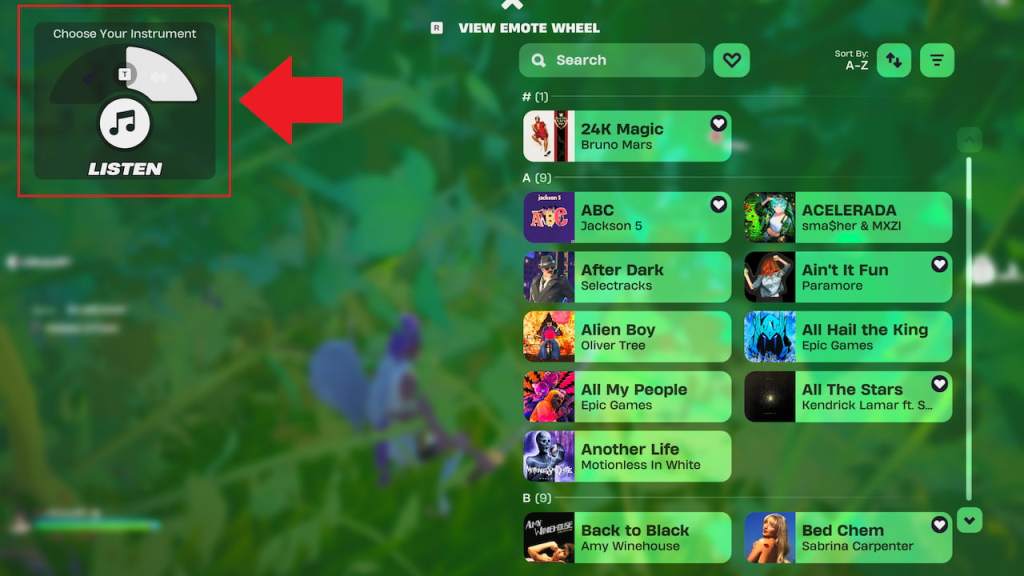
Short version: you must start a song from the Jam Tracks page while in a live round. The menu path is buried, but repeatable. The Jam Track Player is a hidden mixtape in a thrift store — once you see it, you’ll never forget where to check again.
- Load into a round. You can start preparing during the pre-match countdown in the waiting room so the song is ready when the drop begins.
- Hold the emote button. Default controls: B on PC, Down on the D-pad for console, or the dancing icon on mobile. If you changed binds, use your custom key.
- Switch to the Jam Tracks tab. While holding the emote button, toggle from the Emote Wheel to the Jam Tracks page — it’s the second tab in that menu.
- Select “View Collection.” That button sits near the bottom middle of the screen while the emote menu is open.
- Press “Choose Your Song.” Found in the upper-left of the collection screen; selecting it opens the “Listen” tab where Jam Tracks live.
- Pick any Jam Track to play. Choose a track from your collection and start it — the Jam Track Player activates and stays on for the round unless you stop it.
How do I activate the Jam Track Player?
Activate it by starting any track from the Jam Tracks collection while in-match. You’ll see the track name appear near the middle-right of your HUD once it’s live. If you want to test the menu layout, check a YouTube guide or a Moyens I/O clip to watch the sequence in real time, then recreate it in warm-up.
I timed myself to see how long it took — Search containers while listening to the Jam Track Player in Fortnite
The mission requires you to search 25 containers while a Jam Track is playing. Containers are any interactable loot source: Treasure Chests, Ammo Boxes, Produce Boxes, Rare Chests, vending machines that open, and similar loot capsules found across the island.
Open anything you can interact with after you start the Jam Track Player and it counts. The player persists for the match unless you manually stop it, so start the song early and loot everything you touch.
What counts as a container in Fortnite?
If you can press a button and reveal loot, it’s a container. Epic Games treats crates, chests, ammo boxes, and produce boxes the same for quest tracking. Rare Chests and Loot Caches count as well. If you’re unsure, watch the HUD prompt: if it says “Open” or shows a loot animation, it registers.
Practical tips I use:
- Land in medium-traffic areas where chests cluster so you don’t waste time running between single boxes.
- Start the song during the drop or even in the pre-match countdown to maximize windows of looting while the track plays.
- Track progress mentally or on a quick notepad app; reaching 25 is easier if you’re counting aloud while you play.
Opening chests while the track runs is a conveyor belt handing you loot — the rhythm keeps you moving through the objective without second-guessing.
Does the Jam Track Player keep playing for the entire match?
Yes, once you start a Jam Track it remains active for the rest of that round until you stop it. That means one activation can cover all 25 containers if you focus on efficient looting routes. Streamers on Twitch and creators on YouTube often start their track immediately and sprint through hotspots to finish this kind of quest fast.
If you want a visual reference, Moyens I/O and several Fortnite content makers (including Epic Games’ community posts) have short clips showing the exact menu flow; watch one to memorize the sequence, then execute in warm-up.
Ready to press play and turn a noisy menu into a straight path to the Captain X rewards—what’s your plan for getting all 25 while staying alive?