
There’s nothing quite like receiving a surprise game gift from a friend or family member. It’s a gesture that every gamer appreciates! While gifting has been a long-standing feature on Steam, it has now made its way to the Epic Games Store, allowing users to share their favorite titles with just a few clicks. If you’re eager to send a gaming gift to someone special, you’re in the right place. Let’s dive into our comprehensive guide on how to gift a game on the Epic Games Store and brighten someone’s day with a perfect virtual present.
Can You Gift Games on the Epic Games Store?
Absolutely! Epic Games Store users can now easily gift games, provided that the recipient is included in your Epic friend list. But it’s not just games—you can also send several other types of content as gifts. Here’s what you can gift:
- Paid games
- Special editions
- Durable add-ons
- Eligible bundles
Keep in mind, however, that certain items cannot be gifted. These include free games, pre-purchase offers, subscriptions, and consumable items like in-game currency.
How to Gift Games to a Friend on the Epic Games Store
The process of gifting games on the Epic Games Store is straightforward and user-friendly. Here’s a quick step-by-step guide to help you send that perfect game—maybe something like Clair Obscur: Expedition 33—even before it becomes the next big hit:
- Go to the Epic Games Store and log into your account.
- Find the game you wish to purchase and click on the Gift option located on the right side of the page.
- Type your friend’s name in the “Who’s it for?” section. Ensure they are on your Epic friends list.
- Add a personal message to make it special, then click on Go to Checkout. Complete the payment by following the on-screen prompts.
- You also have the option to schedule your gift for a specific date under the “When shall we send the gift” section.
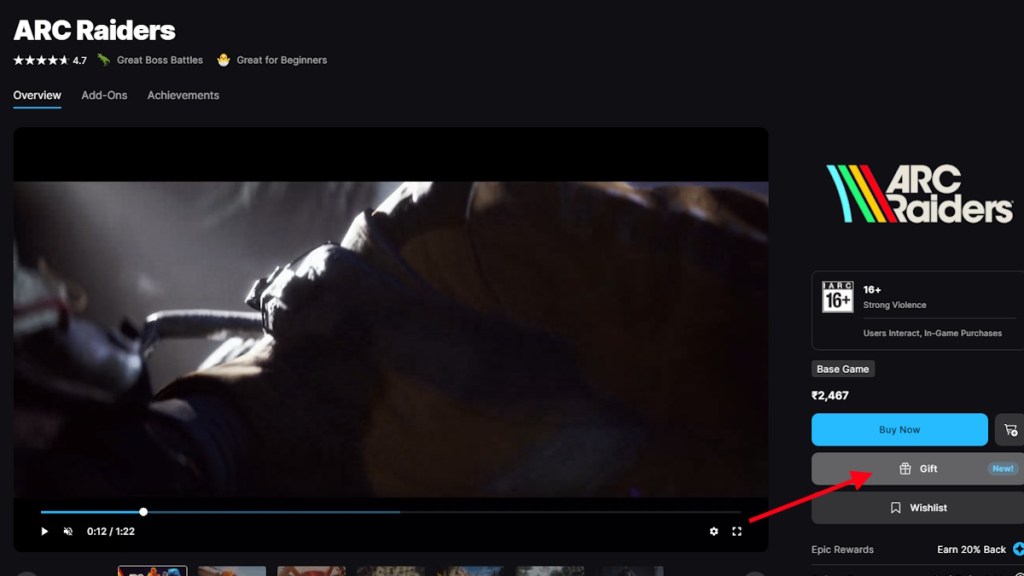
Once you’ve sent your gift, remember that the recipient has 14 days to accept or reject it. If they already possess the game, it will not be accepted and will automatically be refunded to you. Similarly, if they reject the gift, you’ll receive a full refund.
So, are you excited to try gifting on the Epic Games Store? It’s a wonderful way to share the joy of gaming.
What types of items can you gift on the Epic Games Store?
You can gift paid games, editions, durable add-ons, and eligible bundles. However, free games and consumable items cannot be gifted.
How do I check if my friend is on my Epic friends list?
You can easily check your Epic friends list by logging into your account and navigating to the friends section within the Epic Games Store client or website.
Can I schedule my game gift for a future date?
Yes, you can schedule your game gift to be sent on a specific date, making it perfect for birthdays or special occasions.
What happens if my friend doesn’t accept the gift?
If your friend does not accept the gift within 14 days, it will be canceled, and you will receive a full refund.
Ready to spread some gaming joy? Explore the Epic Games Store today—there’s no better time to surprise a fellow gamer. Happy gifting!
For more tips and insights into the gaming world, visit Moyens I/O.