I remember the first time I loaded into Hytale, expecting the familiar comfort of a third-person perspective. Instead, I was greeted by a first-person view, my character’s hands filling the screen. It felt… wrong. Luckily, switching to the third-person camera in Hytale is easier than crafting your first sword.
Why Change Your Perspective in Hytale?
Think about watching a movie: sometimes you want to be in the action, and sometimes you want to see the bigger picture. Hytale offers you that choice. While the default first-person view might feel natural to some, a third-person perspective can drastically change how you experience the game. Here’s how to make the switch:
How Do I Instantly Switch Between First and Third Person in Hytale?
The quickest way to change your viewpoint is directly in the game. Simply press the ‘V’ key. Each press will toggle between first and third person. You can remap this key in the settings menu if ‘V’ doesn’t suit your playstyle. Think of it as your instant camera angle remote control.
How Do I Make Third Person the Default Camera View?
Prefer to always start in third person? No problem. Here’s how to set it as your default:
- Load into your Hytale world.
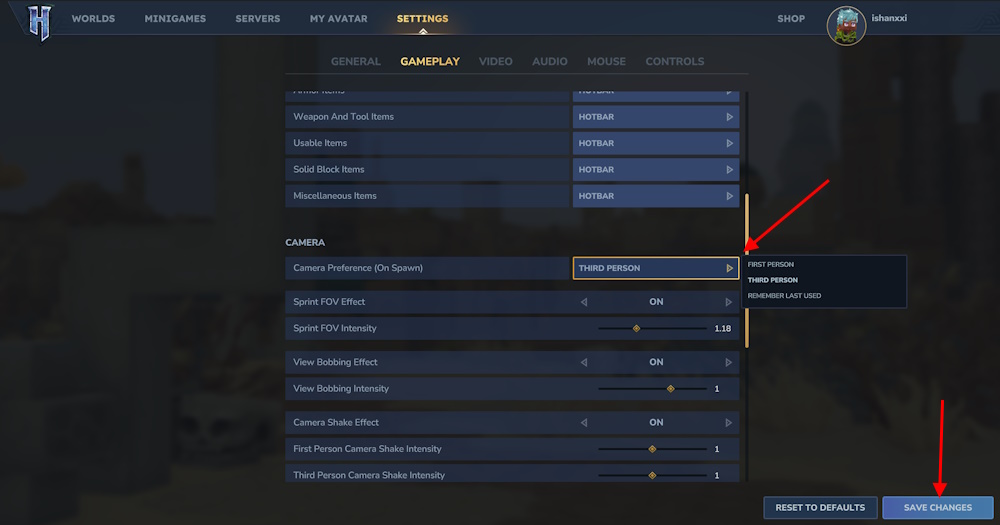
- Press ESC to access the game menu, then click “Settings.”
- Find the “Camera Preference (On Spawn)” option.
- Toggle it to “THIRD PERSON.”
- Click “Save Changes.”
Now, every time you spawn, you’ll be greeted by the third-person camera.
First Person vs. Third Person: The Great Hytale Camera Debate
Choosing between first and third person in Hytale isn’t about which is “better,” but about which is right for the moment. Think of it as selecting the right tool for the job; a hammer isn’t inherently better than a screwdriver, but each excels in specific situations.
Third-person excels when you’re exploring sprawling landscapes. The wider field of view lets you spot hidden treasures and appreciate the environment. It’s like having a drone follow your character, giving you a bird’s-eye view of the world.
First-person shines during intense combat or intricate building. It offers precision and immediacy, allowing you to react quickly and aim with accuracy. This perspective puts you right in the thick of things.
Does Third Person Mode Help With Resource Gathering?
Yes, it certainly can. The expanded field of vision in third person allows you to spot resources that might be hidden just out of sight in first person. This is especially useful in densely forested areas or when searching for underground entrances.
Ultimately, the best camera view is the one that enhances your enjoyment of Hytale. Will you stick to one perspective, or constantly switch to suit the situation?