
The lights were off, the ticket counter empty, and I still had three unused codes in my clipboard. I pasted one and watched NPCs flood the floor like a midnight crowd. You get that same small, sharp thrill when a code actually works.
Update: added new Build an Arcade codes on February 17, 2026
I play Roblox obsessively and I follow dev posts, Discord threads, and the Our Arcade Roblox group so you don’t have to. Build an Arcade turns a handful of mini-games into a business: NPCs visit, play, and tip cash that you reinvest into new machines. If you’re starting out, a few active codes will change the tempo of your progress immediately.
All New Build an Arcade Codes
Developers often drop codes during milestone posts and Discord events. Below are the working codes I verified for February 17, 2026 — redeem them fast because they vanish without fanfare.
- Cupid: Cupid’s Heart Balloon NEW
- 500KMembers: 5 VIP customers NEW
- 100KLikes: 10 VIP customers
- 20MVisits: 2 Midas customers
Expired Build an Arcade Codes
Event codes often have short lives — once the event ends, the code usually follows. If you see an expired tag, try the active list above or check the dev’s Discord for replacements.
- 80KLikes
- Update12
- 300KMembers
- 20MVisits
- 70KLikes
- 50KLikes
- Snowman
- Xmas
- 400KMembers
How to Redeem Build an Arcade Codes
Redeeming a code takes seconds when you follow the menus in the right order. I run through these steps every time I test a code and they never fail unless the code has expired.
How do I redeem Build an Arcade codes?
- Open the Build an Arcade experience on Roblox (game ID 121156243721577).
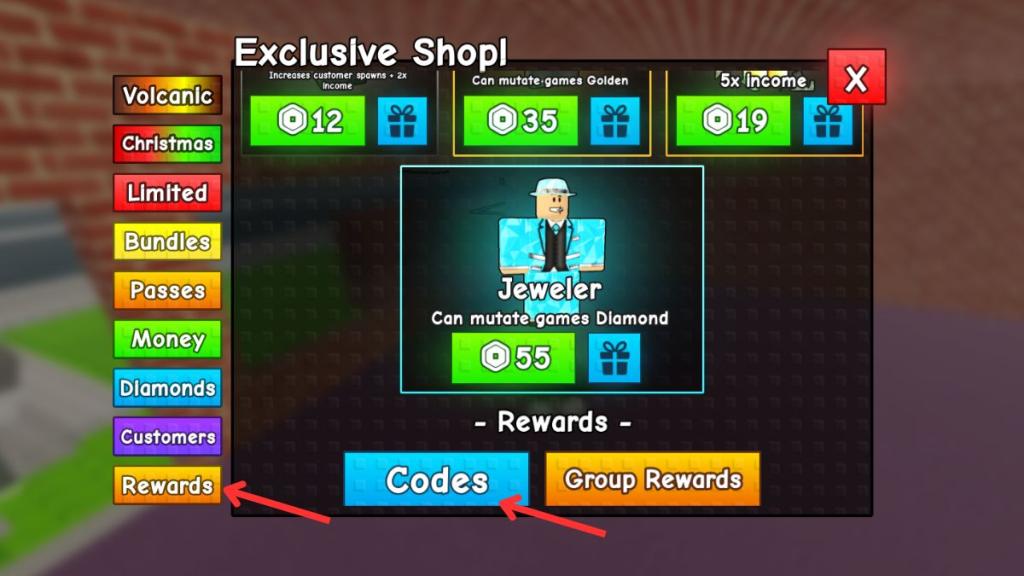
- Tap Shop at the bottom of your screen.
- Select Rewards, then hit the blue code button.
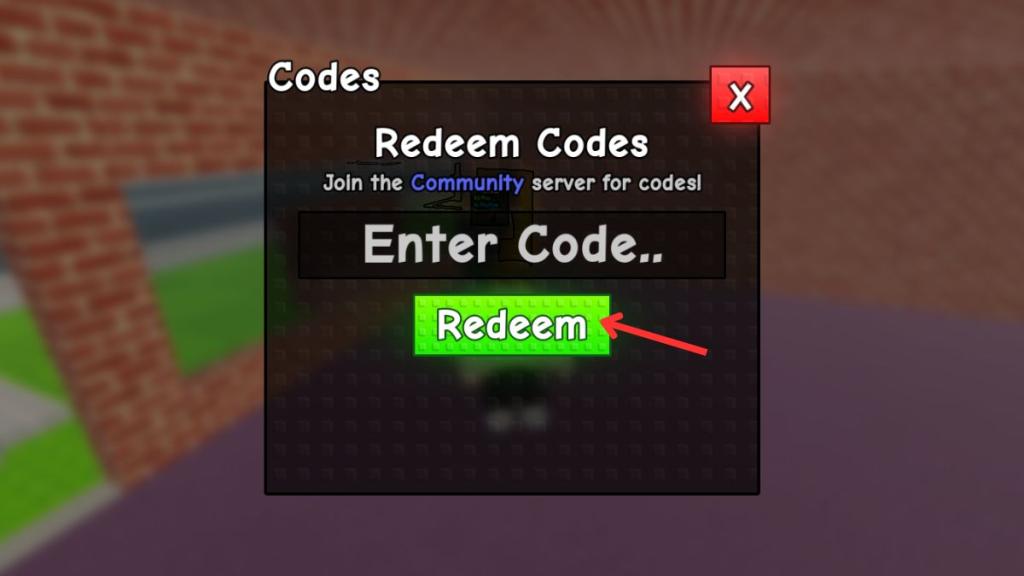
- Paste a working code into the box and press Redeem.
- If successful, the reward (customers or items) drops into your account immediately.
Pro tip: Copy-paste the code directly from this page or the game’s Discord to avoid typos.
How to Get More Build an Arcade Codes
Most dev teams announce codes in Discord and Roblox group posts. If you want real-time drops, those two channels are where they happen.
Follow these moves if you want fresh codes first:
- Join the official Build an Arcade Discord and check the #codes channel.
- Follow the Our Arcade Roblox group for milestone posts.
- Bookmark this page and refresh it after major updates or holiday events.
I monitor Discord and the Roblox group; between those feeds and community threads you’ll usually catch codes within minutes of release.
Why Are My Build an Arcade Codes Not Working?
Most failures are human or timing errors — a typo, an expired code, or a client that needs updating. I’ve tested every common error and narrowed the fixes below.
Why won’t my Build an Arcade codes work?
- Check spelling and capitalization; codes are exact.
- Wait a few minutes if a big update just dropped — servers sometimes need a moment.
- Some codes are one-time or limited to specific milestones and will show as expired after they run out.
Can I use Build an Arcade codes more than once?
No — each code is redeemable once per Roblox account. If a friend used the code on their account, you still need to redeem it separately on yours.
Why this list matters to you
Most players treat codes like bonuses; I treat them as growth fuel. Codes are digital keys that open small but immediate advantages — whether that’s VIP customers or a cosmetic balloon. When a working code drops, it can turn a quiet arcade into a humming coinbox.
If you want me to chase down a fresh batch of codes after the next update or verify a community-submitted code, tell me which one and I’ll test it live — which code should I try first?