
I booted the trailer on my phone and felt my hands go cold—the mountains, the wind, the leaves moved like they’d been painted by someone who refuses shortcuts. The world on-screen is a cathedral of pixels, every blade of grass sharpened until it hurt. I put the phone down and asked myself the one question every Steam Deck owner will ask: will this beast run in my lap?
I write this from the vantage of someone who tests portability claims against spec sheets and real handheld runs. You want clear answers, not wishful thinking, and I’ll give you both the facts and the trade-offs so you can make the call yourself.
Fans keep refreshing the game’s page and hope for a verification badge — here’s the current reality
No — Crimson Desert is not verified for Steam Deck at the time of writing. Pearl Abyss hasn’t added the Steam Deck verification badge on Steam, and the developer hasn’t released official performance figures for the handheld. The verification badge matters because it signals a level of compatibility and controller support that reduces guesswork for you.
Is Crimson Desert Steam Deck compatible?
Not officially. The lack of a verified badge means you’ll be running the game in an unverified state, relying on Proton/SteamOS layers and whatever community tweaks appear after launch. That doesn’t automatically mean it won’t play, but it does change your risk profile if you expect a plug-and-play experience.
On the bright side, the game’s published minimum GPU is a GTX 1060 — an older entry that suggests the developers targeted a mix of hardware rather than only bleeding-edge PCs. That gives me cautious hope that performance can be shaped down to fit the Deck’s AMD APU.
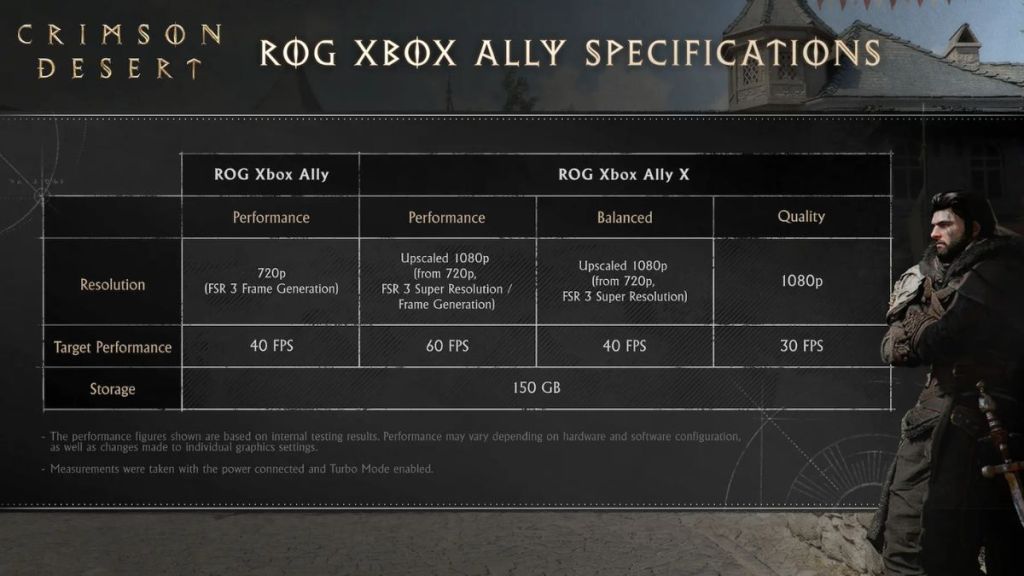
At official ROG Ally X demos people measured frame numbers — here’s what that implies for handheld play
Pearl Abyss shared performance targets for ROG Ally X that give us the clearest hint so far. The spec sheet states Crimson Desert hits about 40 FPS at 720p with AMD FSR 3 frame generation enabled on ROG Ally X.
Will Crimson Desert run on the Steam Deck?
Short answer: yes, it should run. ROG Ally X and Steam Deck sit in the same general class of handheld PC power, so targets reported on one are informative for the other. Expect to use the lowest or a low-medium preset and turn on AMD FSR 3 frame generation to chase a steady 30–40 FPS range.
I won’t pretend the experience will match a 4K desktop. Visual fidelity will take hits: higher draw distances, shadow quality, and post-process effects are the usual sacrifices. But if you want playable sessions away from your desk, the Deck looks capable of delivering them.
What settings will let it run on the Steam Deck?
You’ll likely need to combine three things: low graphics preset, AMD FSR 3 frame generation active (the same tech referenced by Pearl Abyss), and a conservative TDP/clock cap to keep thermals and battery life reasonable. Expect compromises in fidelity and possibly longer load times if streaming assets are heavy.
Think of the game as a heavy travel trunk: you can fit it in the car if you unpack and only carry what you need. If you want smoother framerates, shave graphical features; if you demand visuals, accept shorter battery life and lower frame targets.
I’ve seen handheld communities tweak launch titles with Proton GE, controller remaps, and shader cache tricks to improve performance; Valve’s Steam Deck tools and the wider Proton/Proton-GE ecosystem will be your allies here. The moment benchers post Deck runs, we’ll get clearer profiles for battery drain and thermal behaviour.
There’s one last point: third-party handhelds such as the ROG Ally X and ASUS models sometimes ship with higher TDP ceilings than Valve’s default Deck profile. That explains some of the difference in reported frame numbers; with proper tuning, you may close the gap, but don’t expect miracles.
So — will you be able to play Crimson Desert on your Steam Deck, and will it feel like the full PC version or a trimmed portable sibling? Which of those outcomes matters more to you as a player?