
The server went silent for a beat, then someone shouted a code and the whole lobby surged toward the shop. I pasted it, hit redeem, and suddenly my inventory had new potions. You can feel the little rush when a free reward lands.
Update: added new Throwing Simulator Codes on March 19, 2026
I’ve chased Roblox codes long enough to know the patterns. You and I both want the fastest route to free gems and potions so you can train, upgrade, and dominate the leaderboard. Codes are like a treasure map—follow the markers and you get the spoils without burning time.
On most servers you’ll see players pasting codes into chat. All New Throwing Simulator Codes
- 1mevent: Free Potion (NEW)
- update2: 5 Enchant Gems and Potions
- update1: 5 Enchant Gems and Potions
- RELEASE: Luck Potion
I checked multiple sessions and found no expired codes yet. Expired Throwing Simulator Codes
This title is new and fresh, so there aren’t any retired codes to move into an expired list yet. When the devs rotate codes off, I’ll move them here so you can spot what’s gone and what’s still live. Redeem quickly—some codes run on strict timers and vanish without warning.
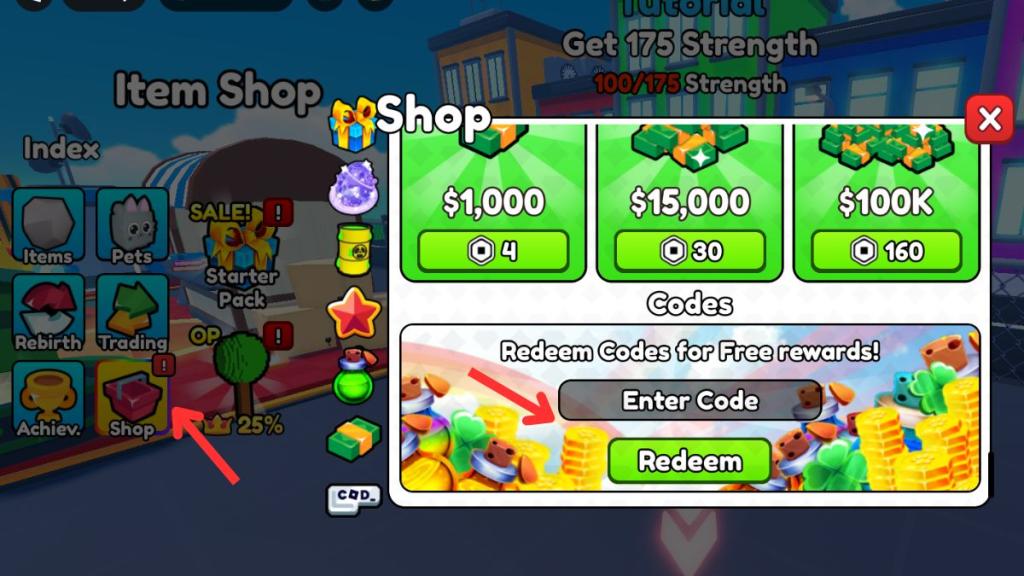
At the in-game shop the code box sits near the bottom. How to Redeem Throwing Simulator Codes
Redeeming is faster than perfecting a long-distance throw. Here’s the exact sequence so you don’t fumble:
- Launch Throwing Simulator on the Roblox app or web player.
- Click the Shop icon on the left side of the HUD.
- Scroll down the shop panel to the Codes field at the end.
- Paste a working code into the Enter Code box (copy from this page to avoid typos).
- Hit Redeem and enjoy your rewards.
You’ll spot the official Discord pinned messages before anyone tweets a code. How to Get More Throwing Simulator Codes
Want a steady feed of codes? Follow the pipeline I watch: the game’s Roblox page, the developer’s Discord, and community hubs on X (Twitter). Announcements pull players like a magnet, so be where the devs publish first.
Where I check:
- Throwing Simulator Official Discord (join the server for instant posts).
- The game’s Roblox page and the Creator’s profile for update notes.
- Community threads on X and Roblox groups—sometimes players share one-off codes.
- Catalogs and roundups from gaming sites such as Moyens I/O, which maintain lists for fast copying.
You’ll often see an “Invalid Code” pop-up after a client update. Why Are My Throwing Simulator Codes Not Working?
If a code refuses to redeem, don’t panic. Try these checks in order:
- Wait a minute after a big update—servers sometimes need time to register new codes.
- Copy and paste the code to avoid small typing errors (caps and underscores matter).
- Confirm the code wasn’t already redeemed on your account—most codes are one-use per profile.
- If nothing works, check the developer’s Discord or the game’s update notes for any posted expirations.
Can I use Throwing Simulator codes more than once?
No. Each code is redeemable only once per Roblox account. If you try it again, the game will return an “Already Redeemed” or “Invalid Code” message.
How often does Throwing Simulator release new codes?
Codes typically arrive during updates, limited events, or holidays. There’s no fixed schedule, so staying in the official Discord and watching the game’s Roblox page is the fastest way to catch them.
Why can’t I redeem codes in Throwing Simulator?
Common causes are expired codes, typo errors, server lag after an update, or trying to reuse a code on the same account. Copy directly from a verified list and retry after a short wait.
While you wait for more drops, try other popular Roblox experiences such as Steal a Brainrot, Escape Tsunami for Brainrot, Abyss, and Garden Horizons to keep training and trading. Which code gave you the best boost so far—care to brag or roast your own throws?