
I logged into Fortnite, the lobby buzzing, and saw the Battle Pass icon glowing like a dare. My thumbs hesitated over the purchase button while everyone in chat spammed “Bugs?” The decision felt smaller than it was—until I pictured dropping into a match as a Looney Tune and smiling at the chaos.
I’m going to walk you through exactly how to get Bugs Bunny in Chapter 7 Season 2, what it costs, and the quick routes that save you time. I’ve bought Battle Passes, paced the grind, and tested the shortest paths—so you don’t waste V-Bucks or hours. The Bugs outfit is a neon flare in a grayscale lobby.
How to Get Bugs Bunny Skin in Fortnite
The Battle Pass icon flashes in the lobby every time you log on.
You buy the Chapter 7 Season 2 Battle Pass and push the progress bar to the rewards page where Bugs sits on level 85. The purchase options are:
- Battle Pass only: 800 V-Bucks (approximately $8.99 / €9)
- Battle Bundle: 2,400 V-Bucks (approximately $22.99 / €23) — this grants the pass plus a 25-level instant boost
Buy the pass through your Epic Games account on PC, console storefronts (PlayStation Store, Xbox Store, Nintendo eShop), or the Epic Games Launcher. Once you hit level 85 you claim the Bugs Bunny outfit as the page’s final reward. The seasonal window closes on June 5, 2026, so the skin is time-limited.
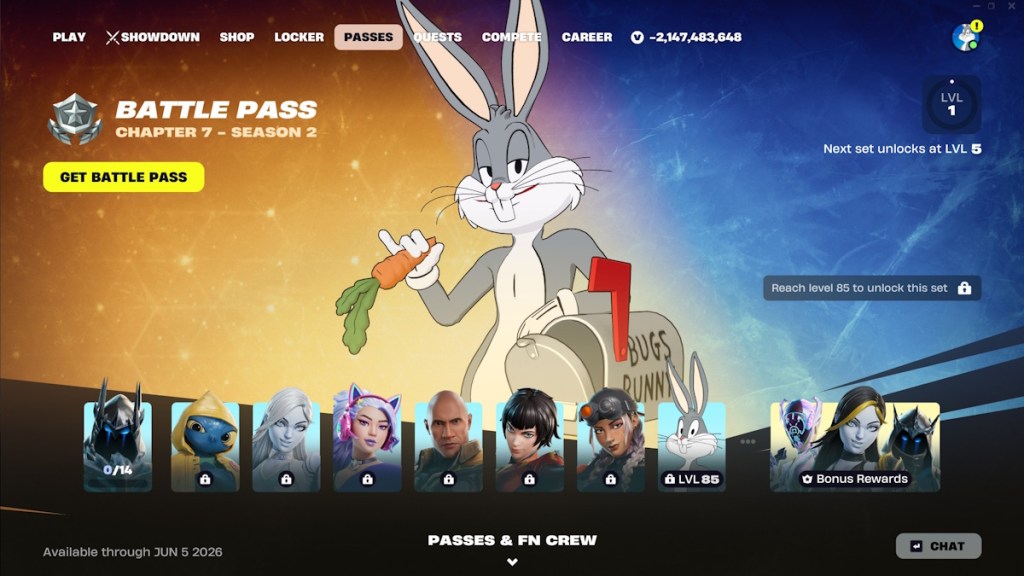
When you reach level 85 the following cosmetics come with the Bugs Bunny reward page:
- Bugs’ Mailbox pickaxe
- Rabbit Season loading screen
- What’s Up, Doc? spray
- Carrot-n-t back bling
- Bugs’ No emoticon
- Banner icon
- Bugs Bunny outfit
How do you unlock the Bugs Bunny skin in Fortnite Chapter 7 Season 2?
Buy the Season 2 Battle Pass and reach level 85. If you’re short on time, the 2,400 V-Bucks bundle gives a 25-level boost so you start closer to that page. Use daily XP missions, XP coins, and any timed challenges in the season to climb faster—link your Epic account to PlayStation Network or Xbox Live to keep progress across platforms.
How to Get the Tune Squad Bugs Style
You’ll notice Space Jam posters and merch around social feeds right now.
After you claim the base Bugs outfit on level 85, the next Battle Pass page gives you the Tune Squad upgrade. Complete that page to switch from the classic Looney look to the Space Jam-inspired Tune Squad style. The upgrade page also includes extras that sweeten the deal:
- Eh, What’s Up Doc? emote
- Ya, Missed Doc spray
- 100 V-Bucks (redeemable in the item shop)
- The Exhalted And The Reforged loading screen
- Space Jam Slammer pickaxe
- Rapid Rabbit spray
- Tune Squad Bugs outfit style

How do you get the Tune Squad Bugs Bunny style in Fortnite?
Claim the base Bugs skin on level 85, then complete the associated upgrade page in the same Battle Pass to receive the Tune Squad style. The Upgrade page behaves like other premium Battle Pass tiers—finish the challenges and collect the page rewards. If you play cross-platform, keep your Epic account linked so progress carries from PC to consoles.
Quick tips from experience: focus on weekly quests and XP coins, squad up for faster survivals, and use XP boosts from previous seasons if you have them. Brands involved here are Epic Games (Fortnite), Warner Bros. (Looney Tunes and Space Jam), and platform stores like the PlayStation Store and Xbox Store for purchasing V-Bucks.
Pair the outfit with the Victory Umbrella and the Carrot-n-t back bling for maximum chaos in the lobby. The Battle Pass page is a passport to a throwback crossover.
Are you buying the pass to drop into mayhem as Bugs or waiting to see how the lobby reacts first?