
I was running low on battery and an unfamiliar neighborhood loomed ahead. I asked Maps out loud, and within seconds it handed me a coffee shop with a charger and no line—like texting a streetwise friend who never sleeps. That small rescue felt like proof that maps are finally earning the intelligence we expect.
I write about products that alter daily habits, and you should know what this one can do before your next trip. I’ll walk you through the new Gemini-powered Ask Maps and the Immersive Navigation view, show where they matter, and point out the trade-offs you’ll want to watch for.
Find Your Way Easily with the Gemini and Ask Maps
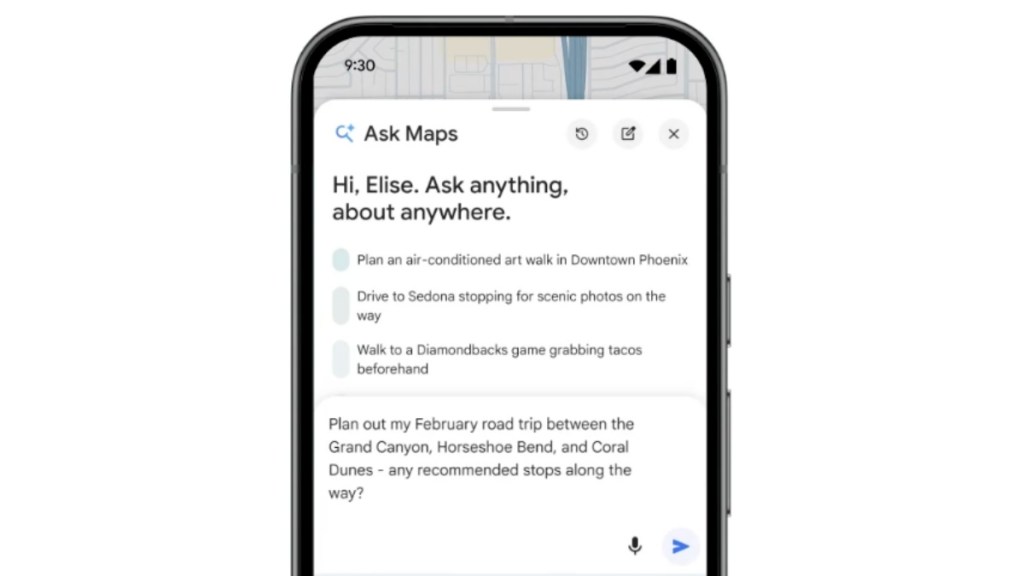
On the street, you ask a friend; Ask Maps wants to be that friend. Using Google’s Gemini model, Ask Maps accepts natural-language questions and returns curated, step-by-step suggestions rather than a list of pins.
Say you whisper, “My phone is dying — where can I charge it without having to wait in a long line for coffee?” and Maps replies with a short list of places, estimated wait times, and a ready route. Or ask, “Is there a public tennis court with lights on that I can play at tonight?” and it filters by hours, lighting, and distance. It can assemble an entire itinerary from a single prompt: name three destinations and Ask Maps will plot the route, give ETAs for each stop, and surface user-reviewed detours and side trips pulled from millions of Google Maps reviews.
The results are personalized. If you’ve favored vegan spots before, Ask Maps will weight suggestions toward those choices when you ask, “My friends are coming from Midtown East to meet me after work. Any spots with a cozy aesthetic and a table for 4 at 7 tonight?” That preference-aware logic is tied to your history in Google services, so the answers feel less random and more like a tailored shortlist.
What is Ask Maps in Google Maps?
At its core, Ask Maps is a conversational layer on top of Google Maps. It combines Gemini’s language understanding with Maps’ local data, reviews, and routing. The result is a single-pane reply that can include directions, timing, and contextual notes—no extra tabs required.
Experience a New Way to Commute with Google Maps
When I took a complicated exit last week, the new view made the junction obvious in a way a flat map never could. Immersive Navigation adds 3D buildings, road contours, and transparent structures so you can see the route beyond the nearest block.
Think of Immersive Navigation as a diorama come to life: transparent buildings, highlighted sidewalks, and real-world imagery merge with lane-level guidance. Google pairs that visual feed with a more natural-sounding voice assistant to walk you through multi-exit roundabouts and complex merges. You’ll also see trade-offs for alternate routes and live traffic data pulled from both Google Maps and Waze, which helps you decide whether saving three minutes is worth the extra highway weaving.
Parking is another practical win. Immersive View can show nearby parking options using Street View imagery and highlight the building entrance you should aim for, which reduces the time you spend circling blocks looking for a curb.
How do I use Immersive Navigation in Google Maps?
Immersive Navigation will roll out in the U.S. on Android, iOS, and CarPlay. When it appears for you, switch to the new navigation view during a route and the 3D rendering and voice guidance will activate. The visual layer is especially helpful in dense downtowns or on unfamiliar interchanges.
When will Ask Maps be available?
Google says Ask Maps and Immersive Navigation are starting to roll out in the U.S. Availability will expand over time; if you follow Google’s product updates or the Google blog, you’ll see region-by-region timing. Integration with Gemini is a clear signal Google plans to tie its AI advances into Maps, Android, and other services in the Google ecosystem.
I’ve used both features in real streets and inside simulated test runs. Ask Maps is a shortcut for multi-step planning; Immersive Navigation reduces the mental load when the road gets messy. But neither is perfect: Ask Maps can mirror biases in local reviews, and Immersive Navigation relies on fresh imagery—so older Street View captures can mislead in rapidly changing areas.
If you care about efficiency, privacy, or control, watch how data flows between your Maps history and Gemini suggestions. And pay attention to platform ties: Apple Maps has its own 3D approach, Waze still feeds traffic into Google’s stack, and CarPlay users will want to test how familiar UI elements behave when the new layers arrive.
I’ll keep testing as the rollout spreads. Will you trust a map that thinks like you?