
The hum of the factory was deafening. You stare at the chaotic jumble of machinery, a knot forming in your stomach, knowing there had to be a better way. Then, a veteran operator casually mentions blueprints, and a wave of relief washes over you.
In Arknights Endfield, blueprints are the backbone of efficient AIC factories, offering pre-designed production chains ready for implementation. Think of them as expert templates, saving you from re-inventing the wheel each time you need a new production line. Blueprints capture every detail, streamlining your base construction.
Let’s explore how to craft your blueprints and import designs from other players.
Crafting Your First Blueprint in Arknights Endfield
I remember spending hours optimizing a single ore-refining setup, only to realize I needed to replicate it multiple times. Before tapping into community designs, creating your own blueprints is valuable, like having your own recipe book.
- Enter the AIC Mode and use the Top View.
- Select Bulk Action, and highlight the specific design you want to save as a Blueprint – either a portion or the entire setup.
- Once satisfied with your selection, press Ctrl+S to save it.

Customize your Blueprints with unique names, descriptions, icons, and tags for easy categorization and identification. These details can save you time down the line.
Importing Blueprints: Borrowing Expertise in Arknights Endfield
Watching a neighbor effortlessly assemble a complex piece of furniture got me thinking about Arknights Endfield. Using designs from other players allows you to leverage their expertise, unlocking base designs you might not have conceived yourself. It’s like discovering hidden shortcuts in a familiar city.
- To import, you’ll need Blueprint codes. These are unique alphanumeric strings shared within the community. Copy a code from outside the game.
- Access your Core AIC (or Outposts).
- Enter Top View by pressing Q/R3 (if using a controller).
- Press F1 to bring up the Blueprint menu.
- Go to the Shared Blueprints tab to paste the copied code.
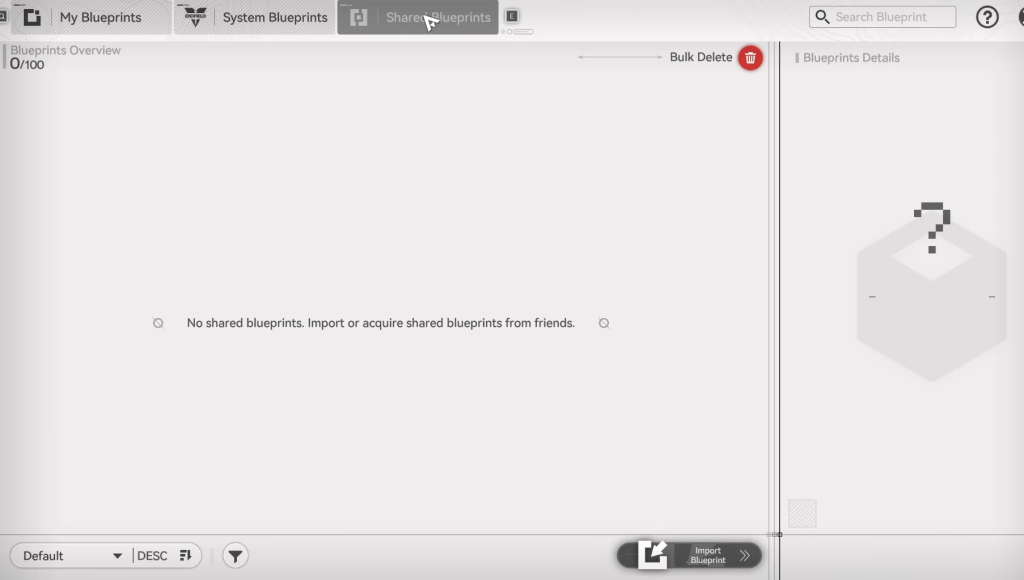
Alternatively, visit another player’s base in Arknights Endfield and directly copy their Blueprint, automatically capturing the alphanumeric code.
Can I modify imported Blueprints?
Absolutely. Think of imported blueprints as starter templates. They are meant to give you a head start. You can modify, expand, and optimize them to match your needs.
Blueprint Codes: Community Favorites in Arknights Endfield
The Arknights Endfield community actively shares codes online. I’ve personally found these codes valuable and will continue updating the list below. Remember, these designs are not set in stone; feel free to adapt them.
What happens if a Blueprint requires resources I don’t have yet?
The game flags any missing resource requirements when you attempt to place a Blueprint. This allows you to adjust the design or prioritize resource acquisition.
Are Blueprints transferrable between different saves?
Blueprints are tied to your account, not a specific save. So, yes, any blueprint you create will be available across all your playthroughs.