
The clock on my Sim’s phone blinked while Marina Corsair—aka the Royal Envoy—stayed stubbornly off the radar. I swore the quest was broken until I found the one interaction that actually counts. You know that small, sinking panic when a single missing step stops an entire event? I’ve been there.
You’ve stared at the phone icon until it blurred. Here’s the exact sequence that finishes the call quest.
If you’re chasing this task, it behaves like chasing a ghost in a fog: the Envoy is present in the world but the game only accepts one specific action to tick the objective. I tested the obvious routes—the Relationships panel, invites, even visiting her in-world—and only one method reliably completed the mission.

- Open the phone menu. It’s the icon in the bottom-left of the screen, between the notepad and calendar.
- Tap the Social app. The icon shows a mouth with a chat bubble.
- Select “Chat with…” This is the only social action that registers for the Lost Legacies call objective.
- Choose Marina Corsair. The Royal Envoy will appear under her given name. She’s the red-haired Sim wearing an elegant black, green, and gold vest—pick her from the list.
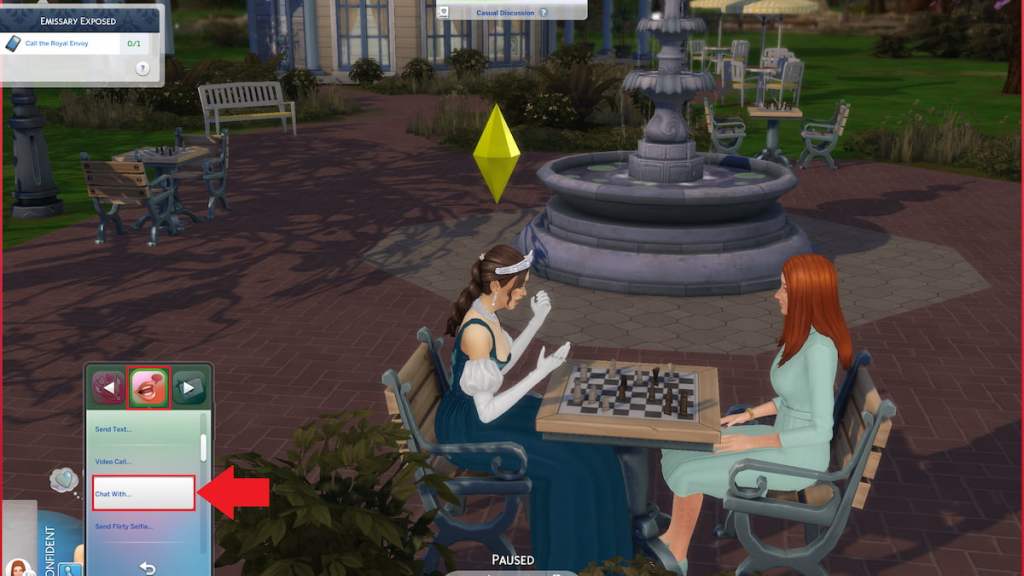
How do I call the Royal Envoy in The Sims 4?
Short answer: use the phone, open Social, pick “Chat with…”, then choose Marina Corsair. Say it aloud if it helps. The game won’t mark the objective complete if you use quick-call from Relationships or try other social interactions—only the Social > “Chat with…” path counts.
Why won’t the Royal Envoy answer my calls?
It’s rarely a bug. The task simply requires the full chat action to finish; that chat takes longer than a typical conversation. If you interrupt it, or you don’t select the Social > “Chat with…” option, the objective won’t register. Give the interaction time—event timers and animations can make it feel like nothing’s happening.
You finish the chat and then stare at the quest tracker. Here’s what follows and where to go next.
The mission will check off once the long chat completes. I sat through the conversation thinking it was frozen, and then the quest updated. Treat it like a slow-loading cutscene rather than a single tap. If the objective still refuses to complete after a patient wait, try saving and reloading, or relaunch The Sims 4 via the EA App or Steam—both platforms are commonly used by players who report similar hiccups.
After the call, the Lost Legacies event throws more decisions at you: surprising the Envoy, investigating the Blue Velvet Nightclub, choosing whether to forgive Marina, and visiting the Municipal Muses Museum. The choices you make shape the narrative, and players on Reddit, Discord, and YouTube often share which outcomes they prefer—I scan those threads when I want other players’ perspectives.
This fix has been tested across Origin/EA App and Steam installs and works for players using Maxis’ live content; if you’re running mods or custom content, temporarily disable them to rule out interference. Want a quick debug trick? Save, exit to desktop, then relaunch the game—many Sims players treat that like hitting a reset button when objectives act oddly, and it’s as effective like finding a needle in a haystack sometimes.
So: you can finish the call by using the Social > “Chat with…” option and waiting for the conversation to fully run. Will you confront the Royal Envoy directly or keep digging for evidence—what will you choose?