
I landed in Classified Canyon with the storm breathing down my neck and a tiny diamond icon prickling my HUD. You can almost feel the map tilt the closer you get; the rocket hums like a warning. I found the ship log, pressed interact, and the story snapped into focus—now you can too.
I’ll walk you straight to the object, tell you what button to hit on whatever system you use, and explain what the audio actually reveals about The Seven’s latest chess move. Think of this as a short field report from someone who’s done the running around so you don’t have to.
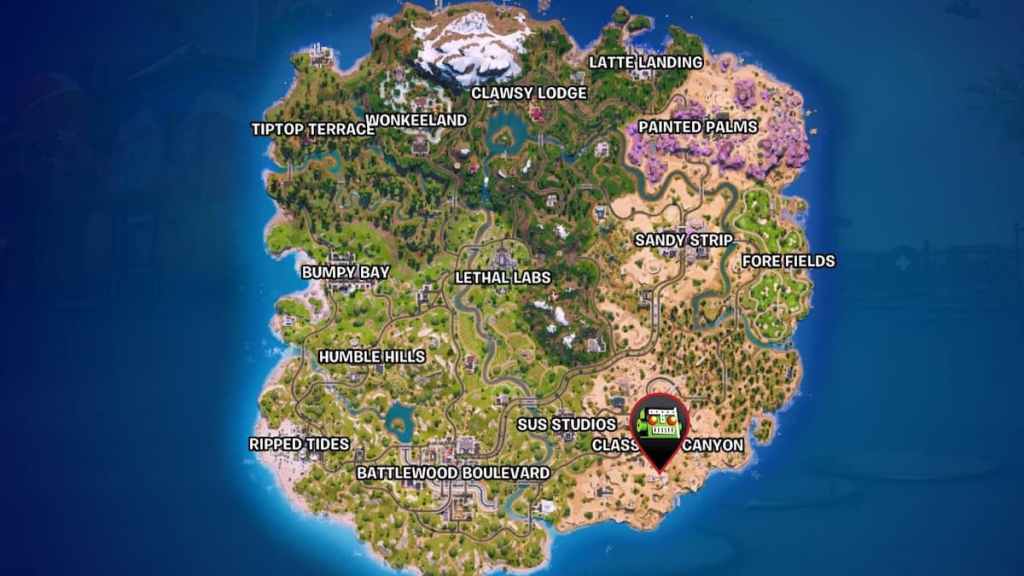
From the cliff the rocket looks like a tin can at dawn — The Visitor’s ship log location in Fortnite
If you’ve dropped into Classified Canyon before, you already know the place: southeast corner of the island, a cluster of buildings pinned to a cliff, and a rocket that spoils the skyline. The ship log sits inside a specific building near that rocket, not inside the big triangular structure in the center of the POI.
Where is The Visitor’s ship log located in Chapter 7 Season 1?
Head to Classified Canyon, approach the cliff-side building closest to the rocket, and go inside. On the first floor, check the corner of a small room—the log is on the ground and gives off a sparkle. You’ll also see a small diamond exclamation point on your HUD that points to the exact tile.
If you’re scanning from above, climb the central triangle and face south; the building you want is directly below. Vengeance Jones and The Visitor NPCs often spawn nearby, so their locations act as useful landmarks.
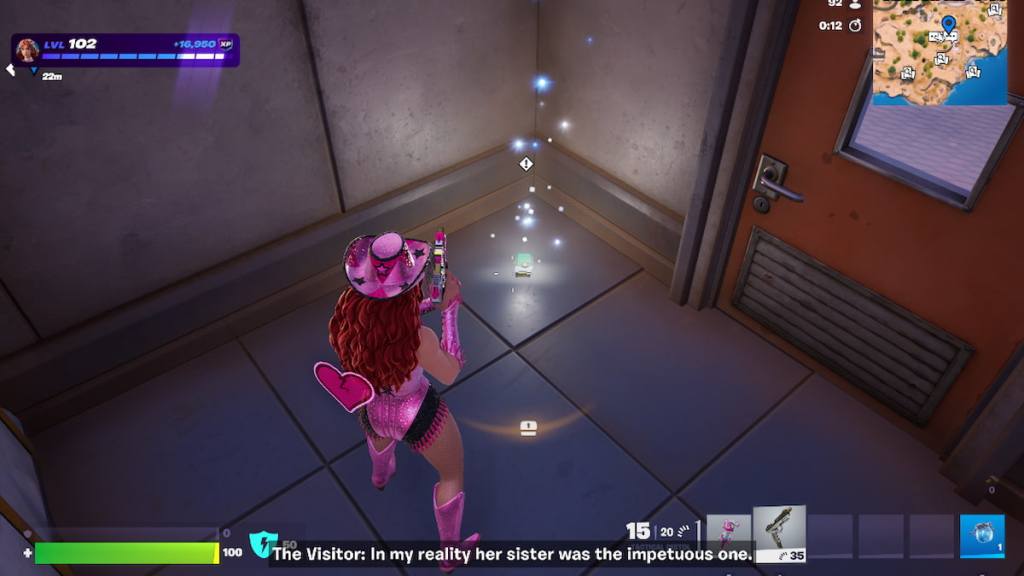
The Visitor’s ship log in your hands — how to interact and what happens next
When you step into the room you’ll see the tiny, gleaming log on the floor—like a whisper in a crowded room, it’s small but unmistakable. Walk up, watch for the word “Interact,” and press the button shown on-screen to trigger the audio.
How do I interact with ship logs in Fortnite?
The prompt displays the correct control for your platform. On PC it’s usually the E key; on consoles it’s the face button the HUD shows (Xbox, PlayStation, Nintendo Switch). Epic Games’ on-screen helper makes it obvious—if you play on different platforms, the control is always shown next to “Interact.”
What happens when you listen to The Visitor’s ship log?
Activate the log and the quest registers immediately—the game marks it done as soon as you interact. You’ll then hear roughly a minute of back-and-forth: The Visitor talking to The Order, threads of reunion and agenda, and dialogue that nudges other Season 1 beats forward.
If you want the clip to play without interruption, clear the room first. The audio plays out even if enemies or other players are nearby, but getting a quiet listen makes the lines easier to catch for story context and YouTube clips.
Want more story tasks after this? Try touching a Zero Point Shard, hunting down Human Bill, contacting Dark Voyager’s ship while airborne, or siphoning items with Treasure Cannons. If you buy the Battle Pass it’s $9.99 (about €10) on the Epic Games store—handy if you’re chasing XP and story missions.
For quick map overlays, community sites like Fortnite.gg and streams on YouTube or clips on X are useful; I check Discord groups for spawn reports when I’m farming quest items.
So: you know where it is, how to trigger it, and why it matters—are you going to snag the log quietly or make it a highlight for your next stream?