
I joined a private Jujutsu Shenanigans server and watched a friend bend the rules with a single imported moveset. You can feel the room tilt when a match suddenly behaves like it’s on a different rulebook. I remember thinking: if this is possible, why are half the servers still plain vanilla?
I’ll walk you through the exact steps I use when I host or join a server, and show which Workshop tools and settings matter. Read fast—there’s a moment of advantage between posting a moveset and the server filling up.
Servers fill fast after a viral drop — How to Use Custom Movesets in Jujutsu Shenanigans
Observation: public server lists spike whenever a talented author releases a character or moveset. That small rush is why you want a private server to test or to host friends without chaos.
I run private servers to import movesets, test balance, and keep a tidy playlist of favorites. You’ll use the in-game Workshop (Steam Workshop if you’re on PC) and the Private Server settings. I recommend toggling the Workshop Access so everyone in your room can import without delay.
How do I import custom movesets in Jujutsu Shenanigans?
Short answer: create a private server, turn on Workshop Access, open the Workshop, find the moveset, and import. Here’s the exact sequence I use when I host:
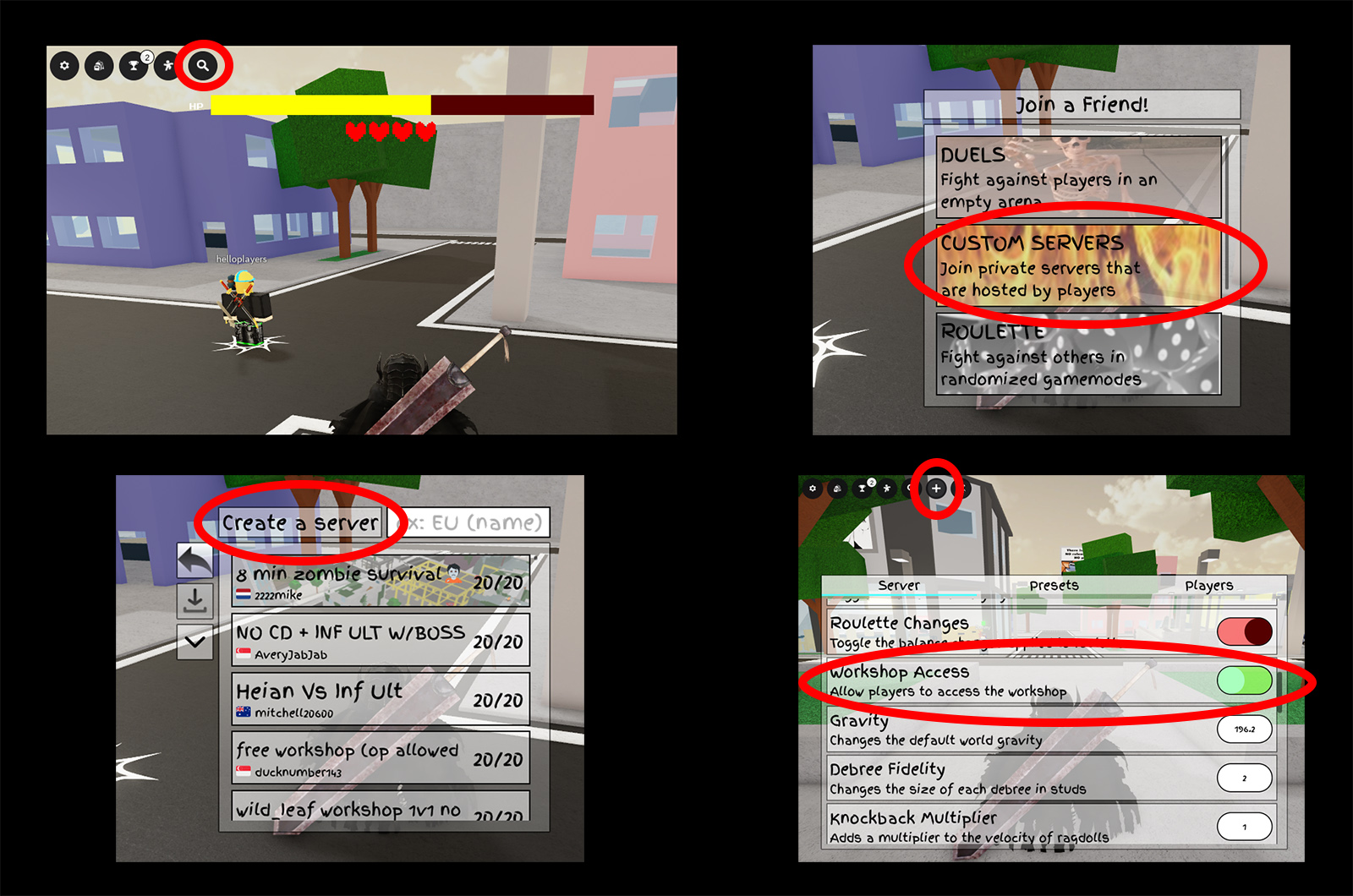
- Launch Jujutsu Shenanigans and click the magnifying glass icon to open the server browser.
- Select Custom Servers and click Create a Server.
- Name your server and click Create — it will now appear to others in the list.
- Open Server settings by clicking the + icon in the top left. Optional: toggle Lock Server if you want a closed session.
- Scroll to Workshop Access and enable it so Workshop content can be imported in-room.
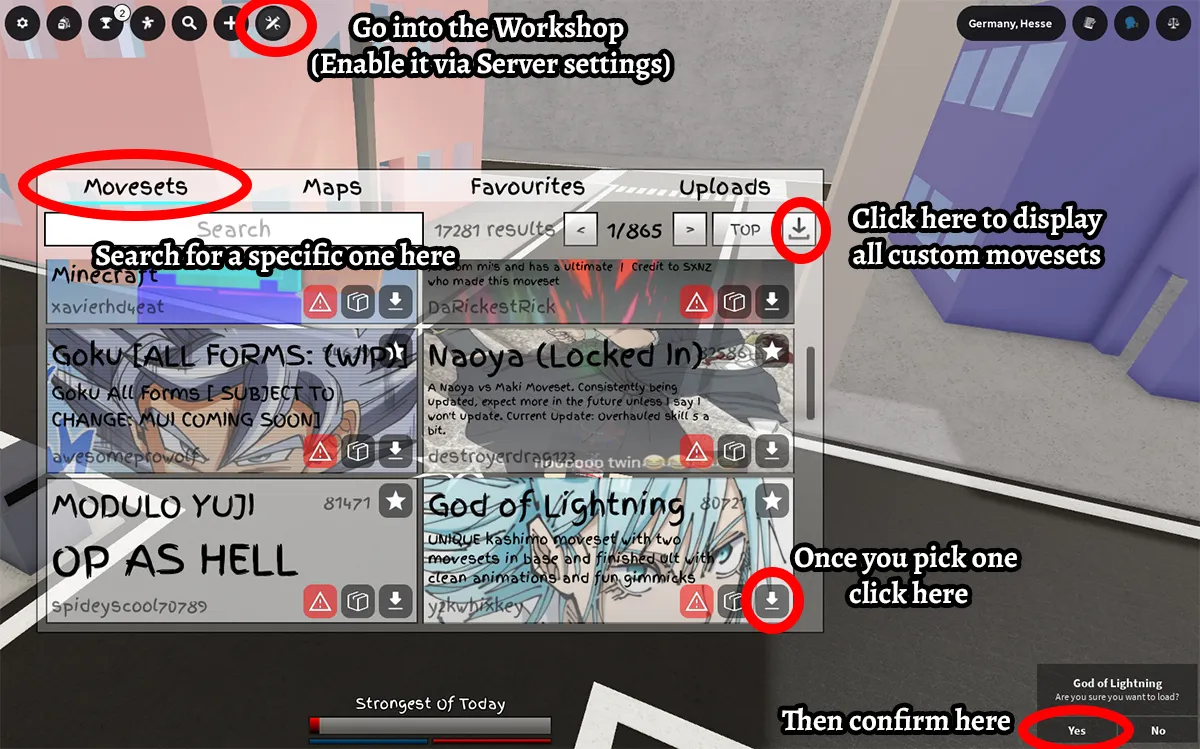
- Click the Workshop icon at the top, pick Movesets, then press the down-arrow to reveal community uploads.
- Search by name (for example, Modulo Yuji) or browse. Click the import icon next to the moveset and confirm by hitting Yes.
- Repeat for any additional movesets. Star your favorites to find them later in the Favorites tab.
Pro tip from my sessions on Steam and Discord: if you want to test multiple builds, spawn dummies via the server settings to isolate interactions. The Workshop is the hub; the more familiar you are with its UI, the faster your sessions start.
Communities cluster around certain servers — Custom Movesets With Friends in Jujutsu Shenanigans
Observation: a server with clear rules and a few starred movesets becomes a social magnet. Friends join faster if you name the server, keep a short description, and leave Workshop Access on.
There are two reliable ways to play with friends: host your own private moveset server or join an existing game-mode server that runs custom movesets. Both work well; your choice depends on whether you want control or chaos.
Can I use custom movesets with friends in Jujutsu Shenanigans?
Yes. Method 1 is the one I prefer when I want order. Method 2 is for when you want mayhem.
Method 1 — Create your own custom moveset server
- Have your friends open JJS, click the magnifying glass, then Custom Servers.
- They should toggle the down-arrow to show all servers, search your server name, and join.
- Confirm Workshop Access is on in your server (+) menu so they can import movesets themselves.
- They can open the Workshop, click the arrow to display all moves, and import the ones they want.
Method 2 — Join a custom moveset game-mode server
Search the public server list for keywords such as “custom,” “X+ Custom Movesets,” or specific creators. These community-hosted servers often run curated playlists (Modulo Yuji, Sonic, The Flash from DC Comics and similar). Join solo or with friends and expect chaotic, fast-paced matches.
If you host, think of your server as a fuse that sparks a riot; if you join public hosts, treat them as a Swiss Army knife for your matches — pick the tool that fits the night.
How do I create a private server in JJS?
Create > Name > Configure via the + menu. Lock it if you want silence; leave it open if you want a steady queue of players. Use the Workshop tab to keep imports quick. That’s it.
Final note: the Workshop and Private Servers are the two levers that turn ordinary matches into curated showdowns. Steam Workshop remains the primary distribution channel on PC; creators post there and players import through the in-game Workshop UI. Moyens I/O and community Discords are good places to find recommended movesets and creators.
Want to keep your server tidy, share an experimental Modulo Yuji build, or spark a conversation about balance — which would you pick first?