
I was racing to send a message on a slow airport Wi‑Fi, my thumbs fumbling over a long email. Halfway through I gave up and spoke the rest aloud, more out of desperation than faith. The reply arrived cleaner, faster, and stranger—like someone had edited my thoughts as I spoke.
What is Wispr Flow?
I was on a late train, testing whether voice could replace typing for everyday work. Wispr Flow is an AI voice-to-text tool that turns spoken words into “clear, polished writing in every app.” You can type at about 45 words per minute; I was getting close to 220 WPM by speaking, which means you’re saying things roughly four times faster than you can type them.
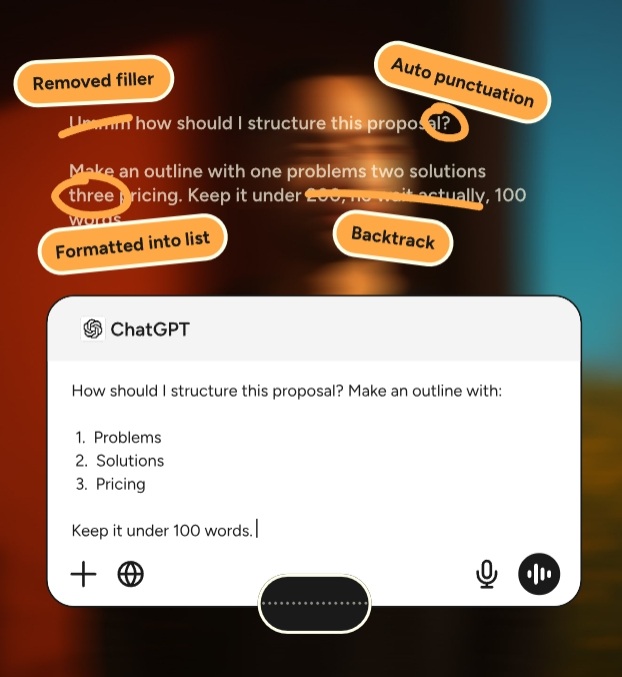
This isn’t a literal transcript engine that copies every “um” and half-finished thought. Instead, Wispr Flow acts like an editor in your skull: it strips filler words, adds punctuation, and smooths corrections in real time. It also adapts tone to context—Gmail reads professional, WhatsApp reads casual—so the output fits the app you’re using.
Is Wispr Flow more accurate than Gboard?
If you’ve used Gboard’s voice typing, you know it often delivers verbatim results that need post-editing. Wispr Flow trades literalness for intent: it guesses how you want a sentence to land and edits filler and false starts out. In my tests, it handled name spellings, punctuation, and mid-sentence corrections better than Gboard or Android’s built-in dictation.
Wispr Flow Features
At my desk I opened Google Docs and tried a 300-word brief to see formatting and flow. Wispr Flow supports over 100 languages and works in any text field—Notion, Gmail, Google Docs, WhatsApp, Cursor—wherever you would normally type.
Highlights:
- Context-aware formatting: formal in email, casual in chat.
- Adaptive learning: it remembers uncommon names and phrases from surrounding text.
- Error correction: you can backtrack mid-sentence and it fixes the transcription.
- Smart lists and punctuation: speak numbers and it creates numbered lists with correct spacing and punctuation.
There’s a free tier that gives you 2,000 transcribed words per week and a paid plan at $12 per month (€11) for unlimited words. It feels like a Swiss Army knife for speech—compact and useful in more ways than one.
How much does Wispr Flow cost?
Free: 2,000 words per week. Paid: $12/month (€11) with unlimited transcription. That positions it competitively against subscription services and premium keyboard apps.
Hands-On Experience Using Wispr Flow on Android
I installed Wispr Flow on my Android phone, opened Google Keep, and the floating icon appeared without fuss. Tap it, speak naturally, hit done, and the text shows up—clean and readable—usually within a second.
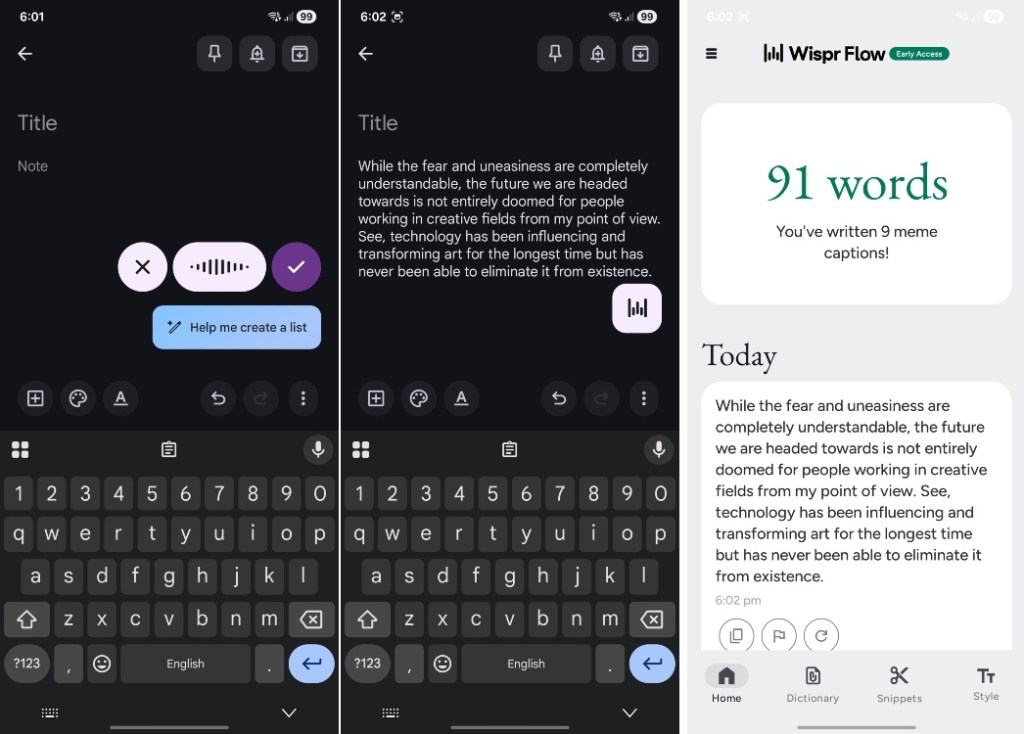
It handled mid-sentence corrections and filler-word removal with surprising consistency. The floating icon disappeared when I left the text field, keeping the UI tidy. On WhatsApp the icon failed to appear a few times—likely beta quirks—and features like Dictionary and Snippets were missing on Android at the time of testing.
One friction point: you must grant an accessibility permission that allows the app to view your screen. That’s standard for overlay-style tools, but it will raise privacy questions for some people. Despite that, I liked not having to switch keyboards—the app lives next to Gboard so you get both voice and traditional typing instantly.
Does Wispr Flow work on Android?
Yes—Android, iOS, macOS, and Windows are supported. The Android build is fully functional for basic dictation, with a few advanced features still rolling out. If you use Google Docs, Gmail, Notion, or WhatsApp, Wispr Flow will appear as an overlay in most text fields.
Wispr Flow is part of a broader shift: from typing to speaking, and from tools that transcribe to tools that interpret. That shift is already nudging players like Google and keyboard apps to rethink voice input, and it’s a reminder that voice-first interfaces—paired with features from OpenAI-style language models and device ecosystems—are arriving sooner than many expected.
If voice can edit as you speak and shave minutes off routine writing, are you ready to stop polishing drafts with your thumbs?