Have you ever wished you could change your Gmail address without losing all your precious emails and data? You’re not alone! Many users have been frustrated by the inability to change their “@gmail.com” username. Well, good news is on the horizon. Google is rolling out a feature that allows users to change their Gmail addresses while keeping everything intact.
This new capability, initially reported by 9to5Google, means that even if you have a “@gmail.com” address, you can now opt for a new username. However, this feature is gradually being introduced, so it might not appear in your account just yet.
What You Should Know Before Changing Your Gmail Address
Before jumping in to change your Gmail address, keep these key points in mind:
- When you change your Gmail address, you’ll pick a new username. Don’t worry, your old address will still work alongside the new one.
- Your new address will function like an alias, directing emails to your existing account.
- You can receive emails at both addresses, ensuring you don’t miss a thing.
- Once you change your address, you won’t be able to modify or delete it for a year.
- All your Google data, including Photos, messages, and emails, remains untouched.
- You can sign into any Google service using either your old or new email.
- You can change your Gmail address a total of three times.
How Can You Change Your Gmail Address?
To check if you can update your Gmail address, follow these steps. Remember, this feature is rolling out slowly, so if you don’t see it immediately, there’s no need to panic.
- Visit myaccount.google.com/google-account-email and log into your Google account.
- If you have access to the feature, look for a pencil icon that allows you to edit your Gmail address.
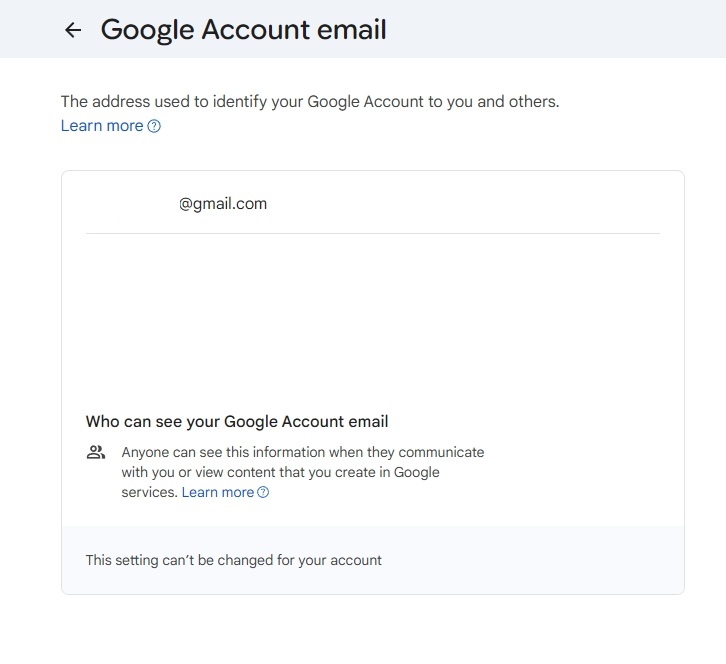
- If the option isn’t there, you’ll see a message saying, “This setting can’t be changed for your account.” In that case, hang tight until it becomes available.
That’s all there is to it! I recently checked my own accounts and found that the feature isn’t universally available just yet, but rest assured, Google is rolling it out bit by bit.
Can I change my Gmail address if it’s an @gmail.com account?
Yes, you can now change your Gmail address even if it ends in “@gmail.com.” This is a new feature that allows for more flexibility without losing your existing data.
Will I lose my emails if I change my Gmail address?
No, changing your Gmail address will not affect your existing emails or data. You’ll still have access to everything you had before.
Can I use my old Gmail address after changing it?
Absolutely! Your old Gmail address will continue to work alongside your new address, meaning you won’t miss any emails sent to either one.
How often can I change my Gmail address?
You can change your Gmail address up to three times, so choose your new username wisely!
Feeling excited about this new feature? Keep exploring more of Google’s tools! What’s the first thing you would do after changing your Gmail address? Share your thoughts below!