The hum of the computer was the only sound as Hiroshi refined his prompt, again. Another failed attempt to capture the precise angle of Naruto’s Rasengan. He leaned back, defeated, wondering if the AI would ever truly grasp the spirit of the Hidden Leaf. What if there were tools to bridge the gap between fan and AI?
Naruto isn’t just an anime; it’s a cultural touchstone. The journey of Naruto Uzumaki and his comrades, from mischievous kids to formidable ninjas, has inspired countless fans to create art, reimagine scenes, and invent entirely new characters. Now, with the rise of AI, crafting Naruto-inspired art has become more accessible than ever.
If you’re eager to generate your own Naruto artwork, there are tools to produce characters, and Naruto prompts to kickstart your creativity. Below, I’m sharing my hand-picked selection of prompt generators, character creators, and ready-to-use prompts for crafting striking Naruto art. Plus, a bonus tip for experimenting with different outfits for your Naruto characters.
Crafting the Perfect Prompt: The 3 Best Naruto Prompt Generators
Ever notice how some AI art looks…flat? It’s usually down to the prompt. These prompt generators will help you construct text prompts that capture the heart of Naruto. You can then use these prompts in your preferred text-to-image generator, such as Stable Diffusion or Midjourney.
1. PromptHero’s Naruto AI Art Generator
PromptHero is a platform for discovering and learning from AI image prompts, including those for Naruto and other anime. Its primary function is to allow users to find and replicate prompts used to generate specific images, along with information about the AI models required. It’s invaluable for understanding prompt construction, saving time, and recreating particular art styles.
It’s not a direct image creator; instead, it leans on community uploads. The quality hinges on community contributions, and using it requires familiarity with AI image tools. Instead of direct image creation, it focuses on prompt sharing.

2. AIPRM for ChatGPT: Your Shortcut to Naruto Prompts?
AIPRM is a browser extension for ChatGPT that helps you generate Naruto prompts with greater speed. It boasts a vast library of ready-made prompts that can be searched and used as templates, especially for creative writing or AI image generation.
You can tweak prompts by altering characters, scenes, and styles, and fine-tune the tone to produce better descriptions. Keep in mind that AIPRM needs ChatGPT and other AI tools, has a learning curve, and only functions via a web browser with an internet connection.

3. promptoMANIA
promptoMANIA is a free, web-based tool designed to help users craft detailed prompts for AI art generators like Midjourney and Stable Diffusion. It’s akin to a digital LEGO set for prompts. If you’re creating Naruto art, you’ll need to manually input all character and scene specifics.
Its visual menus make it straightforward for beginners to incorporate styles, lighting, and other effects without needing to understand complicated prompt rules, and it’s compatible with multiple AI models. While it’s valuable for experimentation and costs nothing, it doesn’t provide Naruto-specific options and has limited control over precise character details.

Bringing Characters to Life: The 3 Best Naruto Character Generators
What if you need a character, pronto? These Naruto character generators can produce nearly any character you envision:
1. PixAI.art
PixAI.art is an AI art platform with a focus on anime, making it ideal for generating Naruto-style characters. It has a vast community model library. Users can select specific character models to achieve very precise aesthetics and utilize advanced tools to manipulate poses and details.
It also provides editing and upscaling tools and offers free credits to get you started. However, the sheer number of model choices can be overwhelming, image quality is model-dependent, and costs are structured around a credit system. Plus, mastering the advanced features takes time.

2. Pixelcut
Pixelcut’s AI Naruto Character Creator is designed for generating Naruto-style characters from text descriptions. Users input specifics like village, clan, abilities, outfits, and jutsu, and the AI creates a high-quality, anime-style ninja image that aligns with the Naruto universe.
It stands out for its ease of use, speed, and production of high-resolution, watermark-free images, making it suitable for fan characters, stories, and avatars. But, quality relies on the detail of your character description, and advanced features might need a subscription. It also primarily concentrates on single-character portraits as opposed to complete scenes.

3. Komiko
Komiko is an AI tool for developing anime and manga content, which includes Naruto-style characters. Thanks to its anime-centric models and a dedicated Naruto generator, character creation is simple. The tool’s forte lies in upholding character consistency across numerous images, which is valuable for stories and comics.
It also accommodates scenes, comic panels, and basic animations. However, its interface might feel overwhelming to newcomers, it offers limited in-depth control, and it is mainly geared toward anime and manga styles.

Ready to Go: 10+ Naruto Prompts for Text-to-Image Generators
Below are 10+ Naruto prompts for creating Naruto-themed AI art via tools like Midjourney, Stable Diffusion, or PixAI.art. The prompts are arranged by style to help produce diverse aesthetics, from classic action scenes to imaginative alternative concepts. Feel free to mix and match them to personalize your Naruto art:
What makes a good Naruto character portrait? Classic Action & Character Portraits
These prompts spotlight iconic Naruto characters in memorable moments, capturing their strength, emotion, and signature abilities in a dramatic anime style:
-
1.Naruto Uzumaki in Six Paths Sage Mode, floating mid-air with nine
Truth-Seeker Orbs orbiting around him, glowing yellow staff in hand.
Vibrant, god-like aura, determined expression, anime keyframe, detailed
line art, vibrant colors, official art style. -
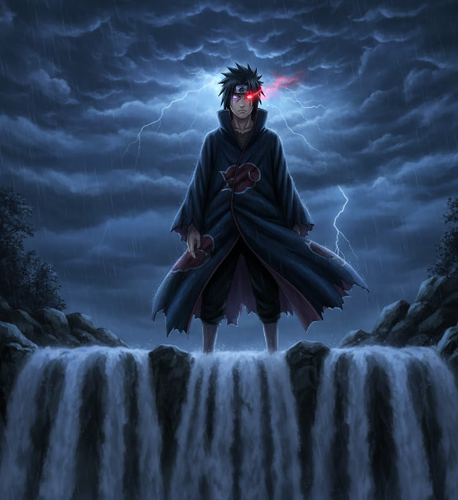
2.Sasuke Uchiha, standing atop the Final Valley waterfall. He activates
his Rinnegan in one eye and a fully evolved Mangekyo Sharingan in the
other, a dark storm brewing behind him. Moody lighting, detailed cloak,
sharp features, and dramatic composition.
-
3.Kakashi Hatake, mid-action, performing Lightning Blade (Chidori) in
the rain at night. The blue-white lightning illuminates his face and the
falling raindrops. Blurred motion, speed lines, cinematic lighting, and
Uchiha Obito in the blurred background.

What are the most iconic Naruto settings? Iconic Village & Landscape Scenes
These prompts move the attention from Naruto characters to their environment. They reflect the mood, history, and beauty of notable Naruto locations via detailed landscapes:
-
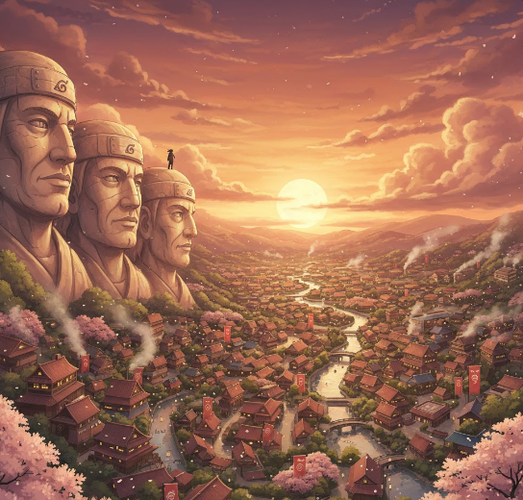
1.Panoramic view of the Hidden Leaf Village (Konoha) at sunset from the
Hokage Mountain. The stone faces are illuminated, lights are turning on
in the houses below, and cherry blossoms are falling. Studio Ghibli
style, breathtaking vista, warm colors, and highly detailed.
-
2.The Valley of the End at dawn. The massive statues of Hashirama Senju
and Madara Uchiha stand shrouded in mist, with the waterfall roaring
between them. Epic scale, ancient, moss-covered stone, rays of sunlight
piercing the fog. -
3.The Akatsuki hideout, interior. Itachi Uchiha and Kisame Hoshigaki are
silhouetted against a giant stone statue in a dark, cavernous space. Red
clouds on their cloaks, a moody red and black color palette, and an
ominous atmosphere.

What makes a good Naruto fight scene? Dynamic Jutsu & Battle Scenes
Here are some Naruto prompts that capture the excitement and intensity of epic battles, exhibiting each ninja’s unique jutsu, speed, and power in dynamic, action-filled moments:
-
1.Rock Lee, having opened the Fifth Gate, releasing a devastating Front
Lotus on Gaara. A whirlwind of green energy and sand, explosive impact,
a blur of motion, a dynamic fighting pose, and intense facial
expressions. -
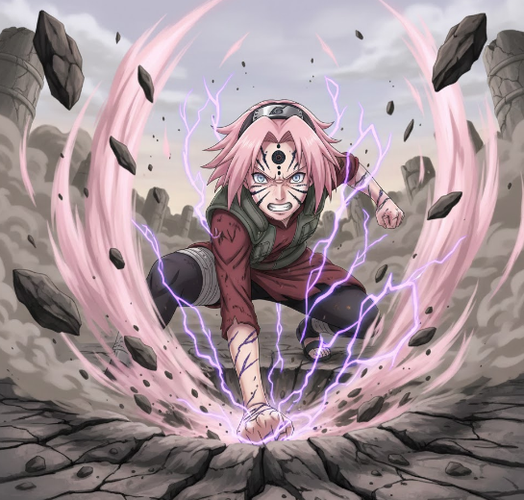
2.Sakura Haruno, in the Fourth Great Ninja War, her Byakugou seal fully
released. She punches the ground, creating a massive crater with seismic
force, her pink chakra flaring around her. Powerful, determined,
cinematic, detailed destruction.
-
3.Minato Namikaze, the Fourth Hokage, in mid-Flying Thunder God
Technique (Hiraishin). Multiple glowing kunai are in the air, and he is
teleporting in a flash of yellow light, leaving an afterimage. Speed and
motion are emphasized, with a bright yellow and blue color scheme.

Pushing Boundaries: Creative & Alternative Concepts
The following Naruto prompts explore imaginative and unexpected takes on familiar characters.
They combine fantasy, modern life, and everyday scenes to generate fresh, visually striking concepts:
-
1.A Tailed Beast (like the Nine-Tails or One-Tail) reimagined as an
ancient, benevolent forest spirit in a mystical Japanese forest.
Ethereal, glowing, surrounded by fireflies and ancient trees, Makoto
Shinkai art style, beautiful and serene. -
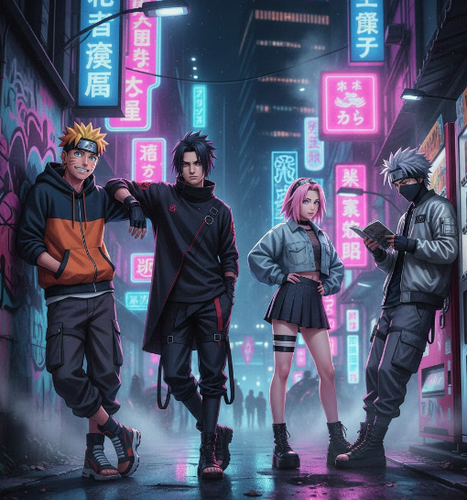
2.The members of Team 7 (Naruto, Sasuke, Sakura, and Kakashi) in a
modern-day streetwear photoshoot in Tokyo at night. Neon lights, urban
backdrop, cool and casual poses, fashion photography, cinematic
lighting, and vaporwave aesthetic.
-
3.Jiraiya, the Toad Sage, writing his novel at a small wooden desk in a
hot springs inn. Steam rises from the bath, scrolls and ink bottles are
scattered around, a nostalgic and peaceful mood, a detailed painterly
style, and warm light.

[Bonus Tip] Seeing Yourself in Naruto Clothes: Free AI Clothes Changer
Ever thought about how you’d from the Hidden Leaf Village? You can try on outfits with a tool like Tenorshare PixPretty. It features a free Online Clothes Changer that lets you upload photos and swap the outfit you’re wearing. The tool will adjust the clothes to fit your body shape, pose, and lighting with realistic HD results.
Here’s how to use the PixPretty Clothes Changer to see how you or a person
appears in a different outfit:
Step 1: Upload your photo and the image of the clothing you’re interested in trying on.

Step 2: Select the uploaded clothing or combine pieces to build your style. You can also include shoes and accessories.

Step 3: Click “Generate” to view the clothes on the person in the photo.

Final Thoughts
Generating Naruto AI art has never been more accessible, thanks to tools for prompts and character design. PromptHero, AIPRM, and promptoMANIA aid in crafting detailed prompts, while PixAI.art, Pixelcut, and Komiko enable you to produce high-quality Naruto characters with control over poses, outfits, and expressions.