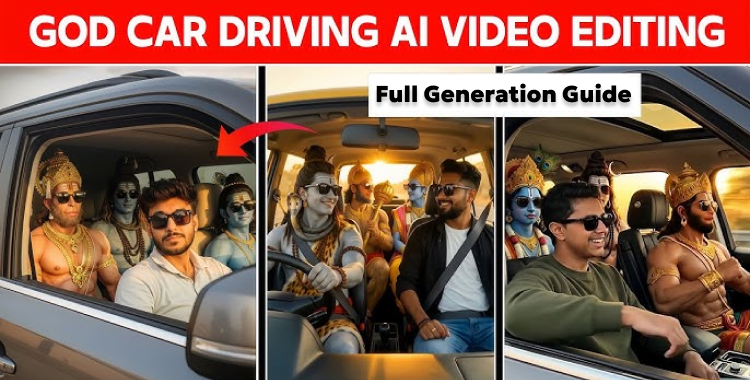
The engine hummed, a low thrum against the vast silence of the desert. A figure in sunglasses glanced over, a ghost of recognition in their eyes, as if piecing together a dream. Beside them, Hanuman, rendered in impossible detail, gripped the wheel, a modern deity navigating an age he couldn’t have conceived. The question isn’t *if* AI can generate art, but what happens when that art starts generating a sense of the uncanny?
This tutorial reveals how to craft a cinematic “God Driving Car” AI video from inception to completion. You’ll discover how to conjure a compelling god character image, breathe life into a seamless driving scene, and elevate it with realistic motion and evocative lighting. This guide prioritizes achieving a natural, dramatic aesthetic ready-made for social sharing. The intention is to produce a movie-style AI video that feels genuinely immersive rather than synthetic. If a picture is worth a thousand words, consider this the visual novel you didn’t know you needed.
Part 1. Mastering God Driving Car AI Video Editing Prompts
I recently saw a friend scrolling through TikTok when I noticed one of these videos pop up on his feed, it completely stopped him in his tracks. The blend of familiar faces with divine figures was a scroll-stopping experience. It’s a creative mashup that demands attention. Here’s how you can make your own:
- 1. Select the Right Tool: Begin with an image generation tool. Gemini AI is a solid starting point. If you want a specific face in your video, upload a reference photo. This gives the AI a clear facial framework to work from, preserving identity and details.
- 2. Image Generation: Copy and paste the provided prompts into Gemini AI (or your chosen tool) to generate the initial image. Review the output closely. Don’t hesitate to tweak the prompt and regenerate until you achieve the desired result.
| Theme | Prompts | Copy Now |
| God Driving Car AI Image |
Use the uploaded photo as the PRIMARY and ONLY face reference for the front passenger seat person.
The front passenger must be the exact same person from the uploaded image, with 100% identical facial structure, skin tone, facial proportions, hair or beard, and identity. Biometric accuracy required. Facial landmarks locked. Do not create a new face. Do not beautify, stylize, or alter the identity in any way. Scene: A modern luxury SUV driving through a vast desert highway during golden hour sunset. Front seats: – Driver: Lord Hanuman, muscular physique, monkey face, golden crown, divine ornaments, wearing black sunglasses, hands firmly on the steering wheel. – Front passenger: The person from the uploaded photo, wearing black sunglasses and seatbelt, calm expression, cinematic soft light shaping the face. Back seat: – Lord Shiva with ash-covered blue skin, rudraksha mala, long tied hair, serene expression, black sunglasses. – Lord Rama with blue skin, golden crown, royal divine presence, black sunglasses. – Lord Ganesha with elephant head, traditional ornaments, peaceful and composed expression. Clear spatial hierarchy: front passenger is the visual focus, divine figures remain balanced and secondary. Ultra-realistic cinematic photograph, realistic human skin texture, shallow depth of field, dramatic golden lighting, high contrast, modern movie poster style, ancient mythology meets modern luxury, 8K quality, sharp focus, matte cinematic color grading. exact face match, identity lock, reference image priority, no face variation, no face morphing, no beauty filter, no AI stylization on face |
COPY
|
- 3. Transform the Image into Video: Download your generated image and head over to a tool like Flow AI. Switch to “Frames to Video” mode. Paste your chosen video prompt, upload the image, and hit generate.

| Theme | Prompts | Copy Now |
| God Driving Car AI Video Editing |
Generate a hyper-realistic cinematic video using the uploaded reference image only.
CRITICAL FACE IDENTITY LOCK: Facial structure, proportions, and geometry must remain 100% identical to the reference image. No face reshaping, no beautification, no stylization. Skin texture, pores, and natural asymmetry preserved. Frame-to-frame facial consistency required. MICRO EXPRESSION (VERY SUBTLE): Add a barely noticeable micro-smile. Smile intensity 2–3% only. No teeth visible. Lips remain closed, relaxed. No lip corner stretching. No cheek lift. Eye shape and eyelids remain neutral. Expression should feel like quiet inner enjoyment, almost unnoticeable. ENJOYMENT THROUGH BODY LANGUAGE: Very gentle rhythmic head nod (pitch rotation ±6–8 degrees). Subtle shoulder bounce, low amplitude. Soft upper torso sway synced naturally to the beat. Movement should feel relaxed, seated, and calm, not dancing. Characters & Seating (unchanged): Driver: Lord Shiva Front passenger: uploaded human (primary focus) Back middle: Hanuman Ji Back right: Vishnu Ji All characters share the same minimal rhythmic movement and micro-smile, enjoying the music quietly. Camera: Front dashboard perspective. Slow cinematic push-in toward the windshield. Single continuous shot. No camera shake. Lighting & Mood: Warm golden sunset light. Cinematic reflections on windshield and dashboard. High contrast but natural shadows. Negative Prompt: Strong smile, teeth showing, exaggerated expression, talking, lip movement, laughing, face deformation, beauty filters, identity loss, frame inconsistency. Duration: 6–8 seconds Aspect ratio: 9:16 Style: Ultra-realistic cinematic |
COPY
|
- 4. Saving and Sharing: Once the video is processed, download it for your viewing pleasure or push it directly to platforms like TikTok and Instagram.
Part 2. The 20+ Best God Driving Car AI Video Editing Prompts
The beauty of AI art lies in the details. A slight tweak to a prompt can drastically alter the final image. Think of these prompts as recipes. Experiment and adjust to taste. Who knows, you might stumble on the next viral sensation.
1. Desert & Highway Cinematic God Driving Car Prompts

1. Use the uploaded photo as the PRIMARY and ONLY face reference for the front passenger seat person. The front passenger must match the uploaded image with exact facial structure, skin tone, hair, and identity. Scene: A luxury SUV driving through a vast desert highway at golden hour. Driver: Lord Hanuman wearing a golden crown, divine ornaments, black sunglasses, hands on the steering wheel. Front passenger: the uploaded human wearing sunglasses and seatbelt. Back seat: Lord Shiva and Lord Rama seated calmly. Ultra-realistic cinematic photograph, dramatic sunset lighting, shallow depth of field, film grain, movie poster style, exact face match.
2. Use the uploaded photo as the sole face reference for the human passenger. Scene: A modern black SUV cruising across an empty desert road under a glowing sky. Driver: Lord Vishnu with blue skin, divine crown, sunglasses. Front passenger: uploaded human, calm expression. Back seat: Lord Hanuman and Lord Ganesha. Cinematic lighting, high contrast shadows, modern and ancient fusion, 8K quality, identity lock.
3. Use the uploaded photo as the only facial reference. Scene: A luxury off-road vehicle driving through desert dunes at sunset. Driver: Lord Shiva with ash-marked blue skin and sunglasses. Front passenger: uploaded human with seatbelt. Back seat: Lord Rama and Lord Hanuman. Hyper-realistic cinematic look, dramatic warm lighting, realistic skin texture, exact face preservation.
4. Use the uploaded photo as the primary identity reference. Scene: A premium SUV driving on a desert highway during golden hour. Driver: Lord Rama wearing a golden crown and divine ornaments. Front passenger: uploaded human wearing black sunglasses. Back seat: Lord Shiva and Lord Ganesha. Cinematic editorial photography, soft highlights, shallow depth of field, movie poster composition.
5. Use the uploaded photo as the only face reference. Scene: A luxury SUV driving through an open desert road with endless horizon. Driver: Lord Hanuman, muscular divine form. Front passenger: uploaded human with relaxed posture. Back seat: Lord Vishnu and Lord Shiva. Ultra-realistic cinematic photograph, high contrast lighting, matte texture, identity locked.
6. Use the uploaded photo as the exact face reference. Scene: A high-end SUV driving along a desert highway at sunset. Driver: Lord Vishnu with calm divine presence. Front passenger: uploaded human wearing sunglasses. Back seat: Lord Rama and Lord Ganesha. Cinematic golden lighting, film grain, sharp focus, no face morphing.
2. City God Driving Car Prompts

7. Use the uploaded photo as the PRIMARY and ONLY face reference for the front passenger. Scene: A luxury SUV driving through a neon-lit city at night. Driver: Lord Shiva wearing sunglasses. Front passenger: uploaded human. Back seat: Lord Hanuman and Lord Vishnu. Cinematic night lighting, reflections on glass, ultra-realistic movie style, identity lock.
8. Use the uploaded photo as the exact identity reference. Scene: A modern SUV driving through a downtown city street at night. Driver: Lord Rama with royal divine look. Front passenger: uploaded human wearing seatbelt. Back seat: Lord Shiva and Lord Ganesha. Cinematic urban mood, dramatic contrast, shallow depth of field.
9. Use the uploaded photo as the only facial reference. Scene: A luxury SUV cruising under city lights. Driver: Lord Vishnu with blue skin and sunglasses. Front passenger: uploaded human. Back seat: Lord Hanuman and Lord Rama. Ultra-realistic cinematic photography, neon reflections, movie poster style.
10. Use the uploaded photo as the sole face reference. Scene: A premium SUV driving through a modern city tunnel. Driver: Lord Hanuman with divine ornaments. Front passenger: uploaded human. Back seat: Lord Shiva and Lord Ganesha. Cinematic lighting, strong shadows, high realism, identity preserved.
11. Use the uploaded photo as the exact face reference. Scene: A luxury SUV moving slowly through a nighttime city boulevard. Driver: Lord Shiva. Front passenger: uploaded human wearing sunglasses. Back seat: Lord Rama and Lord Vishnu. Hyper-detailed cinematic look, urban reflections, no face variation.
3. Sunset & Golden Hour God Driving Car Prompts

12. Use the uploaded photo as the PRIMARY and ONLY face reference. Scene: A luxury SUV driving during golden hour on an open road. Driver: Lord Rama with divine crown. Front passenger: uploaded human. Back seat: Lord Shiva and Lord Hanuman. Cinematic warm lighting, soft shadows, film grain, editorial style.
13. Use the uploaded photo as the exact identity reference. Scene: A modern SUV driving through countryside roads at sunset. Driver: Lord Vishnu. Front passenger: uploaded human with calm expression. Back seat: Lord Ganesha and Lord Hanuman. Ultra-realistic cinematic mood, golden light, shallow depth of field.
14. Use the uploaded photo as the only face reference. Scene: A luxury SUV driving under a glowing sunset sky. Driver: Lord Shiva wearing sunglasses. Front passenger: uploaded human. Back seat: Lord Rama and Lord Vishnu. High contrast cinematic photography, warm highlights, identity lock.
15. Use the uploaded photo as the primary face reference. Scene: A premium SUV cruising along a sunset-lit highway. Driver: Lord Hanuman. Front passenger: uploaded human wearing seatbelt. Back seat: Lord Shiva and Lord Ganesha. Cinematic composition, realistic textures, movie poster feel.
16. Use the uploaded photo as the exact facial reference. Scene: A luxury SUV driving through open land at golden hour. Driver: Lord Vishnu. Front passenger: uploaded human. Back seat: Lord Rama and Lord Hanuman. Cinematic warmth, matte texture, ultra-realistic detail.
4. Luxury Interior & Divine Presence Prompts

17. Use the uploaded photo as the PRIMARY and ONLY face reference. Scene: Inside a luxury SUV with premium leather interior, driving on an open road. Driver: Lord Shiva. Front passenger: uploaded human. Back seat: Lord Hanuman and Lord Vishnu. Cinematic interior lighting, shallow depth of field, identity lock.
18. Use the uploaded photo as the sole face reference. Scene: A high-end SUV interior with panoramic windshield. Driver: Lord Rama. Front passenger: uploaded human. Back seat: Lord Shiva and Lord Ganesha. Ultra-realistic cinematic photograph, dramatic lighting, no face morphing.
19. Use the uploaded photo as the exact identity reference. Scene: Inside a luxury SUV driving smoothly on a highway. Driver: Lord Vishnu. Front passenger: uploaded human wearing sunglasses. Back seat: Lord Hanuman and Lord Rama. Cinematic interior reflections, film grain, sharp focus.
20. Use the uploaded photo as the only face reference. Scene: A modern luxury SUV interior during sunset drive. Driver: Lord Hanuman. Front passenger: uploaded human. Back seat: Lord Shiva and Lord Vishnu. High realism, cinematic glow, editorial movie style.
21. Use the uploaded photo as the PRIMARY and ONLY face reference. Scene: A premium SUV interior driving through an open road. Driver: Lord Shiva with divine calm. Front passenger: uploaded human. Back seat: Lord Rama and Lord Ganesha. Ultra-realistic cinematic photography, identity preservation, modern and ancient fusion.
Part 3. Practical Tips for Creating Compelling “God Driving Car” AI Videos
Crafting high-caliber AI videos requires a delicate touch. Minute adjustments in prompts and setup can yield substantial improvements. These pointers will assist you in generating smoother, more convincing God Driving Car AI videos.
- 1. Emphasize Identity Preservation: Consistently specify that the face *must* remain identical to the reference image. This preempts unwanted alterations during the generation process.
- 2. Restrain Movements: Subdued head nods and minimal body movement project more believability than exaggerated gestures, particularly in brief cinematic clips.
- 3. Prioritize Lighting and Ambiance: Describing golden hour illumination, cinematic reflections, and gentle shadows enriches realism and depth.
- 4. Curate the Scene: Even when featuring multiple characters, retain a distinct visual focal point to spotlight the primary subject.
- 5. Iterate and Refine: Subtle alterations in wording can dramatically impact output. Adjust prompts incrementally rather than rewriting wholesale.
What is the best AI tool for generating realistic images?
While many AI tools exist, the “best” depends on your specific needs. Tools like Midjourney excel at artistic and imaginative visuals. However, for photorealistic results with precise control over details, Stable Diffusion and DALL-E 2 (OpenAI) are strong contenders. Gemini AI offers a balance of ease of use and quality, especially when combined with detailed prompts focusing on identity preservation, lighting, and composition. Keep in mind that the landscape of AI tools is constantly evolving, so experimentation is key.
How can I improve the quality of AI-generated faces?
Achieving high-quality faces in AI-generated images involves several key strategies. Firstly, using high-resolution reference photos significantly improves the AI’s ability to replicate details. Secondly, specify desired characteristics like skin texture, eye detail, and lighting direction within the prompt. Also, use negative prompts to explicitly exclude undesirable features such as blurriness or unnatural skin tones. Another trick is to use face enhancement tools (many are integrated into AI platforms) to refine the generated faces further.
Is it possible to animate AI-generated images?
Yes, animating AI-generated images is absolutely achievable. Several tools facilitate this process. The method outlined in this article utilizes Flow AI’s “Frames to Video” mode. Alternatives include specialized AI video platforms like RunwayML or Kaiber. These platforms enable you to add movement, camera effects, and even subtle expressions to your AI-generated creations, turning static images into captivating video content. The key is to use prompts that guide the AI to create realistic and natural-looking animations.
The “God Driving Car” trend is merely a snapshot of what’s to come, a ripple in the ocean of AI’s potential. As the tools grow more sophisticated, the line between reality and simulation will continue to blur, demanding we confront not just the *how* of creation, but the *why*. Will this technology elevate human creativity, or merely reflect it back in distorted, unsettling ways?