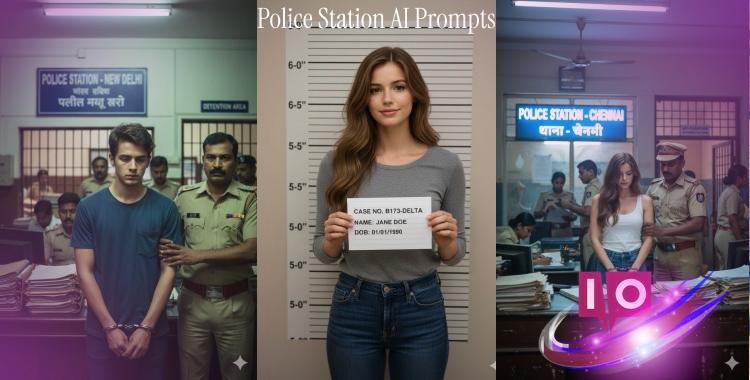
The sound of handcuffs echoing in a stark room. A young woman stands with her head bowed, the weight of mischief settling heavily on her shoulders. This moment transcends ordinary reality, thanks to the creative power of AI image generation, a trend rapidly gaining traction across platforms like Instagram and TikTok.
Imagine blending reality with a twist of imagination. Users are bringing humor, style, and surreal elements to life with just a few clever prompts. At the heart of this phenomenon? Our fascination with the police station—a setting rich with potential for storytelling. Below, I present over 20 engaging AI prompts that breathe life into this narrative.
Part 1. 20+ Police Station AI Prompts
Prompt 1. Arrested for Public Mischief
Generate a high-detail photograph capturing the interior of an Indian police station. In this scene, a young lady with an identical face to the reference image stands solemnly, wearing metal handcuffs. A khaki-uniformed police officer grips her arm, guiding her as a prominent blue sign declares ‘POLICE STATION – Lucknow’ in both English and Hindi. Shadows dance across stacks of office files and busy officers, under the sterile glow of fluorescent lights. Go for an ultra-realistic, cinematic documentary style in 8K resolution.

Prompt 2. Caught Stealing in the Market
Produce a realistic image of an Indian police station’s interior, focusing on a guilty-looking young woman at the booking desk, hands cuffed. Her downcast gaze hints at her plight, while a police officer in uniform anchors her arm, framed by a window showcasing ‘POLICE STATION – CHENNAI’ in vibrant letters. The detention area looms behind, filled with officers and paperwork. Bring this scene to life with soft fluorescent lighting and a cinematic touch in 8K resolution.

Prompt 3. Arrested for Mischievous Pranks
Render a captivating image of a police station interior featuring a young boy, eyes downcast and handcuffed, captured with perfect facial accuracy. He’s flanked by an officer, moving past a blue sign with ‘POLICE STATION – NEW DELHI’. Visualize an environment with stacks of files and officers, under the glare of overhead lights, ensuring a realistic, high-resolution experience.

Prompt 4. Photorealistic Police Booking Portrait
Create a hyper-realistic booking portrait, maintaining 100% facial accuracy of the subject against a height measurement board. Incorporate a fictional case number placard, utilizing soft studio lighting and subtle shadows for texture.

Prompt 5. Casual Break Room Meeting
Capture a sunny scene inside a police break room where uniformed officers share a moment of camaraderie over coffee. Let daylight spill through the blinds onto snacks and notes, creating a relaxed yet engaging atmosphere grounded in realism.
Prompt 6. Police Dog Training Yard
Visualize an outdoor canine training yard brimming with activity. The subject’s face appears on a trainee’s badge as a German Shepherd navigates obstacles in sunny, vibrant surroundings.
Prompt 7. Intense Interrogation Scene
Draw the viewer into a moody interrogation room, spotlight illuminating the suspect’s tense expression at a metal table. Flanked by stern detectives, every shadow and reflection enhances the dramatic tension.

Prompt 8. Forensic Lab Investigation
Shine a light on a clean, sterile forensic lab where the subject examines evidence under a microscope. Surround them with a backdrop filled with evidence bottles, detailed labels, and the cool tones of a professional environment.
Prompt 9. Night Dispatch Center
Create a nighttime dispatch scene filled with activity: the subject engages with multiple monitors displaying maps and call logs, enveloped in a calm yet urgent atmosphere.
Prompt 10. Traffic Stop Tablet Inspection
Portray a roadside scene where a police officer checks a tablet, the uploaded face visible as the driver. Add layers of detail such as traffic cones and flashing police lights to heighten the tension.
Prompt 11. Busy Police Station Hallway
Introduce a dynamic hallway scene where the user’s face appears on a wanted poster. Officers and clerks bustle about against an atmosphere of activity and purpose.

Prompt 12. Police Press Conference
Craft an image capturing the buzz of a press event inside a police station. Position the subject confidently behind a podium, surrounded by reporters and bright studio lights.
Prompt 13. Crime Scene Tape Street Scene
Render a city street cordoned off with police tape, the subject’s face evident on flyers nearby. A chalk outline and reflective puddles evoke a dramatic mood.
Prompt 14. Evidence Board Analysis
Show a detective thoroughly studying an evidence board, with the user’s photo featured prominently as a suspect. Red string connects clues amidst office clutter.

Prompt 15. Field Crime Investigation Team
Create a scene from a field investigation, where the subject’s face is on a CSI vest while collecting evidence surrounded by dynamic daylight.
Prompt 16. Busy Detective Desk
Visualize a cluttered detective desk with open case files and coffee stains, the uploaded image serving as the focal point atop the files bathed in warm natural light.
Prompt 17. Intriguing Jail Cell Window
Frame an evocative image from outside a jail cell window, the subject’s silhouette faint but perceptible, contrasting light and darkness.
Prompt 18. Late Night Watch Desk
Set a 3 a.m. scene at a watch desk where the subject sips coffee amidst stacks of reports, capturing a comfortable mood.
Prompt 19. Community Event at Station
Show an inviting outdoor event at a police station where the subject interacts with families, set against colorful decorations on a sunny day.
Prompt 20. Creative Police Sign Redesign
Envision a modern reinterpretation of a police station sign, incorporating the uploaded face into a mascot logo with bold typography.
Prompt 21. Vintage Police Car Backdrop
Capture the essence of the retro 1980s with a police car scene featuring the uploaded image larger than life on a billboard.
Part 2. How to Generate Police Station AI Images Step by Step
Creating compelling police station AI images involves a few straightforward steps:
Step 1: Select an AI Image Tool
Choose from popular generators like ChatGPT, Gemini, MidJourney, or Stable Diffusion. These platforms offer distinct styles tailored to your vision.
Step 2: Upload Your Photo
Utilize a clear portrait photo if your prompt necessitates a realistic face.
Step 3: Enter the Text Prompt
Copy one of the detailed prompts and paste it into the generator’s input.
Step 4: Add Style Preferences
To refine the image, include tags like photorealistic, cinematic, or specify an aspect ratio.
Step 5: Create and Refine
Generate the image, and if it doesn’t meet your expectations, adjust the prompt for better results.
Part 3. Tips for Generating Police Station AI Images
To achieve impressive results with your AI images, keep these tips in mind:
Part 4. Boost Realism: Use AI Clothes Changer for Police Uniforms
Why Use It for Police Station AI Prompts
This technique proves invaluable if your original photo features casual attire unsuitable for your police-themed vision.
Conclusion
Crafting police station-themed images allows you to mix creativity with storytelling. With over 20 prompts at your fingertips, will you explore the dramatic, comical, or stylish possibilities waiting just a click away?