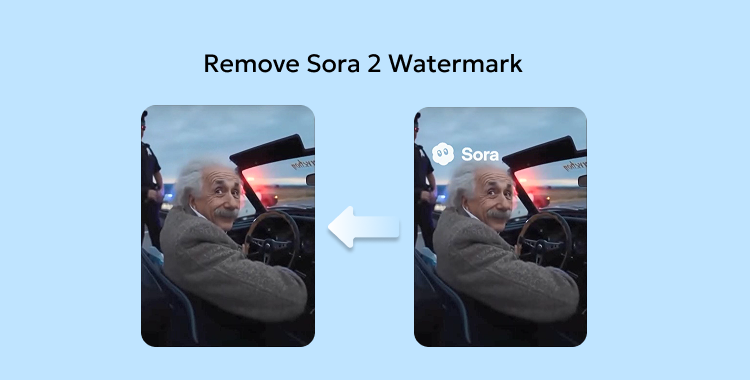
As I watched a vibrant video come to life, the persistent watermark loomed like an unwanted shadow, whispering doubt about its quality. You might feel the tug of frustration too—after all, a watermark can turn a brilliant creation into a mere reminder of an unfinished project. But fear not; the mystique of removing that watermark isn’t as daunting as it seems.
Sora, powered by OpenAI, facilitates rapid video creation with just a prompt, bringing your ideas to vivid reality—ideal for everything from social media posts to professional marketing campaigns. Yet, using the free version can feel like donning a badge of amateurism with its conspicuous watermark. What if I told you that there are effective strategies to rid your Sora videos of that watermark while maintaining their high quality? Let’s explore your options.
The Hard Truth: Removing the Sora Watermark
Can you rid Sora of its watermark legally?
You have a couple of avenues. The straightforward, ethical choice is to upgrade your subscription with Sora/OpenAI to access watermark-free downloads. Alternatively, some users attempt to use third-party tools to eliminate or obscure the watermark. However, this route can lead to a decline in quality and potential violations of terms of service.
Is it permissible to erase the watermark?
Legally, removing a watermark without explicit permission is typically prohibited. The safest path is to secure a license or recreate your video independently—both promote professional integrity.
Method 1: Remove Sora Watermark via Adobe Premiere Pro
Adobe Premiere Pro serves as a powerful tool for video editing, ideal for those versed in cutting techniques. While not a one-click solution, this method allows you to mask or blur the watermark, enhancing your video’s outward presentation.
Steps to utilize Adobe Premiere Pro for watermark removal:
- 1. Launch Adobe Premiere Pro and navigate to the Effects panel.
- 2. Search “Gaussian Blur” and apply it to the video layer that hosts the watermark.

- 3. Select the video layer and access the Effect Controls panel.
- 4. Utilize a mask shape—Ellipse, Rectangle, or Pen Tool—to delineate the watermark area.

- 5. Adjust and position the mask to cover the watermark completely, ensuring a snug fit.

- 6. Increase the Blur level until the watermark becomes indistinct.
- 7. To blend the effect seamlessly, elevate the Mask Feather value slightly, softening the edges.
Method 2: Remove Sora Watermark with SorryWatermark
SorryWatermark streamlines the process with its user-friendly interface, allowing you to erase watermarks without complicated software. Supporting formats like MP4, MOV, and WebM, this tool preserves your video in HD quality while securing your data with encryption during the process.
Steps to use SorryWatermark:
- 1. Visit SorryWatermark.com and upload your video via drag-and-drop or file selection.

- 2. Position the rectangle over the watermark; adjust the mask if needed, then click to remove the watermark.

- 3. Download your polished video in HD or 4K within moments.

Method 3: Remove Sora Watermark via Unwatermark
Unwatermark employs sophisticated AI to identify and eradicate watermarks without compromising visual integrity. This entirely online tool is accessible across devices from Windows to mobile, eliminating the need for software downloads.
Steps to utilize Unwatermark:
- 1. Navigate to the Unwatermark website.

- 2. Upload your video containing the watermark.
- 3. Highlight the watermark area using the selection tool.

- 4. Allow the AI to process the video, removing the watermark.
- 5. Download your high-quality video when finished.
Method 4: Remove Sora Watermark via MagicEraser
MagicEraser is your ally in eliminating watermarks effortlessly, utilizing AI to detect and erase while preserving the background’s natural aesthetic. Best of all, it operates from your browser—no software required.
Steps to use MagicEraser:
- 1. Access MagicEraser.org in your browser.

- 2. Upload your video by dragging and dropping or clicking directly.
- 3. The AI automatically purges the watermark without additional effort on your part.

- 4. After processing, preview and download your polished video in HD.

Bonus Tip: Elevate Your Visuals with
Do watermarks affect audio quality?
No, stripping away a watermark impacts only the visuals. Your audio and subtitles remain untouched.
Can multiple watermarks be tackled at once?
Absolutely. Tools like MagicEraser and advanced editors like Adobe Premiere Pro allow for simultaneous removal of multiple watermarks. Simply select all areas before applying the edits.
Does Sora provide a built-in watermark removal feature?
No built-in options exist within Sora for watermark removal; you will need to rely on tools like MagicEraser or other video editors to achieve a clean cut.
The Final Word
Is that Sora watermark overshadowing your video’s brilliance? Armed with tools like Unwatermark and MagicEraser, you now have a suite of techniques to elevate your work without sacrificing quality. So why let a simple mark define your creations when a few clicks can restore your professional flair?