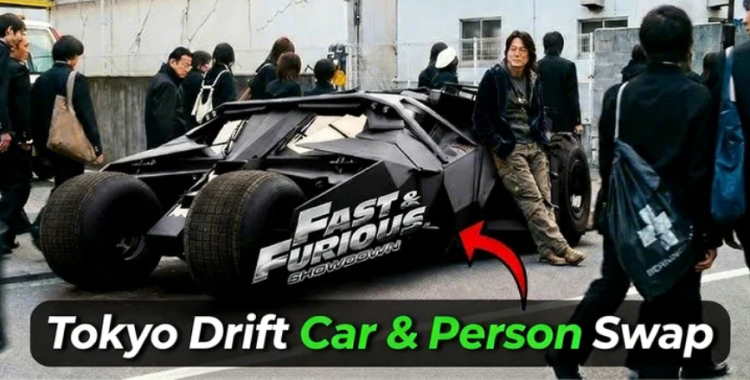
Smoke curled under a neon bridge as a cheap clip I slapped together started clocking views by the minute. My heart pinged — that small edit had the geometry of something viral. You can make that happen, and faster than you think.
by Emma Collins 2026-02-27 15:00:17
At 2 AM in a cramped edit bay I noticed a clip go viral and I figured out why — how to create Tokyo Drift car & person swap videos easily
I work with the tools you already know: Higgsfield AI for image and video models, PixPretty for cleanup, and basic NLE moves in Premiere or CapCut. You want fast, convincing swaps that stop a scroll. I’ll show you a lean workflow, prompt templates, and the psychological tricks editors use to keep viewers watching.
Cold start workflow — the shortest path from clip to viral drop:
1. Grab a clean reference clip. Pick a high-res frame or a 2–3 second clip that shows the car or person clearly during a drift or move. The cleaner the base, the fewer odd artifacts you’ll fight.
2. Pick a replacement image that matches angle and light. Whether it’s a supercar, an anime vehicle, or a person swap, matching perspective and lighting is what sells realism. The swap should read like a sleight-of-hand — invisible if done right.

3. Write one clear prompt, then refine. Tell the model which parts to keep (lighting, smoke, motion blur) and which to replace. Short, specific, model-aware instructions outperform long poetic paragraphs.
4. Use Higgsfield AI: Nano Banana Pro for stills, Kling Video 01 for motion. Upload the original frame and replacement asset, select Nano Banana Pro for the best image swap, then feed the edited image and original clip into Kling Video 01 for a motion pass. Small adjustments to strength and mask feathering will stop the uncanny valley from creeping in.

How do I swap a car in a video using AI?
Export a clean frame, replace the car in an image model (Nano Banana Pro recommended), then run the edited image and original clip through a video model (Kling Video 01). Use masks to protect reflections and shadow areas so the generated result respects the scene’s geometry.
Can AI replace a person in a clip convincingly?
Yes — but match body angle, eye-line, and motion flow. For person swaps, add prompts that preserve facial orientation, hand positions, and clothing folds. If possible, supply multiple reference frames for micro-timing accuracy.
What prompts make drift edits go viral?
Trigger attention by naming the car, specifying neon reflections, visible tire smoke, cinematic motion blur, and a single emotional hook — danger, humor, or absurdity. Short, descriptive prompts with one clear twist tend to perform best.
At a coffee shop I sketched 30 prompt ideas on a napkin and they map to every viral edit — 30 Tokyo Drift AI prompts ready to run
Below are concise, model-friendly prompts. Swap “photo 1” with your exported frame and attach a matching reference image. Keep each prompt focused: vehicle/person type, angle, lighting, and one emotional descriptor.
1. Lamborghini Aventador Drift Swap
Replace the car in photo 1 with a Lamborghini Aventador. Preserve cinematic lighting, tire smoke, motion blur, wet-street reflections, and original trajectory.
2. Formula 1 Racing Drift
Replace the vehicle with a Formula 1 car. Keep speed blur, tire deformation, smoke trails, and street reflections while matching perspective.
3. Classic Muscle Car Drift
Swap in a 1970s Mustang. Preserve side angle, tire smoke, wet reflections, motion blur, and real shadows.
4. Futuristic Hypercar Night Drift
Replace with a neon-trimmed hypercar. Keep motion blur, neon reflections, and cinematic street lighting aligned to the original path.
5. Monster Truck Action Swap
Swap to a monster truck with exaggerated tire deformation, motion blur, and matching reflections.
6. Horse-Drawn Carriage Meme
Replace the car with a horse-drawn carriage while keeping scene angle, shadows, and realistic motion blur.

7. Cyberpunk Neon Drift
Swap to a neon cyberpunk vehicle with reflected neon on wet pavement, tire smoke, and motion blur.
8. Racing Drone Swap
Replace the car with a racing drone; mimic motion path, shadows, and reflections on nearby surfaces.
9. Transforming Robot Car
Swap in a robot that transforms into a drift-ready vehicle; keep motion continuity and lighting consistent.
10. Ferrari LaFerrari Drift
Replace with a Ferrari LaFerrari, preserving wet-street reflections, tire smoke, motion blur, and cinematic light.
11. Neon Sports Car Night Drift
Swap for a neon-lit Tokyo-style sports car. Retain tire smoke, side-drift angle, reflections, and shadow fidelity.
12. Anime Style Drift Car
Replace with an exaggerated anime drift car while keeping believable perspective and motion lines.
13. Classic Japanese Drift Car
Swap for a Nissan Silvia S15. Match angle, tire smoke, reflections, and night lighting cues.
14. Formula Drift Championship Car
Replace with a pro drift car, keeping smoke, motion blur, and exact trajectory alignment.
15. Luxury SUV Drift
Swap to a high-end SUV while preserving side-drift appearance, shadows, and reflections.
16. Transforming Robot Car Drift
Another robot variant—emphasize mechanical joints, motion blur, and consistent lighting.
17. Miniature Toy Car Meme
Replace the car with a small toy model; keep reflections and motion feel realistic for comedic effect.
18. Futuristic Hover Car
Swap to a hover vehicle with soft underglow reflections, light lift shadows, and motion blur.
19. Police Chase Supercar
Replace with a police supercar in pursuit; preserve speed blur and chase lighting.
20. Cargo Truck Drift
Swap for a cargo truck; keep exaggerated tire deformation, dust, and shadow realism.
21. Fire-Breathing Dragon Meme
Replace the vehicle with a dragon emitting smoke and flame; blend light spill onto pavement.
22. Video Game Racing Kart
Swap with a kart straight from a game; keep motion blur and environmental reflections consistent.
23. Cyberpunk Futuristic Car
Another neon cyber vehicle—emphasize mirrored reflections and wet-street glow.
24. Night Muscle Car Drift
Swap to a neon-trimmed muscle car; maintain tire smoke and realistic shadow contact.
25. Hover Motorcycle Drift
Replace with a hovering motorcycle; match movement and light reflections on surrounding objects.
26. Cartoon Drift Car Meme
Swap for a cartoon-style vehicle while preserving motion lines and key lighting cues.

27. Futuristic Concept Car
Swap in a concept hybrid vehicle, maintaining motion blur, neon, and reflections.
28. Classic Tokyo Drift Movie Car
Replace with a car lifted from the movie aesthetic; keep motion and lighting filmic.
29. Self-Driving AI Drift Car
Swap for an autonomous drift prototype; preserve motion alignment and sensor reflections.
30. Dragon Car Meme
Replace the car with a hybrid creature-car; blend shadows, smoke, and cinematic lighting for surreal impact. These edits should hug movement like silk over metal, making the surreal feel tactile.
On the street I watched five edits fail and one succeed — pro tips to make the best car and person swap videos
Small choices create trust. Keep your edits subtle where the brain expects physics to hold: wheel contact, shadow direction, smoke sources, and reflections.
Mask smart: Feather masks and preserve specular highlights on windows and wet asphalt.
Protect motion: Use optical flow or run the video model twice — rough pass, then a refinement pass with motion-aware prompts.
Sound matters: Layer engine foley, tire squeal, and a single hit of bass when the swap completes to lock attention.
Publish strategy: For TikTok and Reels, open with the drift midpoint and keep the reveal under 8 seconds. Use a caption that teases the swap so viewers watch twice.

I tested a cleanup pipeline on five images — enhance your Tokyo Drift AI images with
PixPretty is fast for touchups: remove artifacts, refine edges, and fix skin or paint textures before you feed assets back into a video model. Use it to clean up halos, correct color shifts, and polish reflections so the final render needs fewer manual fixes.
Workflow tip: edit the swapped still in PixPretty, then re-run it through Higgsfield’s Kling Video 01 for the motion pass. Mention of Higgsfield and PixPretty here is practical — they’re the tools that kept my edits from looking generated.

In a final scrub of my own feed I noticed patterns — final thoughts
Viral drift edits are not magic; they are patterns you can copy and iterate on. Start with clean frames, match light and motion, use Higgsfield’s Nano Banana Pro and Kling Video 01 where appropriate, tidy with PixPretty, and craft a short, emotional prompt that gives the model one clear job.
Which car or person swap will you risk publishing first, and what will it reveal about the kind of edits people actually want to watch?