
I slipped a fake company memo into our team channel at 11:59 p.m. and watched the typing indicators multiply. You spent a full minute trying to verify it. That tiny pause told me April Fools’ isn’t what it used to be.
30+ April Fools’ Day AI Prompt Ideas for Fun Pranks — quick hits you can use tonight
by Emma Collins 2026-03-30 10:47:54
Cold start: AI makes mischief easy; you need only a prompt and a phone. Below: rapid-fire prompts for text, images, and chat screenshots that look real enough to stop a scroll.
How do I prank someone with AI?
Short answer: mimic official formats and add just the right personal detail. Use ChatGPT, Claude, or Gemini to write believable text; use Midjourney, DALL·E, or Adobe Firefly for images; and PixPretty for outfit swaps or quick edits.
Are AI deepfakes illegal?
Legal risk depends on context. Public figures, malicious intent, or financial fraud are red lines. Keep jokes silly, time-limited, and nondefamatory — and never publish private intimate content.
What tools do I need for April Fools AI pranks?
You’ll want a conversational model (ChatGPT, Claude, Gemini), an image generator (Midjourney, DALL·E, Adobe Firefly), and an image editor or outfit-swapper like PixPretty for quick visual edits.
The funniest prompts are the ones that look official
Observation: people trust a logo and a formal layout more than they should. Use that to your advantage — then pull the rug gently.
These prompts are built for screenshots: memos, press releases, fake headlines, and mock social posts. Copy one into your AI of choice, tweak the company or names, and screenshot the result.
-
“Generate a realistic company memo screenshot announcing that all employees must now communicate exclusively in haiku form starting April 1st. Professional office document layout, company logo, black text on white paper, looks serious but subtly humorous, high realism.”
-
“Generate a dramatic resignation letter screenshot from a fictional office plant named Gerald, explaining why he can no longer tolerate the fluorescent lighting. Typed on office letterhead, signature at the bottom, realistic fonts, slightly comedic but professional appearance.”
-
“Generate a breaking news ticker screenshot in the style of CNN announcing that scientists have confirmed that Mondays are now legally optional. Red BREAKING NEWS banner, newsroom background, anchor desk blurred, realistic broadcast graphics, high realism.”
-
“Generate a fake university press release screenshot announcing a new degree program in Professional Napping with a 4-year curriculum. Includes university logo, formal layout, headings, structured paragraphs, academic tone, realistic PDF or webpage style.”
-
“Generate a passive-aggressive letter screenshot from a dog to its owner explaining 11 grievances, including the crime of saying ‘walkies’ without following through. Typed or printed style, paw print signature, clean document layout, slightly absurd but believable.”
-
“Generate a fake LinkedIn post screenshot from someone who just got promoted to Senior Vice President of Doing Absolutely Nothing. Include profile photo, likes, comments, realistic LinkedIn UI, professional social media formatting, high realism.”
-
“Generate a fake terms and conditions update screenshot from a pizza delivery app that now requires customers to rate their own life decisions before checking out. Smartphone interface visible, modern app UI, checkout screen, slightly absurd but realistic.”
-
“Generate a fake text thread screenshot where a person accidentally invites their entire contact list to a dinner party and tries to undo it. iMessage or WhatsApp style interface, realistic chat bubbles, panic messages visible, humorous but believable.”
-
“Generate a satirical BBC-style breaking news article screenshot announcing that scientists have discovered that coffee is actually just ground-up anxiety beans. Clean BBC layout, headline, and short paragraph visible, credible article formatting, realistic screenshot style.”
-
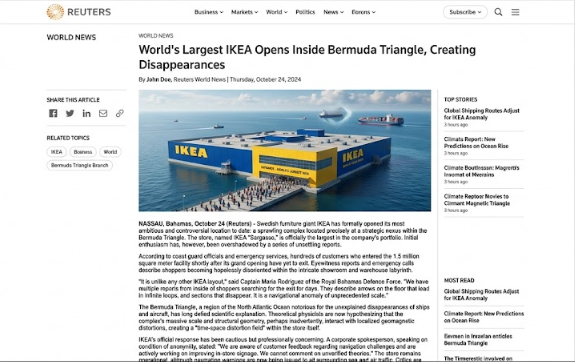
“Generate a fake Reuters article screenshot reporting that the world’s largest IKEA has opened inside the Bermuda Triangle, and no one who enters can find the exit. Minimalist Reuters layout, professional tone, realistic article formatting.”
-
“Generate a mock CNN headline and 3-paragraph news story screenshot claiming that a small town in Nebraska has voted to make naps a constitutional right. CNN branding, article body visible, professional news website formatting, ultra realistic.”
-
“Generate a spoof tech news article screenshot from a fictional site called ‘The Verge But Worse’ announcing that Apple’s next iPhone will have no screen and require users to feel the vibe. Tech blog layout, headline, and images, clean modern interface, humorous but realistic.”
-
“Generate a fake local news report screenshot about a man who held a press conference to formally apologize to his houseplants for mispronouncing their names for three years. News banner, lower third caption, press conference scene, realistic broadcast style.”
-
“Generate a mock Forbes article screenshot about a 7-year-old whose lemonade stand just raised $4,000,000 (€3,700,000) in Series A funding. Forbes-style layout, professional headline, magazine formatting, realistic business publication style.”

Image pranks land faster when they look undeniably real
Observation: a single photoreal image can silence a skeptic. Use Midjourney, DALL·E, or Adobe Firefly to craft one-liners that read like evidence.
These prompts are ready for any image generator; tweak lighting and camera terms for higher realism.
-
“Generate a hyper-realistic photo of a golden retriever sitting at a corporate boardroom table, wearing a tailored suit, looking visibly unimpressed.”
-
“Create an image of a cat conducting a full orchestra in a grand concert hall, mid-dramatic baton swing.”
-
“Generate a realistic photo of a pigeon in a NASA spacesuit, floating weightlessly on the International Space Station.”
-
“Create a photorealistic image of a squirrel with a tiny laptop open, clearly working on spreadsheets at a coffee shop.”
-
“Generate an image of a man confidently presenting a completely blank PowerPoint slide to a confused boardroom, labeled ‘Q1 Strategy.'”
-
“Create a realistic magazine cover of a hamster on the cover of Time Magazine as ‘Person of the Year.’
Fake chat screenshots are the easiest short con
Observation: we treat screenshots as proof. A believable chat screenshot converts curiosity into panic in seconds.
Use WhatsApp, iMessage, or Messenger UIs — include timestamps and realistic avatar crops for trust signals.
-
“Generate a realistic WhatsApp chat screenshot where I text you saying I accidentally sent your photo to a ‘Best Ugly Photo Contest’ and you actually won first place.”
-
“Create a realistic Messenger chat screenshot where I tell you I just saw your photo used in a ‘before’ picture in a gym advertisement.”
-
“Generate a WhatsApp chat where I tell you our teacher accidentally sent the exam answers to the class group and then deleted them.”
-
“Create a realistic chat screenshot where I text you saying a delivery truck full of pizza is coming to your house because I signed you up for a ‘Pizza Tester Job.'”
-
“Generate a WhatsApp conversation where I tell you your crush asked me if you are ‘always this weird’ or just sometimes.”
-
“Create a chat screenshot where I tell you I submitted your name for a stand-up comedy show and you got selected.”
-
“Generate a realistic WhatsApp chat where I tell you your old Facebook posts are going viral, and people are making memes from them.”
-
“Create a chat screenshot where I tell you I accidentally used your email to sign up for a ‘Dad Joke Competition,’ and now they want you to perform live.”
-
“Generate a WhatsApp chat where I tell you I saw someone who looks exactly like you working in a movie, and I think you are secretly famous.”
-
“Create a realistic chat screenshot where I text you saying your name was announced as a lucky winner in a mall lucky draw, but you have to go on stage and dance.”
-
“Generate a WhatsApp chat where I tell you I told my family about you and now they want to invite you to dinner to ‘inspect you.'”

How to use these prompts without making enemies
Observation: pranks go sideways when someone feels targeted. Keep the tone light, reversible, and funny.
Here’s the three-step method I use: pick the format, insert a personal detail (a job title, pet name, or inside joke), and run the output through a sanity check. Use ChatGPT, Claude, or Gemini for text and Midjourney or DALL·E for images. For quick outfit swaps, try PixPretty.
Step 1: Paste the prompt into your chosen AI and ask for a crisp, believable layout.
Step 2: Edit names, times, or company logos so the result lands just inside plausibility.
Step 3: Screenshot and send privately. Applaud the pause and reveal quickly to keep it playful.
Craft better prompts by thinking like a skeptic
Observation: people believe what looks like official formatting and specific detail. So give the AI the tone and names it needs.
Be specific about tone. Tell the model the voice: “write like a disapproving HR manager” or “in the voice of a breathless celebrity gossip site.”
Add real-sounding details. Fake places and statistics make fiction feel factual. “A study from the University of Somewhere, Ohio” reads better than “a recent study.”
Keep it just believable enough. Hover at the plausible boundary — not absurd, not boring.
Customize for the person. Personal details convert a prank from amusing to unforgettable.
Creative angles people forget — quick outfit swaps and staged evidence
Observation: visual edits can sell a story faster than text alone. Try swapping outfits or inserting someone into a silly scene.
PixPretty’s AI clothes changer turns ordinary photos into convincing costume proofs: Victorian ballgown, spacesuit, or a full sequin look, all rendered with believable fabric and lighting. Upload a photo, select an outfit style, and the AI returns an HD result you can drop into a chat.

AI is a mischievous paintbrush — it dresses reality in costumes and hands you the photo. Use that power for laughs, not harm.
April Fools’ used to require ladders and props; now a short prompt and a little taste for drama will do. Pick prompts that match your crowd, keep the reveal quick, and leave no one embarrassed.
Ready to try one tonight and watch the chat explode — or will you play it safe and spare your reputation?