
I stood on the porch of a house I’d designed down to the last tile and watched my Paras file out with a single cardboard box. You realize, in a cold snap of clarity, that a fresh lot will rewrite every relationship you’ve been nursing for months. Moving in Paralives feels like trading an old key for a blank canvas.
The blue “For Sale” sign pops off the map. How to move in Paralives
You and I both have done the awkward circling: hunting for a new lot and wondering where the buy button hides. Here’s the clean, no-fluff way to make a household pick up and go.
- Zoom out to the world map. Use your mouse scroll wheel or press M. The map is where choices live—treat it like a control panel, not a scenic overlay.
- Find a lot with a “For sale” sign. Blue house icons mean available; orange means occupied. If a lot calls to you, click it to open the info pop-up in the upper right.
- Select Purchase. Click the Purchase option. If your Paradimes balance is short, players on Steam and the Paralives Discord often share safe money cheats and mods you can test in single-player saves.
- Decide whether to sell your old lot. You can own two lots if money allows—click your current lot and choose Sell this lot to clear the slate.

Can you move houses in Paralives?
Yes—you pick a new lot from the world map and buy it. After that, choose whether to sell your previous property or keep both. If you need ideas for builds, check the Steam Workshop and popular YouTube creators who post moving guides and lot tours.
A crowded living room, a half-packed bag on the couch. How to split household in Paralives
If you want some Paras to leave while others stay, the Split option is the polite, surgical way to do it.
Zoom out to the map, click the house icon for your active lot, and select Split household. A pop-up lets you pick which Paras move out and how many Paradimes to give them from the household pool. Think of it as assigning a moving budget and personalities to the new address—small choices create believable drama.
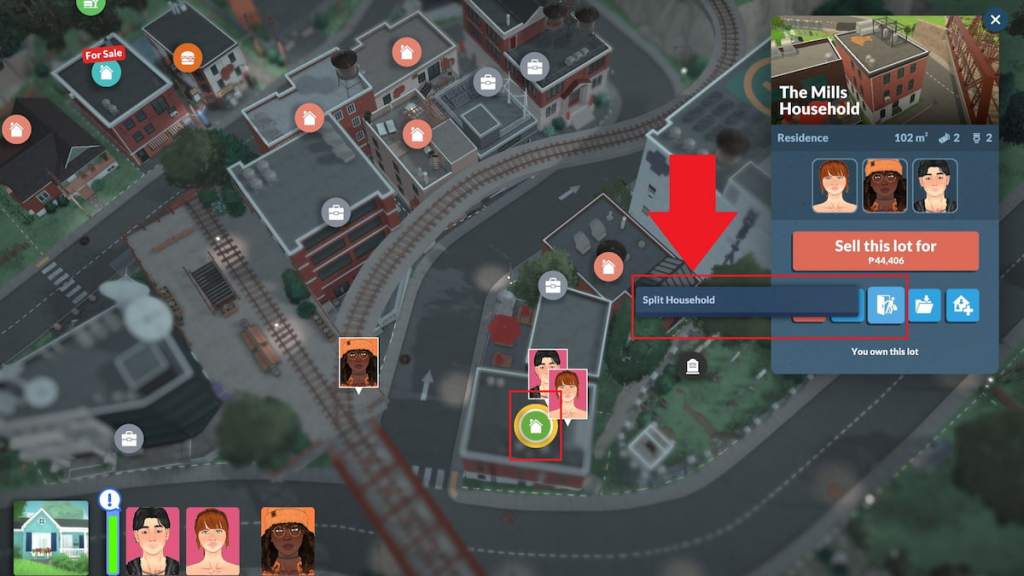
How do I split a household in Paralives?
Open the world map, select your active lot, choose Split household, then allocate Paras and funds. You can preview where they end up if you’ve already bought another empty lot, which helps when you want a neat narrative break rather than chaos.
You notice other households listed like postcards. How to move households in Paralives
Switching between households is a quick swap—perfect when you want to follow a neighbor’s story instead of moving your current cast.
Zoom out to the map, click the household you want, and choose Switch to this household. You’ll load that family’s needs, relationships, and lots—no selling required unless you want their property for your main clan.
The lot you crave already has curtains in the windows. How to move into an occupied lot in Paralives
Occupied lots can be yours, but it will take an extra step: make the owner leave or persuade them to sell.
Click the household that owns the lot and switch to them. From their view, select the lot and hit Sell this lot. Return to your household, buy the now-empty plot, and drop your build. If you prefer roleplay, use the community’s forums on Reddit and Discord to stage believable buyouts or story-driven conflicts.
I use these moves in my saves when I need a narrative pivot or a clean slate; you’ll find they reshape relationships faster than any plot device. The world map in Paralives opens like a city-sized scrapbook, and once you know the buttons, you move with intention rather than accident.
Want to push a household into a dramatic breakup or craft a paradise on a riverside lot—how messy are you willing to get?